Cosmic Buddy : The free theme to turn your BuddyPress to orkut style site
Date: 11/03/2010
Update : If you are looking for Cosmic Buddy Theme for Buddypress 1.2+, please download it from here
https://buddydev.com/buddypress/cosmic-buddy-theme-for-buddypress-1-2-available-now/
I will accept it, this theme is highly inspired from old orkut theme. Have you used orkut. You will love this clean and elegant adaption to buddypress.
here are the features
- Highly customized theme
- It is not dependent on any theme
- Easy to use
Have a look at the screen shots here(will be updated later today, we are just in the process of updating this site)
and yeh,

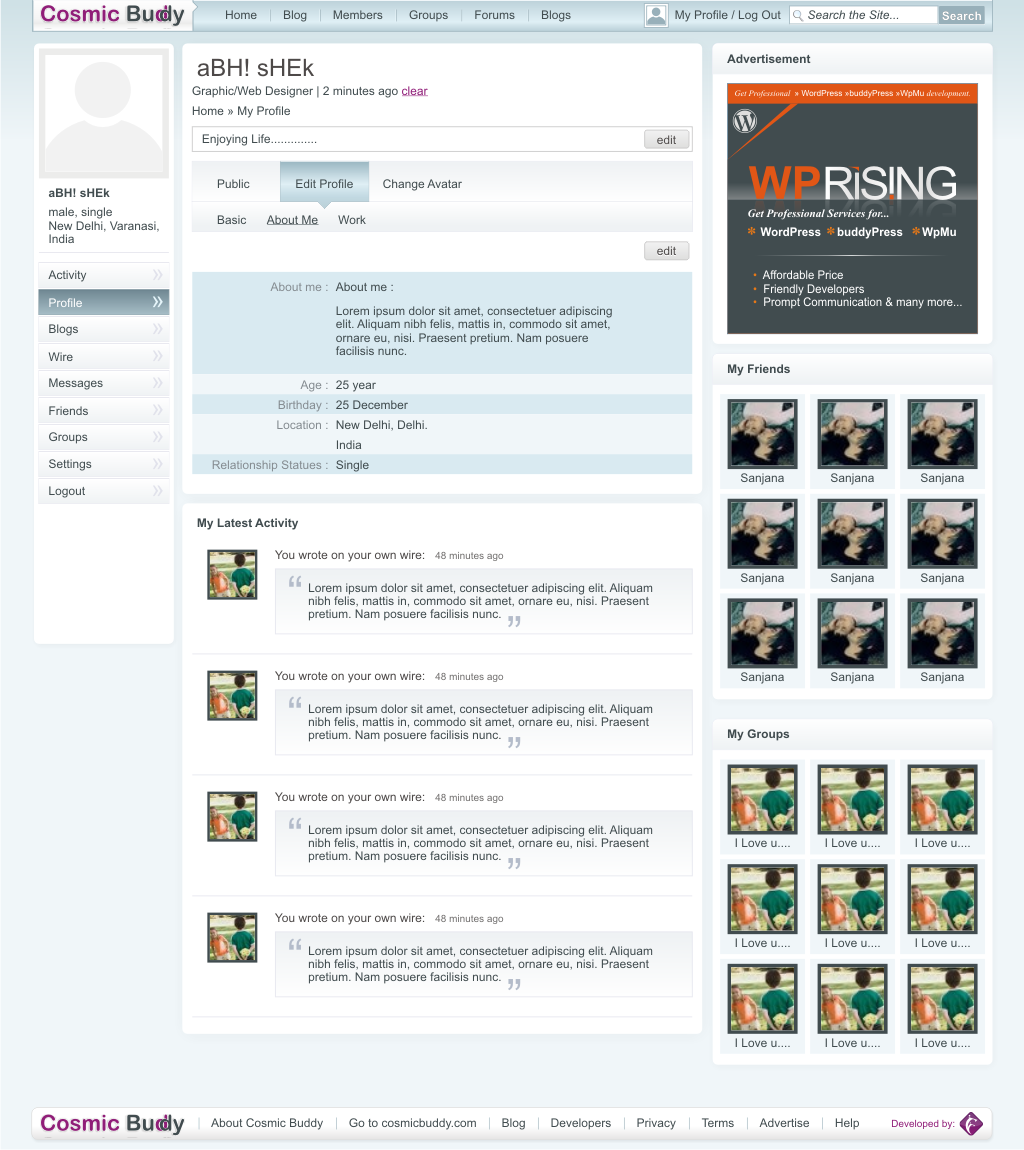
So don't wait , grab this theme from the bottom of this page And turn your buddypress site to an elegant social network.
How to Use
Cosmic Buddy Theme has 7 widget areas. Please have a look at the image below
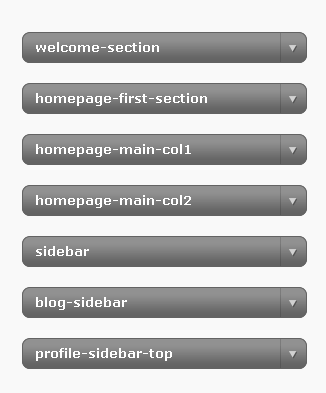
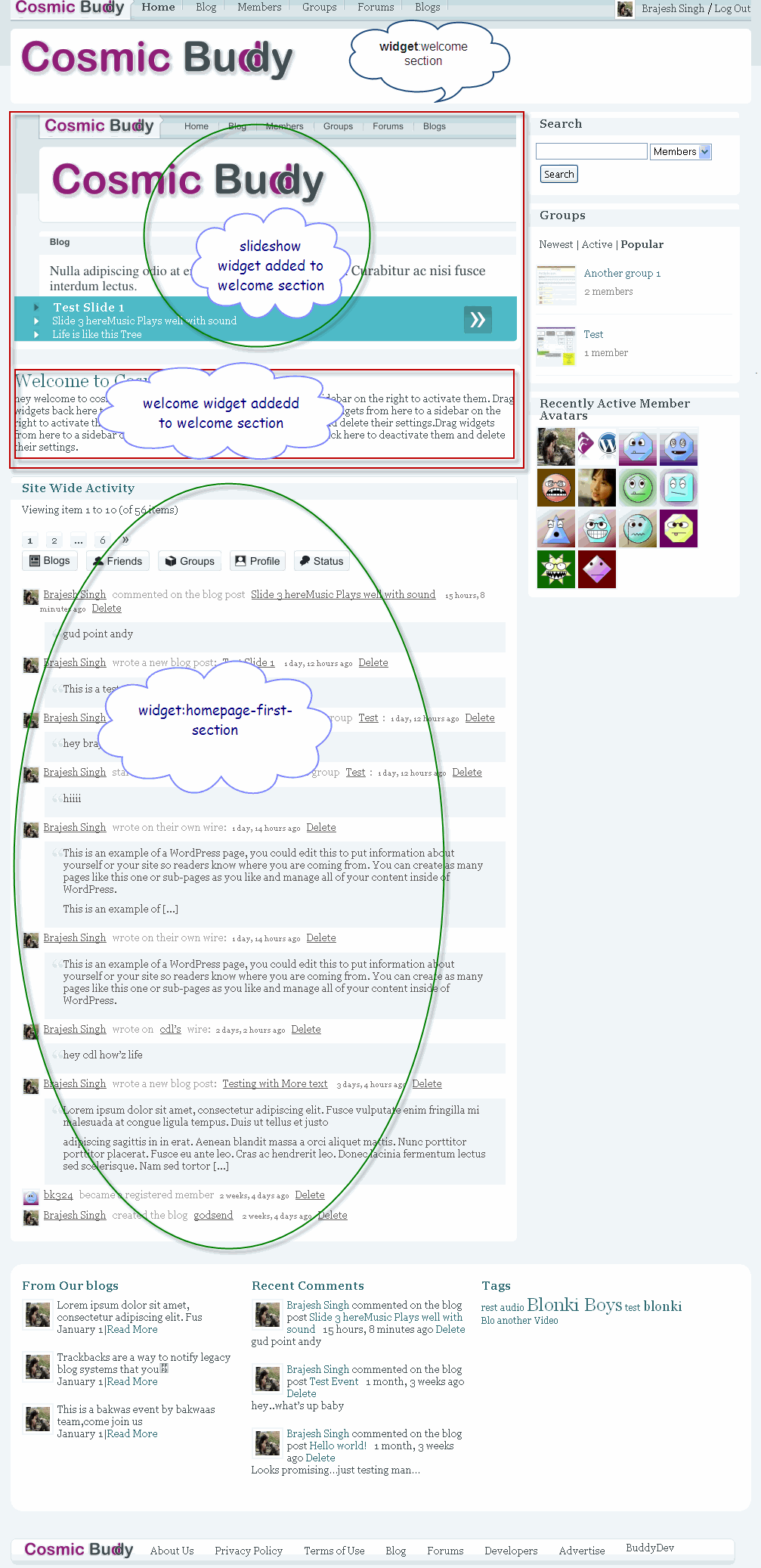
- Welcome Section: This is for the home page. Use this section only if you want to show a welcome message or the Slideshow. If you don't want to show a welcome message/ or slideshow, please do not add any widget to this area.
- Home page First section: if you want the left column of the home page to be a single column(not the double column in the left column), add widgets here.here is a screenshot, to show what I mean.

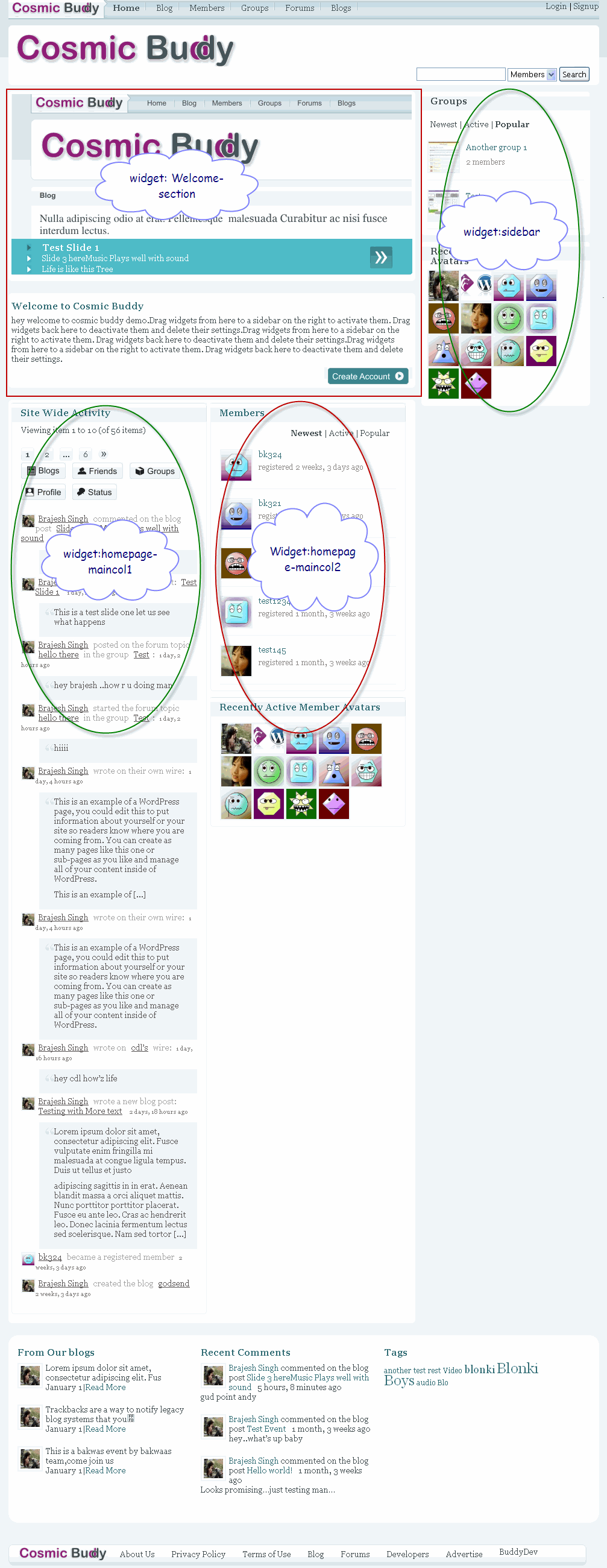
- Home Page main col1 and home Page main col2, If you want to use the home page left column as 2 column, use these two widgets. Please note, if you use any of these two widget area, the widgets added to the "Home page First section" will be ignored. I am using is_active_sidebar methods to test and mutually exclude the widgets. Here is a screenshot.
- Sidebar: This area is used for home page sidebar, registration page sidebar, activation page sidebar. So add what ever widgets you want here.
- Blog Sidebar: It is used for all blog pages(e.g blog home page, single page, page, archive, links, search etc)
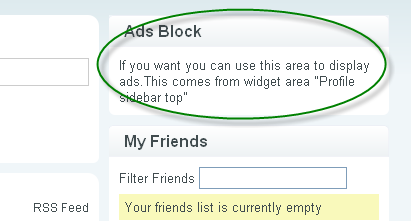
- Profile Sidebar top: this area is the right column top area on Internal profile pages. You can use this to display ads. If you don't add any widget here, this area will be ignored and rest of the right column will be displayed. Here is a screenshot
Cosmic buddy Theme extra addons
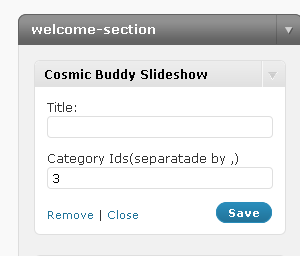
- Cosmic Buddy slideshow widget:- We developed this slideshow to make it easy for you to use slideshows with cosmic buddy theme. This widget uses featured content glider from dynamic drive to create the slideshow. Here is a screenshotYou can specify posts from which category/categories(a comma separated list of category ids) should be used as slideshow. The image comes from a custom field "slide-image" currently. So, Please enter the image url in the posts in a custom field "slide-image". We will change this behaviour and make it easy in the next release. Also, we recommend to not enter the title for the slideshow in the above widget.
- Cosmic Buddy Welcome Widget: This is a slightly modified core welcome widget. It just outputs the widget title only once, while the core widget outputs it twice
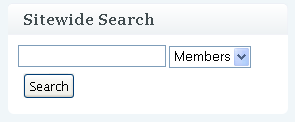
- Cosmic buddy search widget: Since we don't have a sitewide search integrated in the theme, so this addon, enables you to use sitewide search on any/all widget areas.here is a screenshot.
- Cosmic buddy Login widget: This simply puts a login form as a widget when the user is not logged in, when the user is logged in, this widget does not outputs anything.
What Widget Configuration we recommend
Again, It is all your choices , but we strongly recommend to use "welcome-section" only for welcome text/or slideshow.Please do not use welcome section for other widgets.
You should add the login widget to "sidebar", blog-sidebar","profile-sidebar-top".
Search widget is all your choice, but you can add it to sidebar/ blog-sidebar and profile-sidebartop if interested.
Now you either use "Home page first section" or a combination of " Homepage Main col1" and "Home page main col2".
Changing Logos
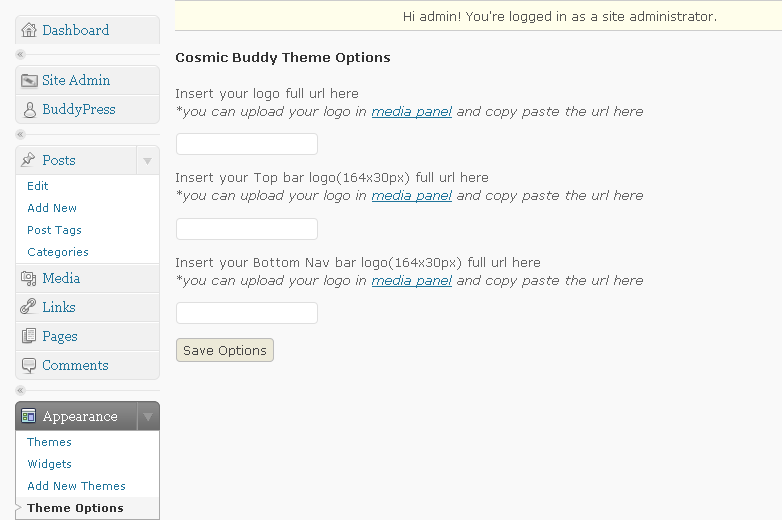
You can change all the three cosmic buddy logo from theme options in the wordpress backend. Go to Appearance->Theme Options and put the logo image urls there.
here is a screen shot to show theme options.
Download
For Bp 1.2, please go here
https://buddydev.com/buddypress/cosmic-buddy-theme-for-buddypress-1-2-available-now/
For Bp 1.1.x
Download Slideshow widget here: https://buddydev.com/http//buddydev.com/public-download/cb-slides.zip
Download other addons(search, login, welcome widget) here https://buddydev.com/http//buddydev.com/public-download/cb-addons.zip
Download cosmic Buddy theme here: https://buddydev.com/http//buddydev.com/public-download/cosmicbuddy.zip
Demo Link:http://bpthemes.buddydev.com/comicbuddy/
Please note, the round corners will appear in mozilla, safari, opera, chrome but not in IE as we have used border-radius property for that. There are a few other glitches we know, we will be fixing them in the next release.
Also, this theme was not developed with localization in mind(a shortfall), so may be , there can be problems in localization, but I hope, there should not be many issues. We will be releasing the more appropriately localized version in the next release
I will love to hear from you, what do you think about this theme. Please suggest improvements and report bugs. Looking forward to your further suggestions..
Now it is your turn to let us know, what you liked , what you did not liked and what Improvements you want.
Announcement: Our next major release will be Buddypress Gallery component in next couple of days. So keep yourself tuned 🙂 and make sure you have subscribed to BuddyDev Premium before Christmas to avail our 1 Month Free membership on any of the membership plan you choose.
Very nice and professional! Looking forward to the release 😉
thanks mercime for the comment
We are working on it and we hope to release it on the coming 5th as promised 🙂
Waiting for the stuff….
thanks for the comment anith
I do look forward to completing it soon 🙂
i cant wait for this theme! just what iv been looking for! screenshots look good. nice work Brajesh, ive seen u around the buddypress forums..keep it up! 🙂
thanks for the comment.Looking forward to its release today late evening PST 🙂
I really want this theme
hey Sarthak, then get it man:)
I can't start your this theme because this is showing blank page after installation on WordPress deshboard.
Please help me…………………………………………………
Same here blank page. WPMU/BP latest versions.
@all
Please make sue you are not using bp-template pack/bp backward compatibility plugin with this theme, These two plugin seems to be causing issues.
One more day to go… Gowni.com is waiting for Cosmic Buddy 😉
haha.. thanks 🙂
Yeh I am working on it and I hope to release it today ,may be in PST.
Hey Mr. Anith,
I visited your website its really very cool.
I want to know more about that. Can u help me for that?
Waiting……..:-)
Now, that's pressure 🙂
haha so true 🙂 working hard to release it today. let me see what happens 🙂
Thanks for sharing.I'm waiting for it 🙂
Very nice and proffesional!… We are the waiting…
Thanks @reclae and @ksceyhun for the comments 🙂
We are working hard on it. There are a few changes left. let us see, whether we can come out with the theme today or not 🙂
Brajesh, Take your own time….
Thanks anith
I am back.Just looking the files now.let us hope for today or latest by tomorrow the theme will be released, I have to test it in IE6,IE7,ff 3.x,ff3.5.x,safari and opera before making public 🙂
Thanks for checking the IE6 and IE7 compatibilities. As much as some theme designers would like to dismiss IE, there are just too many visitors from around the world who still use those two browsers.
Cheers.
Yup. Will be checking the links by tomorrow..
We are now waiting for a download link theme… 😀
Me too…
so far looks like a great theme, cant wait anymore. how much time it will take?
Any Updates Brajesh, Seems you are fixing some BUGS…..
hi anith
Thanks for the comments. I am working specifically on IE6 bugs as It has too many rendering problem in IE6(you know float and margin).
rest of the theme is ready. I am going to work today even in IST to complete this(usually I work in PST).
I do not want to delay it anymore ,but If I release it without making bug free, you know the results. I assure you, the wait for 1-2 day is worth it. I have quiet modified the forums/groups page and it looks kinda cool to me.
I will keep you updated but again, I will need at least 6-8 hours from now.
🙂
@all, please allow us to work for 1-2 days. It is going to be worth the wait.
any suggestions regarding slideshow, currently I have put it as a widget(we will provide the slideshow widget with theme), so If you don't want to use the slideshow you don't have to worry about that.Suggestions please 🙂
Hi Brajesh, I know what you mean. Even the default BP themes from way back to 1.1.3 do not play nice with IE6 or IE7. I had to make my own custom theme and used floats instead of margin offsets 🙂
In addition, the upcoming BP 1.2 version per testbp.org has a nifty total redesign especially with the Forums section! Alleluia!
heey any updates on the theme?? good luck with those bugs 🙂
@all
We are going to have a beta release of cosmic buddy today by 2 PM PST.This release will contain slideshow ,featured footer ,admin options and many more.
A more graphically apt release will be on coming tuesday.For now, just take it as beta.
happy social networking.Please check back after 2 PM PST Today.
Thanks
Brajesh
Yeah……
hehe 🙂 just going to release today , thanks anith for being with us .
Done the slide show as widget and now only a few tweaks at featured bottom, and it will be there 🙂 in next couple of hours .
btw, I am going to write the post in detail again, because using widgets you can have at least 2 different layouts. will be updating soon.
Released ???
Thank you but where is the link?
we are the waiting…
Thanks you everyone.
While I am updating the post.
Please check the demo here.
http://bpthemes.buddydev.com/comicbuddy/
I will advise to not activate the sidewide admin bar, but it is active on the demo.
Just writing the post to show how to customize the theme.There are various widget sections which are mutually exclusive for layout purpose. So The download link for theme and all the widgets will be available in next 1 hour.
Please check the demo here till then http://bpthemes.buddydev.com/comicbuddy/
and sincere apology to everyone, as It took much more time than I promised.next time, I will promise a date for the other theme carefully 🙂
Thanks
Brajesh
Pingback:Turn Your buddypress website to orkut style Site Now:Grab Cosmic buddy Theme for buddypress | Thinking In Wordpress:-Delving deep into wordpress
Thanks Brajesh. Just downloaded the widgets and theme. Will be checking this out. Initial impression is that it's looking good even in IE6 and that's a major achievement for a good-looking theme! Cool.
hi mercime
Thanks for the comment. I look forward to your feedback.
As I told above a more enhanced version will be available next week (No more dates 😛 promised, I know I delayed it too much).
So, Please let me have your feedback here when you test it and help to improve it further .
Thanks Brajesh.. Updated gowni.com with Cosmic Buddy.
Friends, check http://gowni.com and do participate in trail run.
sure anith. you are most welcome. Please do not put the title for "slideshow" and add login widgets in the sidebar for better look and feel. Please have a look at the post again, so you can utilize the theme in best way.
there is one issue with title background, I will be updating on wednesday now.
hope It helps 🙂
Thanks
Brajesh
Corrected, Thank you.
In which folder I have to copy the widgets?
Thank´s.
upload widgets to wp-content/plugins
or use Plugin browser from Plugins->add New->Upload and upload the zipped files(for widgets).
Then Go to Plugins->Installed and activate the widgets 🙂
Hope it helps.drop me a line , if you still have problems.
Thanks
Brajesh
it´s all ok now thank´s
I LOVE this theme and have it up and running, however, none of the bottom links, except for the one to here, work. They all link to the page they are on only. Where can I change this so they work please 🙂
hi Elizabeth
I am glad to know you liked it 🙂
yes, the footer links are not linked to any page.
Please open the cosmicbuddy/footer.php and just put the links there. you will see the codes there. It is simple html.
In the next version I will make it editable from the wordpress backend.
Hope it helps.
Thanks
Brajesh
Ahhh thank you 🙂
Another thing….you say to not use the bp admin bar but how would the members get from their blogs to all their profile, groups etc without it? As it is it looks pretty crud (see my site, follow a blog) as all the css seems to have disappeared. Is this something again that I have forgotten to do?
you are most welcome. thanks for pointing that. It seems we need a custom background for adminbar, as the current transparent thing I tried is not working well.also,at someplace, It is getting overridden by the depricated css for adminbar.
I will have an update of this theme tomorrow with all these modifications. It will not require any major change from your existing customization/use just replacing of a few images we will be providing with the updated theme.
Please check back tomorrow.
Thanks
Brajesh
Thank YOU!! 🙂
The navigation links here on this site are overlapping with the post titles in Firefox. 🙂
thanks Andrea
I was using FF3.0.x so could not find that. Thanks for pointing. I need to improve my testing habit 🙂
Need a screenshot? 🙂
hi Andrea
Though I am making some modification today a screenshot is highly appreciated 🙂
Thanks I think it is a cool theme,
I would just like to make some changes, I am more in favor of simple press to bbpress, would I be able to point the forum tap to another plugin forum?
If so where do I go about to do the changes,
The other thing is the logo, where do I go to do the changes.
I notice too there is a premium account, is the $30 lifetime membership or do I need to renew?
hi Travel
Thanks for the comment.
Yes, you can use simple press, instead of bbpress. If you are not enabling forum from buddypress components, just configure simple press to use the url like yoursite.com/forums and you will need no modification(simple press uses pages for that).
You can change the logo from wordpress backend. All the three logo can be changed from Dashboard->Appearance->Theme Options, you will see there are three options to input the new logo url.
The premium account costs $30 for 3 months(and we are giving one extra month membership free, if you signup before christmas, so It's four months for $30).
It will enable you to download all the existing/upcoming premium plugins/themes instantly and also you can use our forums for all the helps you need.
Please read more about it here
https://buddydev.com/pricing-and-membership-options/
hope it helps.
Thanks
Brajesh
There was mention about comicbuddy pro. What is the difference in the two, is pro a premium theme? Would we be able to access the theme soon?
hi Travel
yes, Cosmic Buddy pro is a wrongly named premium theme. I say wrongly, because It may confuse many of the people to think It is a premium version of cosmic buddy. which, It is not.
Cosmic buddy is a free theme and we will be enhancing it more, It will remain free for ever.
The cosmic buddy pro(Now we have renamed it to Cosmic Wave, Just something got from google wave, had too many headaches deciding the name :D) Is a very different theme with different layout/colors and functionality. I will be posting a sneak peek post about it very soon. I hope to release it on/before Christmas. Please check back later today for a preview of Cosmic Wave theme 🙂
Will you let us know when you have updated the theme?
I am not sure if you have noticed, but I can find nowhere for people to now add friends….
Well, I am not sure too. Just checking an will update soon.
ok, I see, I have missed that button at profile page. Time for updates again. Going to add send Message and Add as Friend at profile page.
Though, The button is available at all other places, except when you visit someone's profile.
thanks so much for pointing this, don't know how I overlooked it :S
LOL myself and my members are really testing it.
Another thing, check replying to messages, I get double messages with an error.
Also the links to bp admin in the admin area.
So far thats it LOL Sorry
hi Elizabeth
Your feedback have been proved very much helpful in updating the theme till now. Much appreciated(Going to link your site after releasing the final theme here 🙂 )
The double message bug is not appearing at my installation currently, but I will give it a shot again, to see if I can reproduce it.
For everyone looking at this comment, here are the list of updates.
1. Add Friend button on Profile page
2. Send Message button on Profile page(Thinking How Jeff's privacy component will work with the layout though )
3.Some more css modifications to make the profile wire better(At profile home)
4.Modifying group sidebar to give it a better look(only css)
and some more if i find, If you find any bug(related to layout too), please report, so we can squash every bug, before the final release.
(Please note, current theme is in beta only, as I mentioned In my Post above).
Thanks
Brajesh
WOW Thank you for the linking 🙂
Hi Elizabeth:
Now into early January but seems you are not using this theme after-all… just noticed that the 1st Angels site looks like combined setup with BuddyPress 'and' Mingle.. do tell..?!?
Ok, it is your theme that caused the message errors. I had to go back to Members default tonight as people could not send messages without errors and showing two or more messages per send.
If I tried to invite people to a group it put it up 4 times. Delete one of those 4 and it deleted all of them.
I am now using your theme for the main page but default BP for members pages.
I do hope you can get this fixed as I really do want to keep using this theme. It is obviously somewhere in the header 🙁
hi Elizabeth
Thanks for pointing this again.
I have made all the previous modifications, but I am not happy with the way, the add friend/send message is appearing, that's why put it for revision and will be releasing as RC1 on Sunday.
Earlier I had tested everything on local install, so some errors may remain there, Like you said. I will be putting it on live site and do complete test before releasing on Sunday again.
Thanks
Brajesh
Pingback:Cosmic Buddy : Free BuddyPress Themes
Pingback:2 temas para Buddypress BBG : Buenos, Bonitos y … Gratis! « super wordpress mu
Hey, How is it going on ? Waiting for RC 1.
hi Anith
Please allow me at least 1 more day. I have fixed the bugs, but you see, some title backgounds are not transparent, so waiting for my designer friend to be here. Doh! I don't know working with corel files.
The RC1 will be available with all the things fixed and a little bit more polished look tomorrow(21st Dec).
@all
Please suggest improvements for RC1 before it is out, so you have got today to suggest what ever features you will like to see included/improved.
Please let me know here in comments, I will be glad to include the features, before we go RC1 tomorrow.
Thanks
Brajesh
Thanks for working so hard for us, I have mention to you that I prefer to you simple press rather that bbpress for my forum. So is there anyway to integrate the group from simple press. I thought it would be a cool feature.
hi Travel
Currently there is no way to integrate simple press forum to buddypress groups AFAIK.
But In future, there may be extensions available for simplepress/buddypress to allow this. If it is developed, It will be a separate module in itself and will have nothing to do with the theme(obviously except template tags).
I will take a look after this month, as In current month there are a aew important themes/plugin yet to be released and are on my priority right now.
Hope you understand 🙂
Thanks
Brajesh
Nice work Brajesh! Let me know if you are contemplating or might be interested in making a news/magazine theme for Buddypress.
edit:corrected my name 😀 after your mail 🙂
thanks Brent
yup, I have been thinking about going for a magazine style theme, but that will be for bp 1.2(as It is to be released in next couple of weeks). Let us look forward to it as soon as the bp 1.2 comes out 🙂 .
ok, we will be waiting; we'd pay some money to have some input in it's layout 😉
thanks 🙂 will get in touch with you in next week, when we will start with the magazine theme .
Thanks for this theme and widgets. But I can't add pictures to slideshow. How can I do?
Thanks for the comment.
here is how you add the pictures.
1. In the widgets section, In cosmic buddy Slideshow widget , you have to specify the category id, whose latest posts will be used.
2. Now when you are writing a post, in the category above mentioned, please use a custom field "slide-image" and put the image url there. This image will be shown in the slide show.
You should add this custom field for each new post in the category you have selected for slideshow, so different images will appear for each post.
Hope it helps.
Thanks
Brajesh
I appreciate for your helps, then I could inserted the slideshow in my frontpage succesfully. And I have one more question. Pictures rotate and when I click on pics the post opening. But the text below the pictures not linking to post. All of this texts link is http://www.mysite/# How can I resolve this problem? Thanks you again and again.
hi Murat
The widget is programmed in that way, to make sure when you click on a title, It loads a new slide, not goes to a new page.
If you want to change this behavior, you may have to make some changes in the cb-slides widget code.
Thanks
I cannot get the widgets to stay when I drag them to the right widget boxes. How can I resolve this?
Please help.
hi Chx
This may be a temporary issue with you wpmu. Have you tried other widgets. Are they getting added. If nothing works, try to enable accessibility mode from the screen options and add the widgets then.
The issue you are facing, may be because one of your active plugins have javascript conflict/or some javascript problem.
Hope it helps.
thanks
Brajesh
we will buy new website for testing this theme only.. dont worry , we will help you to find out trouble ……glitches very soon !!…..
keep it up !!
medicospace
Webmaster
I notice something, if I just load my page, the main page would load and show add widget. That is before I sign in. anyway to allow the admin see that?
hi Travel
sorry for not replaying earlier. I was away for the Christmas celebs. Hope you all have enjoyed Christmas.
are you still experiencing this behavior. You should see the add widget section whether you are logged in or not, if the widget areas are empty.
Please let me know, if you are still facing the issue, I will take a look and assist further.
Thanks
Brajesh
Happy Holidays I hope you enjoyed your Xmas.
Anyway I did place two widgets one welcome and a text widget and it is still that and my side widget is now under the main widget.
hi Travel
That seems to be a problem with mismatched div opening and closing in text widget,as I see, sidebar is getting closed just after the text widget.
Please check the code you have pasted in the text widget. It may have unclosed div.
Pingback:Oorlul.nl Blogs — Blog — Leuk Buddypress theme
Hi
Congratulations for your work, it's so nice !
I m wondering where i could find the older Cosmic Buddy theme ?
I'm talking about your screenshot theme in this article.
Thanks !
hmm.. thanks for the comment. Well, if you mean the exact theme as shown in the screenshot 1, there there has been some small variations in development to adapt to bp better.
Please let me know, what addition you want in the current theme, I will be glad to include.
Thanks
Brajesh
Can someone help me how to install cosmic buddy and customize menus. I tried installing software, some of the links are not working for example login and signup.
hi Ram
Please let me know the problems. I will be glad to help you.
Please go though the post above, I have posted enough details, and Have a look at the "widget configuration" I have recommended.
Which menus you want to change(top/bottom).Can you point me to your site(either here or PM me).
Please let me know, I will be glad to help.
Thanks
Brajesh
I wanted to change both the top bar and bottom bar. I changed the headr to keep the required items but those items are not actually working. For example profile, groups, invite friend, inbox are added to the top bar in the header file may be i am specifying wrong slugs there. Can you please tell me an easy way of pointing those links.
hi Ram
The problem is for each logged in user the nav liks will be different in that case. It does not work on specific slugs, as the links you want to put are dependent on current user
I will advise you taking a look here
http://codex.buddypress.org/developer-discussions/buddypress-template-tags/
and another look at bp-core-templatetags.php
You will see what you need.
Hope it helps.
thanks
Brajesh
Brajesh, Thank you for your help. I have one more question, this time I wanted to add buddypress FOL widget to featured bottom of cosmic buddy. Could you please guide me how to add this.
Thanks again,
Ram
Brajesh,
I was trying to add more widgeted areas(sidebars) by registering those in functions.php but i was not able to see those newly registered widget areas under siteadmin widget area list. Please advise if there is any other place that would need modifications in order to see new widget areas under siteadmin. If you can give me steps to follow that would be great.
Thanks
Ram
hi Ram
Thanks for the comment. functions.php is the right place to add widgets.
Please post the code here on http://buddydev.pastebin.com/ on pastebin and let me have a link here, I will do my best to help.
Thanks
Brajesh
Brajesh,
Here is the link for the code that I added to functions.php Let me know if there is any corrections
http://buddydev.pastebin.com/m6e22bcde
Thanks,
Ram
@Brajesh – I sent a msg via your contact page and figured I might try here as well – I am using the bp-events plugin and the style is all messed up with the CosmicBuddy theme (which I really like – BTW). Is this the appropriate place to seek help modifying the css of bp-events to match CosmicBuddy?
@roydeanjr
Thanks for the mail and the comment here.
Yes, I will be glad to help you with the css of the events plugin.
It should be basically using the layout of cosmic buddy for the event template.
Please allow me to get back to you with the converted template of bp-events for cosmic buddy on 2nd January as currently I am working on bp-gallery to be released on first January.
hope you don't mind it.
Thanks
Brajesh
By all means . . . i am just lucky that you are willing to help. I am at your mercy with gratitude immeasurable. And Thank you!
Hi,
Just changed my theme to cosmicbuddy and now the login link doesnt work – any ideas?
Thanks,
Shai
hi Shai
You mean the login link in the top navigation(right side top) or the login link in the buddypress admin bar.
Either edit the login link in the top navigation bar or use the cb-addons widgets and ad the login widget in the sidebar. The login link will be auto linked to the login widget location.
Let me know, if you need further assistance.
thanks
Brajesh
Yeah the link at the top navigation is not working and I see that it is bad.
where do I edit it?
How do I ad the slideshow widget (or any other widget)?
what are the cb-addon widgets and how do I add them? in the available widgets I couldnt find any login widget.
Sorry for the beginner questions…
Thanks,
Shai
hi Shai
Please look at the bottom of the post. There are links for all the downloads.
You need to get a little bit fimilar with wordpress theme/widgets/plugin if you are a beginner.
WordPress codex is a great place to start with.
Please go through the post above again, I have mentioned all the things properly how do you activate widgets/add widgets.
Don't mind, but I would request you to go through the post again and all your links/widgets will be working properly if you followed the setup.
Thanks
Brajesh
can you help me with the css for the plugins buddypress-kaltura-media-component
I have tried to make the plugins to fit this theme but i have no idea what to do match buddypress-kaltura-media-component Cosmic Buddy
I use the buddypress-kaltura-media-component development verson
you can visit my test site on a free host here
http://vithanhmini.200u.com/members/admin/
as you see the tab media does work like other
thnks
hi Jack
Your comment went to spam(I don't know why ), so i could not see it earlier.Just found it now and whitelisted it.
The problem is with the kalatura plugin ouputs the css and uses !important keyword to override the css.
The solution will be
go to your wp-content/plugins/rt-bp-kaltura-plugin/css/rt_media_add_icon_css.css
and comment the two lines there.It will work perfectly. If you don't want to comment both the lines, just comment out the margin-right and the padding.
Hope it helps.
Thanks
Brajesh
go to your wp-content/plugins/rt-bp-kaltura-plugin/css/rt_media_add_icon_css.css
I can not find this file…. Also I pasted the whole rp-bp-kultura-theme in cosmic folder, and it worked.
It shows the options in profile but now they are being showed as shown in following image:-
http://i45.tinypic.com/2vnrihw.gif
Please can you guide me on how to resolve this, In my thought it looks like some css problem.
I downloaded the buddypress-kaltura pack for buddypress 1.1
Thank you
hi Raghav
You will need to theme the kalatura plugin.
Please check their plugin, I think It supports theming now.
Use the plugin-template.php as a base file for theming.
If you have any issues, please let me know.
Thanks
Brajesh
Can you help me match buddypress-kaltura-media-component and cosmic buddy theme
I have tried my best to change but i cant still
you can visit my test site on a free host here
http://vithanhmini.200u.com/members/admin/
as you can see the tab media doesnt work like others
thanks
Please see my reply above to your comment.
Thanks
Brajesh
Hi,
First of all, thanks for a very nice theme!
Now I have some issues with the theme:
1. When I'm adding widgets in the sidebar some of them appears at the bottom of the site instead of in the sidebar? Why is that?
Kind regards,
Daniel
Thanks Daniel
Please make sure you are adding the widgets to the correct widget area(sidebar), If you are doing so, It should not happen.
Are you using any text widget(with html , if a div is not closed properly, this may be another reason).
Please let me know in details and I will be glad to help.
Thanks
Brajesh
Yes, I'm using text-widgets with html but none of them includes div. It's just img-links and standard links.
It's nothing with the CSS?
/Daniel
@Brajesh – Is it possible to add a menu section to show the pages for the website? Style it like the top theme menu except that it would display in the header section where the logo displays. With pulldowns for any child pages, etc.
hi Roy
Thanks for asking. Yes, I think It can be.
Can you give me a little more idea.
Do you mean where the bigger logo displays(that should be replaced with this).
Please clarify. I think It is achievable and can be done, just need a little bit more insight.
Thanks
Brajesh
@Ram
The featured bottom(if you mean the rea where sitwide comments/tags is displayed) is not a widigitized area, I will advise you to edit featured-bottom.php or create a child theme with home.php/featured-bottom.php and edit it.
You can widigitize this area and then go ahead with adding the FOL widgets.
Thanks
Brajesh
it works, thanks very much
you are most welcome 🙂
Hi,
Thanks!
I started from scratch and its all working now.
one more question. I want to use the slideshow and sure to what you are referring when you are saying posts and categories.
I want to be able to display images as I choose.
Is there a way to do so and also is there a more specific example of how a slideshow widget should be configured?
Thanks again,
Shai
ok – i was able to get the the posts to appear on the slideshow but not the images. I used the full URL from the media panel but I am not seeing the image in the slideshow and it stays blank.
Appreciate your help!
Thanks,
Shai
Please name the post meta key as "slide-image" and It will automatically take the image from your posts meta.
Thanks
Brajesh
Not sure what you mean by post meta key.
Per the instructions I have created a custom field in the post called slide-image and set its value to be the full url of the image. Is that what you refer to as the meta key?
when i do view source on my page and on the page of your example site it looks the same to me but still the image is not displayed.
Is there anything else I should be doing?
Thanks,
Shai
Ok, thanks!
Here are a few other problems:
1. I'm trying to invite a member to a hidden group, however, when the member opens the notifications there is no accept invitation button.
2. In the profile I miss the buttons for friend request.
Kind regards,
Daniel
hi Daniel
On 16th there will be a new version available of cosmic buddy which will address all the issues pointed in comments. I will post a revision log after putting the new version online.
Thanks
Brajesh
ok everyone, the release has been delayed because of my other priority towards another plugin. It will will be available anytime next week, I will update this post with the dates,once I get the things complete.
Hi again,
Another issue that I am noticing in my tests is that when I am going into a member profile I dont see anywhere the buttons to 'add friend' or 'send message' to this member. is that on purpose? Am I missing something?
Thanks,
Shai
looks like this is the same on your demo site as well:
http://bpthemes.buddydev.com/comicbuddy/members/xibbv/
please let me know if this is indeed the case.
Thanks,
Shai
Yeah, I have the same question. I miss thoose alternatives as well. Hopefully they will come in next version?
yes, the add friend/send message button is missing on profile page. It is resolved at my dev version, I am doing a few more revs and I will put the new version available for download on 16th.
Thanks
Brajesh
Hello,
I wanted to know that is there a way that I can add up pages in the top-nav-bar, where the following buttons exists:-
home
blog
members
groups
forums
blogs
etc..
I mean just below the admin panel.. where you have your small logo on top.
Thank you please reply soon.
Also can you help me in a bit of coding work.
Thank you and congrats on making such a wonderful theme..
Regards.
i'd really like to know how to make that work…
i've been trying a few different things, but all i seem to do is break the menu…
it'd be great to be able to add these pages 🙂
@Raghav,@Brenton
You will need to play with the css/xhtml a little bit to make it work.
Please check the header.php and edit it for links.
to make the links look good in navigation, you will need to make some changes in css.
Thanks
Brajesh
Hello everyone,
Does anyone here know about how to install buddypress ajax chat? thanks a lot…
Hanz
Hello!
After installing this theme, i don't see buttons "add friend" & "send message" in a users profiles which I visit
How can I add these buttons?
hi Rustamus
This was a bug in the first release.
Please come back on 16th and update with the new theme(which will be available by then), These issues will be resolved.
Thanks
Brajesh
thank you for your great work.
i meet some problem, I can't make image show with Cosmic buddy slideshow ,i add image in post , but it can't look in front page. please tell me how to use the plus?
i'm a freshmen in BP.
sorry for my poor english, i hope you can understand the mean.
thanks!
sorry,i'm so careless, now, i fot the way from this post.
I am glad you found it yourself 🙂 and no prob with English, we all have something as our weakness.
Any news on when next relase will be? I really miss to add friends, send messages in a profile box.
I also find a bug where it's not possible to accept an invite for a hidden group.
/Daniel
hi Daniel
Thanks for the comment. Please check back on 16th for the updated version.
Thanks
Brajesh
Hey Brajesh,
Any update on RC 1.
hi Anith
Please check back on 16th, we will have the new version here 🙂
those links at the bottom of the article don't work right for me, I end up with weird errors and 0 length files.
hi bifpowell
Please try again. I checked it, and the download is working for me.
It may be a temporary problem, please try again.
Thanks
Brajesh
hello, Brajesh Singh, I meet a problem, when i use this theme, I found the frontpage was confused by the region of "Site Wide Activity" and "Recent Site Wide Posts" ,it resulted by image which in post.
if i want the region of "Site Wide Activity" just show the action ,not includ the detail like the content of post, how can i do? or how can i contral the content display,ex filter the media file out in the region of "Site Wide Activity" and "Recent Site Wide Posts"?
thank you!
hi laosong
For this you will need to modify the activity widget.
here is a small help on that
http://buddypress.org/forums/topic/modifying-activity-content
Hope it helps.
Thanks
Brajesh
thank you for your reply, i visit the link, but i'm really unfamiliar in these code. have it some intuitive manage tool in admin interface? or can you suggest me some learning material about modifying activity content, i want to study it systematically.
thank you again!
Hi,
I have no idea of what is the ID I need in BBSlide. Can you please give me a good understanding about that concern.
Thanks
sweetrockz
Hi !
Not sure what bbslide is, but in order to find out what ID a category has. go to Posts-> Categories.
Hover with your mouse over the link, and the ID should show in the status part of your browser.
see screenshot
http://piclair.com/l927g
Hi Brajesh,
Is the update available now?
Hi
what have i missed – i am new to all this buddypress etc – and i cant get this working
do i upload this to my themes? or buddypress themes? then how do i activate it? or get to the controls to modify it?
sorry – probably basic questions – but i cant seem to get this – and no instructions
hi Jb
Please upload this to wp-content/themes, then go to Dashboard->SiteAdmin->Themes, Enable this theme , Go to Dashboard->Appearance and activate. This should work.
Hi,
Some other bugs:
-In messages it's no breaks between the lines. Instead the text is just written a top of each other.
-Is it possible to show the latest post in a forum thread at the top instead of at the bottom? It's annoying to press next-page each time you want to respond to a popular forum thread.
Looking forward to next release!
Kind regards,
Daniel Bergstrom
hi Daniel
Thanks for the Bug reports. I will check the message section and confirm that.
yes, a little editing in groups/single/forum/index.php will allow that.
I am sorry, I have been very Busy with another plugin, and could not update this theme.
Today, i was pointed by MrMaz, on your problem in the bp forum. I have already put a message there.
The update will be available as soon as I get the gallery release. So, I expect the updates for cosmicbuddy to be available anytime next week.
Thanks
Brajesh
I didn't see anything referring to this issue here, but I'm having a problem with clickable links in the Slider. Right now the links only point to '#' and don't refer to the Featured articles that reside within.
Is there a way to associate this text in the slider with the appropriate page link?
hi Roxanne
yes, It can be associated.
Open the cb-slides widgets php file, you will see a loop there, put the_permalink() in place of the #
Hope it helps.
Thanks
Brajesh
Hi all
Any news about the updated version?
Thanks
hi Wilson
I have updated this post about the coming updates.
I am currently a little bit busy with gallery plugin, so expect it after gallery is released. So a guess is next week any time the updates will follow for this theme.
Thanks
Brajesh
Thank You foryour input here….
Let´s wait a bit for the update.
thx
Hi Mr. Admin.
How do I post the Picture in the BB slide.?
The Picture doest show at the slide. I put the pirtures' url in the Custom Field.
Can u give me a short procedure?
Please help. Thnx.
hi sw33trockz
Please go to Appearance->widgets and specify the category Id in the cosmic Buddy slideshow.
Then while posting in that category, use a custom field, give it a name "slide-image" and put its value as the url of image associated with the posts.
It will automatically fetch that image. Hope it helps.
Thanks
Brajesh
Hi Brajesh. Thanks for the procedure.! It helps.
Hi Brajesh,
I really like your Cosmic Buddy Free Theme. Therefore i've got a question: Do you plan to update the Cosmic Buddy Free Theme to the new BuddyPress 1.2 which
will be out in a couple of weeks?
Thank you for the information.
Ad
hi Ad
Thanks for the comment.
yes, I will be updating cosmic buddy for bp 1.2. A beta of bp 1.2 is expected in 2 weeks, so a soon as beta is out, I will update this theme for bp 1.2
Thanks
Brajesh
Thanks Brajesh for the quick reply!
I'm looking forward to it!
Since buddypress 1.2 is now released.
When will this theme be Buddypress 1.2 compatible?
hi Patrick
yes, Bp 1.2 beta is out today, I will need a few days to release this theme for bp 1.2. Do you have suggestions for 1.2(other than the bug fixes mentioned above) , please let me know.
Thanks
Brajesh
Excellent theme. I'm making heavy modifications for a project I am working on. Feel free to take a look.
I am trying to edit the category page for this theme, but am getting lost in the hierarchy. Could you point me in the right direction?
Thanks again. Learning a lot from your code.
you site looks very nice. very well adaption of the theme.
For category page, currently it comes from cosmicbuddy/archive.php
Please make a copy of it and rename it to category.php (because archive.php is used for date based archive/author archive too) and make changes in the category.php
Hope it helps.
Thanks
Brajesh
Brajesh,
Nevermind, found what I was looking for in archive.php. Thanks again for releasing this resource.
hey Warren, sorry I posted the comment and found that you had already the solution 🙂
I am interested in your theme, but when will the next update be released to be compliant with BP 1.2 and will it contain the featured posts slider that you mentioned earlier in the comments?
hi Brent
Thanks for the comment. I hope to get a release for bp 1.2 by next week now.
This theme uses another addon (I developed specially for this theme, based on dynamic drives featured content glider), called CB slides, which allow you to use posts from some specific category as slideshow.
So, I am not sure about what do you mean by Featured posts slider, do you mean a featured post slider for wpmu(posts featured by admin from sub blogs too) or something, please clarify, I will be interested to investigate further.
Thanks
Brajesh
What is the licence of this theme. Can I modify it a little for my own site?
hi Peter,
Thanks for the comment. It is GPL licensed and you are free to modify. Unless otherwise specified, all the components/themes available here are GPL .
So feel free to adapt them, and yes, we will glad to see how you adapted, so if you don't mind, leave back a comment here when you are done 🙂
Thanks. Great stuff I really like this theme.
How do I add sitewide activity to the homepage-first-section, and the slideshow I spoke about in my previous comment was mentioned in the forum.
hi Brent
Are you using it with bp 1.1.3. if yes, go to dashboard->Appearance->Widgets and there you can add the Sitewide activity widget. This theme is not updated for bp 1.2 yet, so if you mean bp 1.2 , then it may need some additional work.
Thanks for a fantastic theme!
Is it possible to change slug, permalink for the member section? Where can I change it? All help appreciated!
hi Fredrik
Thanks for the comment. Yes, you can change all the slugs.
The slugs/permalink are not dependent in the theme. Create a bp-custom.php in your plugins directory, and customize the slugs.
here is more information.
http://codex.buddypress.org/how-to-guides/changing-internal-configuration-settings/
Hope it helps.
This is a great post! Was wondering if you could help me out.
I downloaded the slides widget but I don't know where to upload it into my public_html folder to activate the widget in WordPress MU…could you please direct me?
I put into public_html but I don't see it available in WordPress dashboard at widget.
-Thanh
hi Thanh
Thanks for the comment.
Please unzip cb-slides and upload it to public_html/wp-content/plugins and it will be available in the wordpress backend to activate.
Alternatively, login to wordpress mu Backend, the Go to Plugins->Add New, select "upload" from the top links on add new page and browse the zip file and upload. Then after uploading, click on activate and It should be available for you in widgets section.
Hope it helps. If you find any issues, please let me know.
Thanks
Brajesh
Hi,
I just wanted to hear when you are planning to release the new version as you said where going to be released last week?
Looking forward to it!
//Daniel
hi Daniel
Sorry for delaying this. Please check back tomorrow. It will be available, as I am finished with my other project and will work on this tonight.
Thanks
Brajesh
Hi Brajesh:
Looking forward to the 1.2 theme version update.. wonder if you had noticed the latest trac code has sub-tabs menu on users profile..?!?
http://trac.buddypress.org
http://testbp.org/members/andy/
Also noted the @members_name function is pretty useful too.. 😎
Cheers..
Hi Brajesh,
Any updates on your new release?
Cheers
Prabhu
Hi Sameer,
I am new to wordpress.
I have installed wordpress mu and buddypress plugin on my site http://mymissindia.com/wpmu and cb theme.
But my login button is not working. I followed your comment and downloaded the cb-addons and cb-slides widgets.
But I dont know in which folder should I put these widget ?
Could you help me in that?
hi Sameer
Thanks for the comment.
Please either use the wp-admin->Dashboard->Plugins and Add New Plugin,m you will see the upload link on the add plugin page, to upload the cb-addond/cb-slides, then It will show you the option to activate.
Alternatively, if you want you can use FTP to upload this to your wp-content/plugins dir.
Then you can activate those and use them as shown in the post above.
hope it helps.
Thanks
Brajesh
Also I just noticed that at bottom page all links in linbar i e "about us","privacy policy", "Terms of Use" etc points to http://mymissindia.com/wpmu/members/admin/ only
yeh, that was intentional. Those are not linked, so will seem to be linked to the current page to the user. Pleas edit cosmicbuddy/footer.php with the links.
Hi Brajesh Singh
Just as a sugestion/question: Do you plan to use gettext for internationalization of CosmicBlue?
It´ll be really cool to use http://www.code-styling.de/english/development/wordpress-plugin-codestyling-localization-en this plugin to help on such huge task 🙂
Thank you
Hi all
Just a little bump 🙂
Hi Brajesh
Thanks for the great theme!
I'm been playing with this theme for my new site and i really like your theme. now, I'm facing a tricky problem – 'signup' in topbar 'create account' button in welcome widget is not actually brining up the signup screen & also i dont see signup button in login widget could you please help to reslove this?
secondly, the 'lost password' or wrong password entry takes user to default WPMU login screen do you have any idea of replacing this.
looking forward for your new release tomorrow.
Cheers
Prabhu
Any news on the update of the theme?
Hi Brajesh
You could use the CU3ER Image Slider (it's free to use) instead of the actual image slider in the COSMIC BUDDY Theme.
Just a thought of me, I think it looks cool
http://www.progressivered.com/cu3er/
@all
I apologize for missing the update of cosmicbuddy, but the project I had been working on has got some issue with client side javascript so, I am unable to work on it at the moment. Please do not expect any update before Sunday.
Buddypress 1.2 RC was released yesterday, so what ever the update will be It will require some time to make it compatible with bp 1.2(you see the wire is lost). I will post update on Sunday about any details.
Thanks
Brajesh
Hi Brajesh,
I guess you are working hard for the update! Thank you.
Just a thought!
Do you have any idea of widgetising 'featured bottom' section?
Cheers
Prabhu
Hi Brajesh,
Any update on the new release?
I'm eagerly waiting for the update..
Cheers
Prabhu..
hi Prabhu
Thanks for the comment.
I am sorry to say, there will be no updates for buddypress 1.1.3 anymore.
The updates are coming for buddypress 1.2 and it will be available within 2-3 days of release of buddypress 1.2 stable.
Hi Brajesh,
Thanks for your response!
I'm using the theme for one of my site but register page has some problem and its not showing up.
on click of signup the page gets refereshed but stayes in home page & does not show the register form. I tried to resolve this to best of my knowledge but no luck…
could you please help me to fix this.
Cheers
Prabhu
Is this theme on its way ? I've been loking forward to see it..
Jim
I have seized the update for bp 1.1.3 and the updates coming are for buddypress 1.2 only.
There are so many changes happening each day, so please let buddypress 1.2 come out as stable and the theme will be updated within 2-3 days of buddypress 1.2 coming as stable.
Thanks
Brajesh
Me too 🙂 like to have this great theme for 1.2
Peter,
there will be no update for bp 1.1.3.
The update coming out is for Buddypress 1.2. I have been monitoring the trac, and there are so many changes happening each day. As per my guess, If buddypress 1.2 comes out soon, the cosmic buddy for bp 1.2 will be available by 18th. Again, It all depends on buddypress 1.2 and when it comes out. It is a real problem to keep updating the theme with the trac. so, Please do not mind the lag and let us look forward to buddypress 1.2 soon.
Hi,
Thank you for this theme,
I want add information into the profil (now, I have just the name)
And in the edit page I have just one field.
But in edit.php there are more than one field
Why?
How can I do?
Thank you
Please check from dashboard->Buddypress->Profile fields setup. You can add/delete/modify fields there. It is a buddypress functionality.
Thanks
Brajesh
Waiting for an update =). Please let us know when it is available. Can't wait!
Hi Fredrik
Finally good news here. buddypress 1.2 stable released yesterday, so I am working on all my themes/plugins. This weekend there will be all the theme and plugins updated for Buddypress 1.2 🙂
Pingback:12 Amazing Buddypress Themes and Getting Started Guides - Speckyboy Design Magazine
Waiting for an update of great theme.
hi Paulo
Thanks for the comment.
I have updated most of the part. Currently dealing with the wire/status. Hope an Update today or latest by tomorrow. 🙂
Pingback:10 Best Buddypress Themes | WordPress How To Plugins, Themes Usability
Hello,
Cngratulations by the theme. In Brazil every body use orkut. A few people have facebook. So your theme is very good to us.
I am wainting the update of this great theme.
Thank you!
Thanks for the comment. It is in progress. Let me see whether I am able to complete today or not 🙂
Does this work with buddypress 1.2 on standard wordpress(not mu).
Brajesh,
Would you consider doing a private network version of Cosmic Buddy? Something like a welcome screen requiring login or registration before allowing access to the main theme/site. Obviously any attempt to access any part of the site without first logging in, would result in a redirect to the welcome page.
Regards
Nick
hi Nick,
That is something I had initially in mind, just gave up to make it open like buddypress does. Thanks for the tip, will be doing that. Currently I am porting cb to 1.2 and status/wire merge is causing headaches to keep it looking like the old one. still working 🙂
Good luck with the upgrade, fingers crossed it all goes well.
I know Jeff had/was working on a privacy plugin, but to be honest, that was way too complex for my needs.
Keep up the great work
Regards
Nick
Pingback:Buddypress Themes
The h2 tag need more bottom space and a navigation between news and old posts from the actual is necessary.
Sory my english, I hope have help.
Bye!
Pingback:WordPressでSNS | APERTOZERO BLOG
when do you estimate that this theme will be completed for buddypress 1.2?
hi Scott, I have upgraded some part of it. It is not yet fully functional, my initial estimates did not work because of the huge structure change in bp 1.2. And cosmic buddy has very different manipulation of wire, to getting the new one to behave as cosmic buddy is causing some troubles, at least 3-4 more days for bp1.2 will take.
Thanks
Brajesh
When I search groups by letters happen this error:
Warning: Cannot modify header information – headers already sent by (output started at /home1/culturc5/public_html/wp-content/themes/cosmicbuddy/directories/groups/groups-loop.php:55) in /home1/culturc5/public_html/wp-includes/pluggable.php on line 868
I don't know if is my fault…
And good luck for the update, thank you by the excellent job!
I can't get it to woooooooooorrrrkkkk!!! 🙁
It is not yet updated for bp 1.2
That's why you have issues. either use backward compatibility plugin(not recommended) for now or please wait for some more days. I was not well for last 2 days, so Could not work on profile are. Just working on that today.
Hi there,
I am playing around with the header menu and the selected tab CSS. I have added more menu options than was supported by the theme.
Original code: <li class="selected"><a href="/" title="">
I want to replace "BP_MEMBERS_SLUG" with the new page that I have created (for example "/start.php". And make that url link when it is active… How do I do this?
oops the code disappeared. …if ( bp_is_page( BP_MEMBERS_SLUG ) ) : ?> class="selected"<?php endif; …
modified it some.
Remove the conditional, just put the link.
It should not dis appear.
Sorry, I was not clear enough in my question. I want the new page that I manually put in the url of, to be highlighted when it is active (class="selected"). I figured I could do this if I replaced "BP_MEMBERS_SLUG" in some way…
I solved it with a CSS modification. Thanks for your support.
Pingback:12 Amazing Buddypress Themes and Getting Started Guides | Son Of Byte - Web Design & Development
Brajesh, how are you doing? How is the update going?. Just asking 😉
hi Peter
Sorry for not updating earlier. Haven't been to IRC because of health,.
Now the theme is updated, Final testings going on the demo site. expect tomorrow.
Thanks
Brajesh
What widget you used homepage-first-section?
Anurag, The theme is in progress to be updated for bp 1.2, I have changed the demo site to reflect the current theme for 1.2.1.
It was using the older siteWide activity, I am going to ship an activity widget with the theme for 1.2.1, so you will have the same experience.
My profile link and members link not working. Can you tell me why?
Anurag, As I mentioned in your previous post, this theme was not compatible with bp 1.2.
I have updated it, but not provided a download link yet, because I need to put some more effort and do some custom widgets for the theme.
Please wait for 1 more day, you can have the exact same functionality as it was for bp 1.1.3 with the additional bp 1.2 features included in the theme.
Is it possible to use the slideshow plugin without having to use the whole theme. I need a slideshow widget that I can use in the default theme, will the slideshow work with 1.2?
I guess, It should work with any theme. The on;ly thing if you may have to modify will be some css in the plugin.
Hi Brajesh,
Can you give us a quote about the upgrade of the Cosmic Buddy to 1.2?
When do you think you will have it?
Thanks,
AD
hi Ad,
The theme is updated for bp 1.2.1
You can see it working with bp 1.2.1 on the demo site(Just updated 1 day ago).
there are a few things remaining there, so I guess now It should be today/tomorrow.
The theme is coming with a few plugins/widgets like site wide activity widget, bp-wire plugin.
You may see some more updates here
https://buddydev.com/forums/topic/cosmic-buddy-updates-what-features-you-would-like-to-see
It should not be delayed much now.
In the this theme remove the wire cos its confussing or make it an option plugin and use Activity Streams which as wire included same as BP1.2
Also check the logo in FF 3.5.8 for overlapping!
hi
Yes, Wire is coming as an additional plugin.
I have made sure to make it non confusing.
When you are on someone else's profile youwill se the wire to post them a message or use the @mention to send them the message.
When you are on your own profile, you won't see the post box for wire, rather you will see the post box fro activity.
Yes, if you want to post to your own wire, you can go to Your profile->Wire and make the post.
Still, wire is an optional plugin and you may want to use it or not use it.
Thanks
Brajesh
Hi Brajesh,
The Cosmic Login widget, I'm using it on my sub-domain blogs on my WPMU site. But when I login I get re-directed back to the main-domain instead of to the actual blog. How can I change this?
Kind regards,
Daniel Bergstrom
hi Daniel
Please change the line number 94 of cb-widgets, change bp_root_domain() with
get_option('home')
This will make it redirect to current blog
hello, I am eagerly waiting for the 1.2 update. Please release it soon.
You and me both 🙂
Not sure where he has disappeared to, even e-mailed him with a quote request on a customization project and….nothing, no response.
Hi Brajesh,
I sent you a message.
I'd like some information on customization, please feel free to contact me.
Best Regards,
James Campbell
hi James, will be replying today/tonight, please take a look at the updated theme btw.
1. When I click on the Groups button and the sceen comes up, all categories are out of alignment with the bullets and boxes.
2. How do you add threads to the forum? I can't find any place to do that. Thank you.
@Glassman96
You used incompatible theme with bp 1.2
Please check the new theme here, It will solve all your issues.
https://buddydev.com/buddypress/cosmic-buddy-theme-for-buddypress-1-2-available-now/
Thanks
Brajesh
Any update on the release of the new version of this theme?
Also, if at all possible please reply to my previous comment.
Thank you.
Best Regards,
James Campbell
Fatal error: Call to undefined function bp_group_pagination_count() in /home/fhlinux130/d/dev.digitalfeat.com/user/htdocs/wp-content/themes/cosmicbuddy/groups/group-loop.php on line 10
any ideas
great theme
on every group page
its worth noting there is no sub nav when scrolling on the top admin bar
will just wait on new update anyway but incase its an issue
looking forward to it
m
Hi Brajesh,
I've now been waiting for the promised upgrade of this theme for over 2-months. I become a premium-member but couldn't use the gallery-plugin because this theme didn't support bp 1.2. Can you either re-fund me or give me a final date (that you will not change time after time).
/Daniel
hi Daniel
Sorry for your issues.
The theme will be released today around 2-5 PM PST. If you still want a refund, just pm me(with the paypal address you paid), I will refund it instantly.(btw this theme is free)
Please take a look at the current schedule for the things here
https://buddydev.com/general/updates-about-buddydev-themes-plugins-and-all/
Thanks
Brajesh
Brajesh,
where it's? thanks
hi there
here it is
https://buddydev.com/buddypress/cosmic-buddy-theme-for-buddypress-1-2-available-now/ 🙂
@all
Cosmic Buddy update is complete for the bp 1.2, you may check it on the demo site.
I am adding the template files for buddypress-links/bp-gallery now which will ship with the template. I will put the down loadable file here today(now around 3-4 hours, after my long post is complete). So many things have changed and I need to write a post about that before making it available for download, so in the meantime, if you have got sometime, please take a look at the demo site and do some tests.
Thanks
Brajes
Looking good so far, but I can't get the login widget to show up when placed in the sidebar.
Look forward to hearing from you via e-mail later on.
We'll chat soon.
Best Regards,
James Campbell
Looks like there is also an error on the sibebar for the Friends section and also an error in the Groups section under the suggested groups in the main section.
I have made screenshots if you're interested.
Best Regards,
James Campbell
Pingback:Cosmic Buddy theme for Buddypress 1.2 available now | Buddy Dev
Hi, really impressed with this theme, it looks brilliant. I am very new to buddypress and really want to learn but am struggling with setting up my site. This is probably a very stupid question but please could you advise me on how to set up the user profile pages? I want each user/member to have their own page but I can't seem to get this working. Can you point me in the right direction, apologies in advance for asking about something so basic. Any help would be very much appreciated, a dummies guide would be perfect!
Thanks again, Shona
hi Shona
Just checked your site.
The problem is you have uploaded the theme to wp-content/plugins/buddypress/bp-themes.
Remove that bp-cosmicbuddy from bp-themes(take a backup for later use).
Please download the new theme from here
https://buddydev.com/buddypress/cosmic-buddy-theme-for-buddypress-1-2-available-now/
Then, upload it to wp-content/themes.
Go to backend(if you are using wpmu), wp-admin->SiteAdmin->Themes and allow cosmic Buddy theme.
Go to Appearance->Themes and activate.
If you are on single wp, go to Wp-admin/Appearance->themes and activate cosmic buddy. It will solve all the issues.
Thank you so much Brajesh, perfect now! Its very annoying, as my Host (Easyspace) installed it for me and put it in the wrong place and I couldn't understand why it wasn't working!
Thanks again, you have saved my sanity!
You are most welcome 🙂 I am glad, I could help.
Thanks
Brajesh
Please help!
Hey Brajesh,
Tank you very much for this theme. So i got my old profil design back. But I'am searching for the Login box on top on the right site for the Members. Could ypu help me?
P.S.: Sorry for my bad english…
hi Phil
Thanks for the comment.
Please add the login widget to profile-sidebar top widget area.
This should solve the problem.
Thanks
Brajesh
Thanks!!
I got this theme and am already using it. Very simple to use, great design. 🙂
hi There
Thanks for the comment 🙂
I am glad you liked it 🙂
I have to also update WordPress MU. Any suggestions on the order. Should I update WordPress BEFORE I update the new Cosmic theme?
hi Roxanne
The best way will be , Upgrade WPMU then Upgrade Buddypress and then upgrade the theme.
Thanks! Makes perfect sense too, will do!
you are most welcome 🙂
Make sure to take a backup of your theme before upgrading to new one, your css will come handy, as I see you have very much customized theme.
If it is ok, please use the css from your old theme in a child theme of cosmicbuddy, so future upgrades will never break your theme.
Thanks
Brajesh
Yup, always do backups! I think most of my changes are in the child theme files, either cosmic or buddypress (mostly cosmicbuddy theme). Thanks for the tips!
Hi Brajesh. I'm using CosmicBuddy theme. But I can't post any update in my groups with this theme. Please help me. But if I use another themes then it is solved.
hi Soubhik
The theme is designed to model around old orkut, that's why there is no post update button on the group screen.
If you still want that feature let me know, I will post how to enable that.
Thanks
Brajesh
Hi Brajesh, can you help me how to insert image into the Slideshow Widget. I tried many times but it faile.
hi Soubhik
PLease Go to apperance->Widgets and in the Settings of CB Slides,
Please insert the category id of featured posts.
While posting a post in the feature category, create a custom field "slide-image" and put the url of the image there and save.
This will be automatically taken as the slide image.
Let me know if you need further hep.
Thanks
Brajesh
If I go here for example, the members of this groups (to the right) isn't well paginated, how can I have them side by side instead of as it is now?
http://footballfantalk.com/players-teams/tomas-rosicky/
//Daniel
hi Daniel
Thanks for pointing to the issue.
Please put following in the css
#cosmicbuddy #right-column ul.horiz-gallery li{height:85px;}
This should solve the issue.
I just installed this theme yesterday to try it out, and it isn't adding my pages to the navigation bar. The only pages showing up are the ones that are default for the theme. There are also no theme options beyond options for the logo. ????? Is there a read-me text file or other theme options/instructions for this theme?
hi
Currently there is no readme file. You can add pages to header using the code wp_list_pages, but It may make the header navigation to break into multiple lines, that's why I avoided it.
Thanks
Brajesh
Hello Brajesh, please tell me how to create the post update button in the Group page. And give me a sample page code to help me in inserting picture in the Slideshow.
hi Saubhik, sorry for the delayed response. was much busy with other projects. I am not sure how to show you to use slide show. Please take a look at the widget section, It asks for a category id, say you enterd 1 there(It is the default Uncategorized category), now if you upload some image to a post in Uncategorized category and create a custom field with name "slide-image" put the url of uploaded image there.
This should be automatically shown in the widget.
For the update, It will need a little bit of coding, I will see and provide code in 2-3 days when I am done with my other project.
Thanks
Brajesh
I'm trying to use this plugin, http://wordpress.org/extend/plugins/external-group-blogs/ but it seems like the Cosmic Buddy theme doesn't support it? I don't see any blog posts in the group page altough the plugin is activated in the group.
Can you help me out with this so I can add rss from external blogs to a group?
It's the same with this plugin, http://wordpress.org/extend/plugins/bp-groupblog/
When I click on Blog I just get re-directed back to my main-site instead of seeing the group-blog.
//Daniel
Fo the bp-group blogs you will have to move the theme from plugin to theme as mentioned here
http://wordpress.org/extend/plugins/bp-groupblog/installation/
Further you will have to edit the theme a little to make it look good with CB.
I will check with external group blog and post here after Thursday if I will need to update the theme.
Thanks
Brajesh
Hi,
In the right-sidebar on group-page I would like to add a 300×250 ad. How can I stretch out the group page so the ad will fit to the right-sidebar?
Same with the left-sidebar, below the menu I would like to add a 160×600 skyscraper. How can I change the size of the left-sidebar?
Appreciate your help!
//Daniel
Hi daniel
For this, you will have to make a few changes in css.
Please take a look at the page using firebug, you will specifically need to increase with for #left-column,#right-coumn
Hey Brajesh
Thank you for your fast answer. I've download your login-widget but if I put the widget in the profil-sidebar-top I don't see anything. Even if I put it in other Widgetareas I don't see anything too. So I've loaded another Loginplugin but I think youre Plugin looks better.
The second problem I have is, the menu in the adminbar don't show me the submenu under the blogmenu like Dashboard, create post, etc. So I must write for example http://www.mysite.net/wp-admin manually.
And what is with the adminbar on other created Blogs with WPMU? Unfortunately I'am missing the adminbar there.
But all things considered you doing a very good job and I am waiting for the release of your gallery.
Hey Phil,
If you're logged in, the login widget won't appear. It only appears when a user is logged out.
Hi Brajesh,
Really loving the theme now and getting on well with it. Thanks for your help the other week.
Can I bother you with another question when you get a minute? I would like to hide a category in the sidebar and have read about how to change this but to no avail. Is there something specific to Cosmic Buddy I need to do? I have altered the code in category-template.php file but it just breaks the site. Can you point me in the right direction.
Many thanks again.
Shona
I like this theme better than any I have seen,
Just getting started with it and I think I only have one problem:
In the option to change avatar, I upload a picture but then the picture don't show.
I found the problem but I don't know if it is something in my setup
I used firebug to chase through the steps and find this code:
Notice there is not a / after the src="
I can insert it with firebug ans the picture shows.
Do you have any idea what might be wrong?
Thanks, Sure hope I can get working, I LOVE it.
Ed
Well the code snippit did not work
Try this:
""
ED
Hello Brajesh, in the cosmic buddy theme in the activity page there is saying error in line 50 instead of active members. help me.
Hello Brajesh, in the cosmic buddy theme in the activity page there is saying error in line 50 instead of active members.
You can also see it in the Test theme page also. So, what should I do now.
Thanks.
Soubhik
hi Soubhik
Please point me to the page. I am not able to see it on demo, I will provide a quick fix, please point me to the page.
thanks
Brajesh
Yes the page is : "http://bookmania.in/members/username/profile/public/"
"username" supposed to your username. there it is saying:
"Fatal error: Call to undefined function bp_members_random_members() in /home/bookain/public_html/wp-content/themes/cosmicbuddy/members/single/right-sidebar.php on line 50"
So please quick reply me. And one thing I want to change the background color and topbar background color so what I will do. And in the main page I am seeing blog updates from http://bookmania.in/BP_HOME_BLOG_SLUG, I want to change this address to http://blog.bookmania.in .
Thanks,
soubhik
Saubhik
Sorry for not responding earlier. I have been busy with some other projects.
Just edit header.php for that to take effect. For all of your other questions, I will be providing update this coming weekend.
Thanks
Brajesh
Pingback:12 Adet Budy press teması ve kullanma yöntemi | Web design source
Anyone been able to get this to work with Forum integration?
The theme works, but there are no buttons to add topics.
Have you installed forum from wp-admin->Buddypress->forum setup and enabled it for the group in group settings. I can confirm this working, as I just tested to make sure it works
Please let me know if you still have issues.
Thanks
Brajesh
I used a fresh install of bbpress and pointed BuddyPress forum setup to the config file.
Did a fresh install of WordPress, Buddypress, and the theme.
Still don't get the "Add Topic" buttons … even if I do a bbpress install through Buddypress.
hi there
So, do you get a forum button on the Single group page.
Clicking on Forum should open the page where you can post the new topic.
Are you looking for the add topic button on forum directory, I think, I have not added it in cosmic buddy 1.1 rc1. so only way to post to a group forum is to be on group page not from the forums directory.
Thanks
Brajesh
Hi Brajesh,
I'm trying to add the Facebook Connect plugin but it doesn't work on this theme. Do you know if it's something with the theme?
hi Daniel
I am not sure why it should not work. What is the issue you get? Please let me know, I can take a look and resolve it if it is theme based thing blocking it.
Hello Brajesh,
I have edited the header.php and the link of the Blog in header is now changed. But in the upper footer means in the area of "From our blog" there are showing posts from "BP_HOME_BLOG_SLUG". So, what should I do now? I want to show the "From our blogs" and "Recent Comments" and "Tags" from blog.bookmania.in
How can I adjust the text in comments so it's margin between sentences. You can see an example here: http://lunch.goteborgsfavoriter.se/ruby-bar/comment-page-1/#comment-2
Now it's just all depressed into one big text instead of divided into three sentences with margin between.
//Daniel
Does this happen to everyone else?
When you click Blog on the navbar … both Home and Blog become selected (bold)
It is so nice on screenshots, but it is not so nice when you install it.
I installed this theme to just get a buddy press site up and running, and I do love that there are lots of widget areas, but there's also a little lacking in the design/development of this theme. Nothing a little tweaking can't fix.
– and to those if you complaining it doesn't look nice out of the box – READ THE INSTRUCTIONS, you need those plugins to make it look nice!
So here are some glitches I have found and would like to try and get some answers..
First, when you go to the site: http://connecticutaquaticplantenthusiasts.com
You see this weird "tool bar" div at the bottom – WHAT THE HECK IS THAT?! None of the links do anything. they dont bring you to pages or the admin side. Why is it even there?
Also, if you look in the sidebar, you will see I have the login form and the search box there, but its not displaying the widget title! It's there in the widget, but when you view the source, theres nothing there. WHAT GIVES?
I also couldn't get your included slider to work, so I installed a completely different one (which is FINE) but thats its.
hi Lindsay
Thanks for the comment. your site looks very nice 🙂
That tool bar is your footer and you will need to modify footer.php and point those link to the relevant pages on your site/ or include any other page on your site if you want to link them in footer for your user. It was just there to show that site admin/developers can put some links in bottom if they want.
Just checked the login widget, please make sure you have entered the title for login and search widget in the widget area. It will show the title once you enter them in widget area.
btw you slider already looks very nice, still if you want the addon slider to work, you will need to know the featured category's Id.
Let me know your issues gets solved or not.
Thanks
Brajesh
Thank you SOOO much for your fast response. I don;t usually expect that from free theme developers, its a nice thing.
As for the site – those links were quite confusing.. i removed them none the less, but I would think you probably should not have them in there (they confuse people and don't really help much) but thats just my opinion.
As far as the widget titles, I really havent a clue what was happening. There was some funky stuff going on with my site as whole, so i was entering the titles and they LOOKED like they were saving but they weren't.. After i fixed that other issue, this one apparenly fixed itself.
I also customized your theme to work for my individual bloggers WITHOUT the need for them to plop widgets into the home page. Maybe it's something you might consider packaging with your theme as well. I have come across many developers who want to give the sub domain blogs a cohesive look to their main site, so doing what I did (stripping out the entire main page and just replacing it with get_posts) makes a workable single blog theme.
Anywans, i would LOVE your feedback on this site i'm doing.. its my first ever buddypress / mu work. Only ever worked with regular wordpress up till now.
ok, so i reinstalled the featured slider because I realized that i REALLY wanted to automatically include side wide posts from a particular category, and the other one didn't do that (you had to tell it from the post creation page to insert into slider).
So you can see the test version of the slider on my page now. I have set the categories ID in the widget and its pulling content from the one category but NOT images.
Have a look for yourself. You can see the difference
http://connecticutaquaticplantenthusiasts.com
I see, cb-slide is not working yet. For it to work, you will need to create a custom field "slide-image" and put the url of image there.
Overall, you customization and color sense is far better, and everything looks well nice there.
btw, I am going to release a new theme(that's premium one and you are already a member), so In that theme , we will have updated version of cb-slides as well as smooth slider(yes, I have modified this too) which will allow you to use Post thumbnail feature rather than uploading and putting the images in the custom field.
ohhh.. and the slider – i tried it with the category ids, it just did not want to work at all.. but it doesn't really matter, because I have a slider that seems to be working
I have uploaded CB & I am having issues with the registration link… it simply reloads to the main URL and doesn't take users to the registration link within the cb theme.
Also, What is the best permalink format to use?
Thank you.
hi Matthew
Please make sure you have enabled the registration from wordpress backend.If you are on wpmu, It should be enables from SiteAdmin->Options otherwise from Settings menu.
For permalink structure, It depends on your preference. It has some issue like speed vs readability(seo). For better speed, numerical is preferred while for seo the category/post name is my favorite one.
/%category%/%postname%/
Thanks
Brajesh
Pingback:Bina Laman Web Social Secara Percuma (Open Source Platform) Menggunakan Buddypress dan Themes Buddypress — Malaysia Web Designer | Malaysia Web Developer | Kelantan Web Designer Baloot's Blog
Barjesh~ Thank you for your reply
I was able to fix the register link.
I postponed asking this next question for some time while trying many options and searches with no luck…
I am attempting to create a custom header similar to the background image that Lindsay has on her web site connecticutaquaticplantenthusiasts
I have attempted to edit the header.php file w/o luck
this is the url of the image I am attempting to make my header:
http://www.whidbeyislandfarms.info/wp-content/uploads/2010/04/Whidbey1.jpg
Changing the logo via "Theme options" dosen't work because my header image is much larger than the parameters set forth — so how would I go about doing it as Lindsay did?
Doing what I did requires a bit of coding knowledge. I changed the html structure in header.php to create a large website banner at the top inside. If you would like, you can email me and I will give you a copy of my header.php
One thing that I really feel might be lacking on this theme is that not all of the pages include a banner, which can loose the branding of the overall website. My next project is to add the header/banner to every page in this theme.
There may be a way to utilize this plug-in so that you can have a header/ banner on every page… http://wordpress.org/extend/plugins/wp-unique-article-header-image/
Thank you for your reply… That'd be great for you to email me a copy of your header.php I'm sending you my address now.
Thank you~
hi Matthew
sorry for not replying earlier.
hope Lindsay helped you in achieving the desired result.
Hi Brajesh, I have the same problem as Soubhik Sinhababu above. Is there a fix for this? on new member profile page: Fatal error: Call to undefined function bp_members_random_members() in /home/bookain/public_html/wp-content/themes/cosmicbuddy/members/single/right-sidebar.php
hi Duncan
just comment that line in the members/single/right-sidebar.php , It is dropped in bp 1.2. So, Please comment that line and it will work.
Thanks
Brajesh
But tell me clearly how to comment the line in members/single/right-sidebar.php.
And also one thing in the profile page like members/member-name/profile
it don't show the footer and admin bar.
But in all other page it is good. And yeah the sign up problem is solved and I saw that your site is also ok.
And please create a new plugin for mobile site of Cosmicbuddy which will do the mobile site at m.sitename.com ok.
Bye brother.
Soubhik
hi Soubhik
1.That simply means it was some temporary thing causing you the issue. I have not made any changes to demo, so may be that was your browser or something.
2. This means somefunction is getting called on profile page which is deprecated in bp 1.2, need to check that.
3. Mobile plugin/theme is not yet on the list. modemlooper is doing a nice theme for that. Please check bp.org for his mobile theme.
Pingback:8 of the Best Free BuddyPress Themes Available - WordPress MU and BuddyPress plugins, themes, support, tips and how to's
Hi Brajesh,
Why isn't it any space in comments, messages and forum threads?
I want space between sentences and not everything packed together which makes it very hard to read.
Can I add something to the CSS?
//Daniel
Hi Brajesh, installed CB to test and it's looking very promising 🙂 One thing I can't work out – there are three columns (widget columns?) at the bottom of the home page that I don't see any configurations for in the admin panel…?
Help meeee….
I tryied to add widgets Like Groups Members…etc..
But it is not seen in my site!!!!
Why???
hi Nistul
Which version of Bp/cosmicbuddy/wp or wpmu? Please let me know.
It is strange to know you are unable to add widgets. Please make sure you are using cosmicbuddy 1.1rc not the older one.
Thanks
Brajesh
I cant ADD Any Widget!!!!!!
Please HELP MEEEEEEEEEEEEEEEEEEEEEE!!!!!!!!!!!!!11
Thanks BrijeshBhai.
Problem with Widgets were solved!
🙂
I have few other Questions.
1.In slide show widget,If I specify the category of posts,then it displays:"Nothing Found".Other wise i can use it,But *Multiple posts are OVERLAYED in SLide show!!*
🙁
2.I can't change the Logo[i uploaded a .jpeg file and in THEMEOPTIONS–> gave the URL of file :: then changes saved message is displayed ! But CROME identifies it as a Currupted image and MOZILLA doesn't display anything!!]
What might be the Problem?!
hi Nistul
Which version of cosmic buddy and CB Slides you are using. It may be a bug. Please let me know, I will get back to you asap.
for Image, please check opening the image directly inside your browser, Is that opening(It may be dues to wpmu htaccess issue, just need a little more detail to confirm.)
Hi Brajesh,
I installed the theme and plug ins. It works out nicely. It's a beautiful theme thank you very much.
I encountered the following problem when installing according to your instructions.
I installed the theme Cosmic Buddy 1.1 RC1.I also installed cosmic buddy log in, search, slideshow, welcome on buddypress 1.2.3
Then I installed the slide show and welcome message according to your instructions in the widget page. Then I installed the search and groups widgets in the dashboard. The groups page ended up as shown below. Groups as well as avatars end up in the left column. Although they don't show up on the page Do you know what i did wrong? Thanks very much for your time and efforts arijjan
@arijjan
Thanks for the comment.
It seems to be most probably a tag remains unclosed the the widget. Are you using default group widget or something else and which search widget(wordpress default widget) ?
Thanks
Brajesh
Dear Brajesh,
I cant seem to be able to add any groups with cosmicbuddy theme.
I am logged in as admin, go to the site and clikc on groups, where I assume I would be able to add my first group, but I get the following error at the bottom of the page:
cosmicbuddy/members/single/groups/group-loop.php on line 57
Any thoughts on how to fix this please?
Cheers
Adam
Hello Brajesh:
I am now using Cosmic buddy with the latest version of Buddypress that was just released this week. All is working perfectly. Except the "sign up" button, or "create account" button brings me back to the the homepage. I have tried it several times after logging out.
Please HELP.
Thank you sooo much;
Vida
hi Vida
Thanks for the comment.
Please check your settings for account creation. Itested on my dev system and It is working with bp 1.2.4.1.
Will the latest version of Buddypress work with Cosmicbuddy Rc1??
Yes It works with bp 1.2.4 but I will advise to wait you till 2nd June, v 1.1. rc2 will be ready with wp 3.0 support to make it better for you.
Hi Brajesh:
I am so hoping to get cosmicbuddy to work as my most preferred theme, but I am getting these problems with Buddypress latest installation.
Create account does not lead to signup page
Side bar widget moves below the slide widget
The blog link refuses to work!!!
I would be so very grateful to make this work as I love the theme.
Thanks so much for your help.
V
Is the problem coming with bp 1.2.4.1 too(In bp 1.2.4 there were issues with blog link).
Which widget you are using in sidebar, It is caused by some unclosed tag in the widget output. try adding core widgets.
Create account /registration is working fine for me on my dev, please check your settings for registration.
Thanks for the theme & support!
I have a question, what is the ideal size for the full logo? I noticed the top and bottom bar logos suggest a size but not the full one. Thanks!
hi Nicole
Thanks for the comment.
For the larger logo please use image of dimension 396x58px
Thanks
Brajesh
Thanks for your reply Brajesh, but maybe you misunderstood my question? I'm trying to get my banner to fill the entire white area. Does that make sense? I tried 750 x 58 (because 396 looked way to small) but it's still too small. Do you know of a larger size that will fit perfect?
Also, is there a way to customize the background colors at all? (including the colors of the navigation buttons at top- home, blog, members, etc?)
Thank you!
hi Nicole,
I am sorry. yes, I had thought that you asked about the larger logo.
The banner is 980x99px
For customizing every aspect of the theme, the best way is create a child theme of cosmicbuddy and override the colors/background in your child theme's css file.
It works fine with firefox. But ie 6-8.. major problems..
That's to hars.. serious problems:-) And again, it's a beautiful theme..is it an idea to have a bug list in the forum??
hi
I am sorry for IE issue.
Please post the bugs here
https://buddydev.com/bt/index.php/cosmic-buddy/tickets/
and check the road map here
https://buddydev.com/bt/index.php/cosmic-buddy/roadmap/
Thanks
Brajesh
I also encounter with firefox and ie text problems in
group directory.
hi arijjan
Please post all the bugs as soon as possible(please try before Monday), on 2nd june rc2 will be out as I posted above, I will cover everything in Rc2.
Thanks
Brajesh
H!
In theme Options i tried to Paste the url of image file Wch is in ma Library and saved the changes.
But i doesn't work!!
😛
Ok so I just now downloaded and installed the new version. How to I theme it? Can I use any theme or do I have to use yours?
Not sure the steps to get a theme working with Cosmic. I hope I do not have to code to get this working if possible.
Thanks
Dave
Maybe I am asking the wrong question as I see that your Cosmic Buddy is already a theme. How do I get the most out of tweaking it? I am trying to stay away from php/css though I can handle it but if i have to I will.
How about some child starter theme?
Thanks again
Dave
Hi Dave
Thanks for the comment. There is a new version of cosmic buddy available, please use that.
I am planning for a child theme for cb to be available as starter, let us hope by next week a child theme will be available.
Thanks Brajesh Singh for your commitment. You are one of the very few that seem totally dedicated to your work and very helpful to the community so I think it's worth talking the time out to let you know. Not sure how you will make money with Open Source (I am a dud) but I guess you can figure that out. You really deserve it. If this works out for me I won't mind supporting your projects. At the moment I am still exploring WPMU possibilities.
Thanks again
Dave
Oops! Your $30.00 membership! Told you I was a dud! LOL! I'll let you know.
Thanks
Dave
🙂
Thanks for the comment. Well, you are right, I offer here premium membership too, It buys me time to support all my free/paid work.
btw, I am always there to help my all the free themes/plugins, never feel hesitant to ask any question. I appreciate you taking time and thinking about this 🙂
Hi there,
You said: on 2nd june rc2 will be out as I posted above, I will cover everything in Rc2.
How are things??
I am still unable tmake the group blog and group wiki work.
Thanks
ArijJan
Hi there,
You said: on 2nd june rc2 will be out as I posted above, I will cover everything in Rc2.
How are things??
I am still unable to make the group blog and group wiki work. Any help on how to fix these issues will be greatly appreciated.
Thanks
ArijJan
hi ArijJan
Cosmic buddy supports Group blog.
For Actual group blog to mix with cosmicbuddy you will need a child theme of cosmicbuddy which mimics the looks of Cosmic buddy group page.
I will put the child theme online for download tomorrow.
Thanks
Brajesh
Hi Brajesh:
I am very much looking forward to Cosmicbuddy rc2, for wordpress 3.0 too.
Thank you sooo much for letting us know.
Vida
we already have it now 🙂
https://buddydev.com/buddypress/cosmic-buddy-rc2try-the-updated-cosmic-buddy-theme-for-buddypress-now
Hello, and thanks for sharing this theme, definately the best one available. 🙂
I was wondering if anyone could tell me how to assign my main site blog to be directed to the nav menu "blog"
When I was using the default buddypress theme, my blog was found on the HOME link. But Cosmic Buddy allows us to use widgets for the home page, but then how do i set my blog to go to the "Blog" page? When I click on the "BLOG" on the nav menu, it just goes to a "page not found".
Thanks for any help you can offer.
hi Shane
Sorry for this so much delayed reply.
To enable blogs link to work as blog home page, please create a page in wp-admin and name it blog, select the "Blog template" from the page template menu(on the New page scree) and click save. That's it.
Now you can go and check yoursite.com/blog(or use the top link and It will show the blog posts on blog page).
Thanks
Brajesh
Hi Brajesh Can you explain this in lay terms for me and can your current version (rc2) handle it now?
"In current version it does not supports multilevel activity commenting"
I kind of have an idea but I am not sure.
I am trying to understand the limitations of CosmicBuddy as I need a Social Network for dating type service and lots of blog comments back & forth from all the members. Lots of interactions.
Thanks
Dave
The multilevel commenting in activity stream is not available in Rc2 too. sorry for delayed response DrDave.
Except that I think everything else is supported in CB.
Hopefully I will be putting rc3 coming weekend with a few fixes for IE6 and try to put the multilevel commenting too.
let us hope for the best.
is there a way to use cosmic buddy theme for everything EXCEPT for GROUPS? i like the group layout for default buddypress theme. if i use cosmic buddy as a child, can i just remmove certain files an dit resort back to parent theme for just the group?
im experimenting but not understanding it much.
Yes, you can.
Use cosmicbuddy as a child theme as you are thinking and replace, cosmicbuddy/groups/single/everything with the bp-default/groups/single/everything.
Make sure to have some conditional statements to use the css of bp-default on group page(you can use bp_is_group())
That should make it happen
PS: do not include bp-default css on other pages, It may break the layout.
Hello there,
I have set up a social network site using this theme and I have allowed logged in users to create blogs. What I want is to set the category for all blogs, meaning I am the only one who can create categories, both parent and subcategoies, for all the blogs.
Is that possible?
To give you a little background, my site is for Filipino online readers and writers. This is the reason why I want all blogs to have fixed categories.
My next question is this: Is it possible that all users will post only under one blog? The one controlled by admin? I would prefer that.
Thank you!
I think the best option is allow all users to post under the same blog. Give them the default role of Author(If you want the posts to be published without moderation) or contributor(If you want to moderate posts before publishing).
I both the cases, you will be the only one who can create categories.
I have bbPress Forums enabled and I see the Forums link when I visit my website but I do not see any option to create topics.
Under latest forum topics I see
* Newest Topics
* Most Popular Topics
* Unreplied Topics
* My Topics
But when I click them I only get
"Sorry, there were no forum topics found."
Maybe a silly question but how do I create topics when I do not even see that option anywhere?
That was the issue I was having with the Cosmic Buddy theme, The "Create New Topic" was not there. and in groups, there wa sno way to write an activity or create a forum. I thoughht I installed it incorrectly, Im actually creating another test install now. I just dont see how to write any activity or create new topics, etc.
in the default one, there is a button to create new. mayeb i did something wrong
Shane
first of all sorry for the delayed reply. My last week was not so well, so could not reply any of the comment.
In cosmic buddy 1.1 rc2 you can post to forum via the forum link available in the group menu.It is only available when you are visiting a group.
Please remember Cosmic buddy was not created to mimic default buddypress theme/functionality. It was supposed to work the way some other social networks work(In this case orkut, but with upgrades, It seems to me, It is more like going in the direction of buddypress themes which all mimic the same functionality/same way). I will be pondering over it a little more and will be looking to comments for what you all actually want in the theme and incorporate it in the next major update.
Topics can be created by visiting a group and using the forum link on the group. Please remember In buddypress, forum is tied to group, so Instead of allowing users to post from the Forum directory, i chose to allow only to post from group->forum link as It gives a better sense and hopefully less spam.
Please see my reply to @Shane just below this comment.
When I navigate to mydomain.com/blog the area where the blogs would be listed says "The page you were looking for was not found. "
I'm also seeing the same as DrDave above re forums
hi DrDave
Please login to wp-admin and create a page with "slug" blog. From the page template menu(It should appear in the side bar of new page screen) choose, Blog Page template.
Just click save and now the blog page will work as expected(will list all your blog posts).
hope that helps.
thanks
Brajesh
Hi Brajesh
From your suggestions, here is what I did…
Under Pages/New I created a new page called "Slug" and it appears on my site but not under Template drop down section. Only Default Template and Blog appears there.
If I select either one of those two templates, default or blog (then update of course) it still won't create forum topics or even display that option on the website.
In other words, bbPRess forum is still not allowing for the creation of any new topics.
Or is this an answer to my "multilevel activity commenting" question? or creating new bbpress topics?
As far as multilevel commenting recall I am not 100% sure what you mean by it. At least not in a clear practical sense.
Dave
hi DrDave
last week, I was not active here much, so sorry for the late reply.
here is a tutorial, please take a look at this. I hope, It should help.
http://stylebp.com/docs/cosmicbuddy/using-blog-page
Thanks
Brajesh
If I select "Slug" as the parent I still don't get bbPress to create new topics.
umm, forum topics are not related to blog page/blog slug,.
for forum, please go to Groups->any of your group->forum link and then create a topic, It should work(I posted it in another comment of you yesterday).
Yes, my initial question was for forum topic creation to which you mention create a page with slug. Maybe just my lack of proper communication.
Thanks though
Dave
Hi Brajesh:
I am still encountering the same problem with 'blog' link on the menu, as it keeps leading to "page not found".
As per your latest response, I am not sure how to create a page with "slug" blog. We don't seem to have a section that allows us to do that when creating a page in admin.
Thank you so much for your help.
Vida
Hi Vida
Just posted to your last comment.
Please check this link for a tutorial on how to do it
http://stylebp.com/docs/cosmicbuddy/using-blog-page
Thank you so much for a such a wonderful theme and this is being taken so nicely by by members imported from ning… one questions
The Forums seem to stop allowing to post a new topic after limit of 10 topics is this something i can fix?
if yes then from where?
i have group management pluigin active … can someone guide me at the latest please?!
hi Asmaa
Thanks for the comment.
What error do you get when you try to post new topic ?
hello Brajesh
First of all thanks for the lovely theme and plugin,they work fine .It took me less then half an hour to make my first wordpress mu testing site running ,keep it up and thanks once again.
I do have one little problem.
when a user dont have any friends then i am getting an error message in MY profile page the error is
Fatal error: Call to undefined function bp_members_random_members() in /home/clientsp/public_html/social/wp-content/themes/cosmicbuddy/members/single/right-sidebar.php on line 50
the link of my testing site is
http://www.clientsprojects.info/social/
you can register and check it yourself,if there is no friends then it is showing the above error but if i add a friend then there is no error.
Just a suggestion,i think when the SQL quesry is not getting any data from database then the output statement is showing the error,
Please help me in solving this issue
thank you in advance
hi Alvaro,
Thanks for the comment.
Please use rc2 of this theme for now. I had updated it and fixed the errors.
you can find more details here
https://buddydev.com/buddypress/cosmic-buddy-rc2try-the-updated-cosmic-buddy-theme-for-buddypress-now/
Thanks
Brajesh
Thank you Brajesh
I have downloaded and installed it,its working fine
You have done a great job.its a great template
thanks for sharing with everyone
Hi Alvaro,
Thanks for the comment. Glad you liked it 🙂
Do you have a css file for this so it looks like the screen shot?
Hopefully yes. will be checking at the backups this weekend and post back If I could locate them. Though, if you want the design, let me know. I can upload the design files(Its vector file in cdr format).
I have a question, Brajesh. Can I customize the colors of the cosmic buddy theme. Can I change the main background and widget background to some other color or image.
Can I also use css styling to those?
Yes, you can.
Please create a child theme and you can override the colors/backgrounds in the css.
Firebug is an incredible tool if you are using firefox.
Hi Sir,
I looked at this page: http://stylebp.com/docs/cosmicbuddy/using-blog-page and followed step by step however, every time I try to make a page, the slug keeps changing, i.e. it has a number after it… like blog-1 or blog-2 or blog-3. How can I just make it appear as just blog slug in there?
Hoping for a reply soon.
Dia Ritoch
HI Dia Ritoch,
You have one of the pages already created with the slug "blog" please check your pages by going to Pages menu. You will either need to change the slug of that page to allow the "blog" slug in new page.
Hello I think that your work is exceptional, along with the website.
A couple of queries as to gain the function I require,
The possiblity to create a group, topic, header photo replacing topic creators photo. Also am trying to enable functionality that enable a photo or video to be attached to each group, topic post by post's creator.
Is this possible?
Hi
Thanks for the comment.
yes, you can create the header to show the topic creators images.
For first thing, please take a look at cosmicbuddy/groups/single/forum/topic.php
For the second thing(attaching the video/image), please take a look at the group documents plugin. That should help.
Hi Brajesh
I am using wp 3, cosmic buddy rc2 theme when i register into the site am not getting the activation mail. i dont know why this problem exist.
Do i want to change anything in admin.
please have a look : http://www.foein.com
where can i get the ads bar widget.
please reply me soon.
Thanks.
Zest
hi Zest,
I just replied to one of your comment regarding the activation mail and gave a link to plugin that may help. The mails ,may not be sent because of server issues, please take a look at the configure smtp plugin.
I am sorry, I could not understand about the ads sidebar widget, can you please explain where you want it to be?
Hi Brajesh
Thanks for your reply. I used the configure-SMTP plugin. But am not getting the test mail.
Regarding ads, i want my to ads to be displayed in members and forum pages. What should i do?
Thanks.
Zest
Hi Brajesh
Thanks for your reply. I configured by using the configure-SMTP plugin with my gmail account. But am not getting the test mail.
Regarding ads, i want my to ads to be displayed in members and forum pages. What should i do?
Thanks.
Zest
hi Zest,
Do you have google hosted email account for the domain(I mean using google apps). This plugin should work with that.
Otherwise, create an email account from your cpanel, and enter the correct port number/email address and this plugin will work.
For ads on members page, please use the widget area "profile-sidebar-top".
Currently, there is no other specific widget area for forums page but you can use the widget logic plugin with the "sidebar" widget area
http://wordpress.org/extend/plugins/widget-logic/
Hope that helps.
Thanks
Brajesh
nice work and thanks this theme will be very usefull to me
Thank for the comment Sumit!
I am glad It will be of some help to you.
Hi Brajesh
Thanks for your previous reply. How to change the cosmic buddy theme font and colour?
Hi Zest,
Please create a child theme and Using Firebug(addon for firefox) you can investigate the live css change and put it in your child theme stylesheet.
That will override cosmic buddy color/font.
Hi, could you help me to get the "Blog" link working, I see it doesn't work on the demo either. I just need that link to point to a page that shows all posts, how easy is this to include.
Hi Paul,
Thanks for the comment.
Sure, I will be glad to help 🙂
here is a doc to show you how to do it:-
http://stylebp.com/docs/cosmicbuddy/using-blog-page
Please do let me know if that helps or not.
yes, the demo is on older version of Cosmic buddy and needs an upgrade. will be upgrading that next month 🙂
Hi, thanks for the reply. That seems easy enough and is exactly what I need but I don't seem to have a "Blog" page template. Should it have come with the theme files or do i need to create it myself?
Thanks
Hi Paul,
If you are on Cosmic Buddy 1.1 Rc2, the Blog page template is included. You will just need to create a page called "Blog" and select the page template for it.
that should do it.
P{lease check the latest version of theme here
https://buddydev.com/themes/cosmic-buddy
Thanks
Brajesh
Thanks, I downloaded the latest version and it was there. I set it up as per the instructions but now get an error:
Fatal error: Call to undefined function has_post_thumbnail() in C:\wamp\www\wordpress\wp-content\plugins\buddypress\bp-themes\cosmicbuddy\blog.php on line 31
Hi Paul,
You have the theme at wrong location.
Please move the theme from "wp-content\plugins\buddypress\bp-themes\" to wp-content/themes.
If you are WordPress multisite, enable it from SuperAdmin->Themes and then activate from dashboard->Themes or if you are on WordPress single user, just activate it from Dashboard->Themes
Please make sure you are using newer version of WordPress.
Hi, Thanks for the great template… I have two problems…
The member's profile it's showing very big pictures and also this template do not work with Wp-Facebook Autoconnet plugin… Please helpme
Sorry for my bad english…
Hi I am new to Buddypress and using your theme. Can you please help me here. How do I create the forums ? Also I want my post to be visible on main page as full text how can I do it ?
I am using WP 3.0.1 and BP 1.2.6.
Thanks for your help in advance.
Brajesh,
Hope that you are well. I really love the CB theme. Thanks for making it available to us all. I am currently about to launch a simple community network site with the theme using buddypress and wordpress 3.0 multi-site. I am testing the theme currently and have encountered problems in the registration process for new users.
If a few cases after filling in all the details on the registration page (profile and blog information)and clicking "Complete Signup" the user was not taken to the next step. It simply stayed on the registration page.
In other cases where users were able to complete the process and receive the verification e-mail, the verification landing page appeared to be broken. All the content and elements are there, but the page has no style. Any idea as to why?
At any rate, I appreciate your effort on this project. It really is a great theme.
Thanks!
Hi Maurice,
sorry, your comment got lost, and I just read it today.
Thanks for the comment. Are you using any of the plugin which modifies registration process?
Hello Maurice,
I am facing the same problem on my site. Have you figured out a solution to this? If so, please let me know. Thank you very much.
Brajesh,
Really have to thank you for this amazing theme. I have implemented it on my social network and am very satisfied with everything..
However, I had just one question, How do I add fields to the profiles of members..
What I mean is, when I go to my profile (for example), the only field is my Name.. None for age, location, etc. So I was wondering how I would be able to add all of that.
THank you very much!
– Raafat
actually, i figured it out. Sorry for the trouble. Thank you, again, for this theme and for all the plugins that come with it!
Brajesh,
Thank you very much for your amazing theme. I have implemented it on my website as a social network dedicated to a particular crowd of music fans of Bangladesh.
However, I have had one problem. When a user registers through the site normally, they are able to edit their profile information when they click "Edit Profile" from their profile pages.
But when a user logs in with facebook and clicks "Edit Profile", it bounces back to the home page. If there was a way to edit a user's profile even after logging in with facebook, it would help my user base connect very easily.
So please let me know if that is possible.
Thank you very much, again.
– Raafat.
Hi Rafat,
Thanks for the comments. I am glad you liked the theme.
Which facebook connect plugin you are using ?
Brajesh,
Thanks for the quick reply.
I am using “WP-FB-AutoConnect”
Brajesh,
Thanks for the quick reply.
I am using "WP-FB-AutoConnect"
Brajesh,
Apart from the problem I mentioned above with "facebook users", I am also facing the same problem Maurice above had with new users. Some users are unable to register to the site, it simply goes back to the register page after they fill in all the information. And I am not using any other registration plugin with CosmicBuddy [In other words, i havent touched the user registration section at all, other than adding new User Fields]
This is a major problem and is stopping users from connecting. Any help to fix this error will be highly appreciated.
– Raafat
Hey, there
I am having some difficulty with the front page image slider. What is the best image size? I have tried 700 x 350 but it is a bit too big it seems and the blue caption bar takes up a bit of space at the bottom. Also, I am trying to add a full banner over the white bar at the top. I can't quite seem to get it to line up. Is there a spacer I might be missing in the CSS?
Hi Aaron,
Thanks for the comment. I have used 670px X 300 Px for the demo slides. Please try that size. There is no spacer on/before the banner, but it does have a margin 10px for top. You may want to experiment with that.
Hope that helps.
Brajesh
Thank you. The width is just about perfect but the bottom still gets cut off by the floating caption bar. Gonna check in on Raafat's suggestion.
Aaron,
I have also found that a 700 X 300 images seem to work quite well for the slider.
Thanks, Maurice. Still seems cut off by the Caption bar on this end.
The size that works perfect for me is 667 X 263. Fits snugly. 🙂
That looks like the one right there. Thank you.
Cool – thank you all. Here is an interesting question. After installing bp-chat, my sliders do not show up anymore on the home page when I am logged in. When I am not logged in, they work perfectly fine. Check out this video. What do you make of this?? http://www.screencast.com/t/1ud3QVJHR
Ahhh . posted the wrong Jing Screencast in the last post. This is the one demonstrating that the slider does not work after I log in – fine before then. This one – http://www.screencast.com/t/hj1fxNOR
Low Resolution in Group Activity Stream Avatar's on Group Stream…any ideas? http://www.screencast.com/t/EcdKwTrYm
Just uninstalled the snow plugin – didn't affect the slider instance of working when logged out but not when logged in. Ideas?
I did update to WP 3.0.3 – is that the issue?
Hi! Stupid question I know but how do I get the recent site activity to show up? Is it a plugin?
Yes, the sitewide activity is a plugin.
you may want to check it here https://buddydev.com/plugins/buddypress-sitewide-activity-widget/
Hope that helps.
Like the theme a lot so far. Just a couple questions. For the site wide activity plugin, how can I have the Groups filter show by default or just the Groups filter show? Is there a way I could have Forums show in that area? Also, how can I hide the Blog tab in the main navigation? We just don't need a link to that. How can I add a tab in the main navigation back to our main site? Thanks so much.
Hi,
Please download the Site Wide activity Widget 1.1.1 and you can enable/disable the filters from widget panel.
Hey. I found widgets!
Ok.
Now.
question.
Is it possible to add just photos in the slideshow rather than categories?
Hi Gayatri,
No, The photo can not be directly added to the widget. If you want that functionality, I will suggest you some other widget. You may want to try this one
http://wordpress.org/extend/plugins/s3slider-plugin/
That allows to upload image.
Hey thanks for responding!
Cool.
I will try it out.
Another question.
How do I change the default top navigation and bottom navigation?
You are most welcome 🙂
Just replied to your other post. Please make sure you do change in child theme as the next update will contain wordpress custom menu support for both the nav.
Hey !
Ok. One more question.
Since Cosmic Buddy Slideshow is in Widget Form, how do I change s3 slider into widget form?!
So I can just add it in the welcome area?
Hi,
Well, I have put the code for widget here.
Please copy the code to some php file and upload to your plugins directory and then activate it via plugin menu. You will have the widget.
Please make sure s3 slider is active, otherwise the above code will be of no use
http://bpdev.pastebin.com/T8a4L0Aj
Hope that helps.
Oops! the above link is having a bug.
Please use this one instead
http://bpdev.pastebin.com/X7q19e0B
hey you rock.
thanks !!
will try this and get back to you.
Nice theme! I'm putting together a BuddyPress membership site for myself and had been beating my head against the wall for hours trying to make the necessary mods for BuddyPress to a premium theme that I have on file here. Sometimes necessity is the mother of solution (… I know … it normally is invention. 🙂 )
Your theme and plugins have saved me. Thanks!
I did have trouble registering at your site and sent an email to your support group. I may be interested in joining.
Warning: implode() [function.implode]: Invalid arguments passed in /home/ckelatco/public_html/malaysiancommunity.net/wp-content/plugins/buddypress/bp-activity/bp-activity-templatetags.php on line 887 ??
the blog is not working the message when i click on blog is "The page you were looking for was not found. whats the problem???
Hi,Thanks for nice theme,but member can't login or register my page..It's already to late still can't figure out.When member try to login kicking to the home page but it's not showing member is log in.
Sorry for delayed reply. It could be a problem with your wordpress. Hope you have got it fixed(as I am more than 15 days late in reply).
Pingback:Best BuddyPress Themes for Social Networking - Wordpress Arena
Pingback:Cosmic Buddy | buddy perl
Hi,
Can you me how to enable nested comments for groups?
Thx
Hi Judy,
do you want to enable the nested comment for activity stream ? We are updating the theme and hope to have it by Thrusday. please check back on Thursday for the update.
Hi, I can change the color of links?, I want to be orange. Where can I change it? Thanks !
Greetings
Hi Sandra,
sorry for getting back a little late. Please check back tomorrow. there is a new version of cosmic buddy ready for publishing. I will put the document on how to change background/text colours with that.
Hi, I really like your theme, I have some questions though.
1. Do you know how to add buttons(custom icons) to top bar?
2. How do I change to background?
3. Can you add a "search anything" button on the top bar?
Thanks.
Hi Presta,
do you have any experience with css?
Adding buttons and changing background will require css.
And thanks for the suggestion of search anything, certainly I will add that.
Please make sure to check the updates here
https://github.com/sbrajesh/cosmicbuddy
Hi, please inform me why error comes when we install cosmic theme in our site …somes error comes in ajax.php file on 63 line
Hi Davinder,
are you using the updated version from github ?
https://github.com/sbrajesh/cosmicbuddy/archives/master
That will work with BuddyPress 1.2.9.
got the update from https://github.com/sbrajesh/cosmicbuddy.
Widgets now working. Thanks!
Glad you got it from the github. I am going to link it from theme page for better visibility. Please do let me know if you need any help 🙂
Pingback:uDare Buddypress | Blog | Adding New Plugins
Cosmic Buddy slide show does not show images and does not show correct links for posts nor does it show correct links for "next".
Looking into cbslides.php does explain the missing links, as they are noted as "#" in the script.
Did I miss anything?
Kind regards from Austria,
eliZZZa
Great template!
However, I'm having some issues with the links to the blog pages. Sorted out the main link in the header by defining blog for "BP_HOME_BLOG_SLUG" in bp-custom.php file but still getting page not found for links to specific blog post e.g. http://www.ebookforum.info/welcome-to-the-all-new-ebook-forum – any ideas?
Thanks for help in advance, great site!!
nice theme i will try in my blog
Hello, I am using the orkut theme for my Wp site. I recently upgraded to wp 3.3.1. When I try to add a widget to the sidebar I can't edit any existing content witthin the widget. Is there a fix for this because it seems to be theme related, because I changed to the default theme and I could edit widget content?
Any help appreciated.
Steve
Haven't tested it with wp 3.3, will test and let you know tomorrow.
Pingback:Buddypress nedir? 12 Adet Ücretsiz Tema Ve Açıklama | Çetin Demirpençe
I'm having the same problem. I have the latest version of WP (3.3.1) but I can't edit anything in the sidebar widgets — this is the ONLY buddypress template I've found that I like, so I hope that a solution is found.
Hi Caitlin,
Thank you. I just tested on WordPress 3.3.1(single site)found the issue. Earlier, I was testing with multisite and it was working. I will be pushing a fix today and will reply back.
Sounds good, thank you!
Hi I am in the process of setting up a social network and am extremely new to things. I am using WP 3.3.1 single site. I really like the look of this theme, but would like to know if it is possible to have a static picture rather than slide show for the home page. If so, would I need to change anything?
Hi Anne,
sure you can have static pictures. The slide is a widget and you can use text widget in that place.
Please use current version from github which is compatible with wp 3.3+
Where do I upload the cb-slides and cb-addons to?
Scratch that. I had it right. I just messed it up while uploading them. Sorry :/
Having this little challenge. When ever i try to open my site (http://localhost/naakiss) /instate of going to the index.php or homepage, it takes me to register. How can i resolve this
Hi Ubong,
Please make sure that you have no other plugins doing this. It does not seem to be a theme issue.
hello i have suggestion regarding Bp magic