Stealth Mode for BuddyPress Site Admin Plugin
Well, thanks goes to mercime for the idea of this plugin. As he suggested to create something which will allow site admins to anonymously do updates/testing on site without appearing in the recent online members list/ who is online members list.
Checkout the suggestion of mercime here https://buddydev.com/forums/topic/stealth-mode-for-site-admins
So, I came up with this plugin, called BpDev Stealth Mode for Site admins(s)
What It Does
- It allows Site Admins to control whether they want to appear in the online members/ recently active members list or not.
How It works
- When A user logs in, If the User is one of the SiteAdmin(In case you have multiple site admin account), The plugin puts the User in Stealth Mode. Here stealth mode is nothing, but simply stops buddypress for recording the last activity time of the user.
- From the Settings page of your profile, you can activate/deactivate the Stealth mode if you are a site admin.
Download
Download this plugin from here https://buddydev.com/plugins/bp-stealth-mode-for-site-admin/
Installation
1. Download bpdev-stealth-mode-for-siteadmin.zip, if you have not yet downloaded
2. Unzip the plugin
3. Upload bpdev-stealth-mode-for-siteadmin to wp-content/plugins
4. Login as Site Admin and Go to Dashboard->Plugins->Installed
5. Activate "BPDev Stealth Mode for Site admin" Sitewide
How to Use
When You are logged in as one of the Site Administrator, you will see and extra menu appearing in your profile settings page. Here is a screenshot.
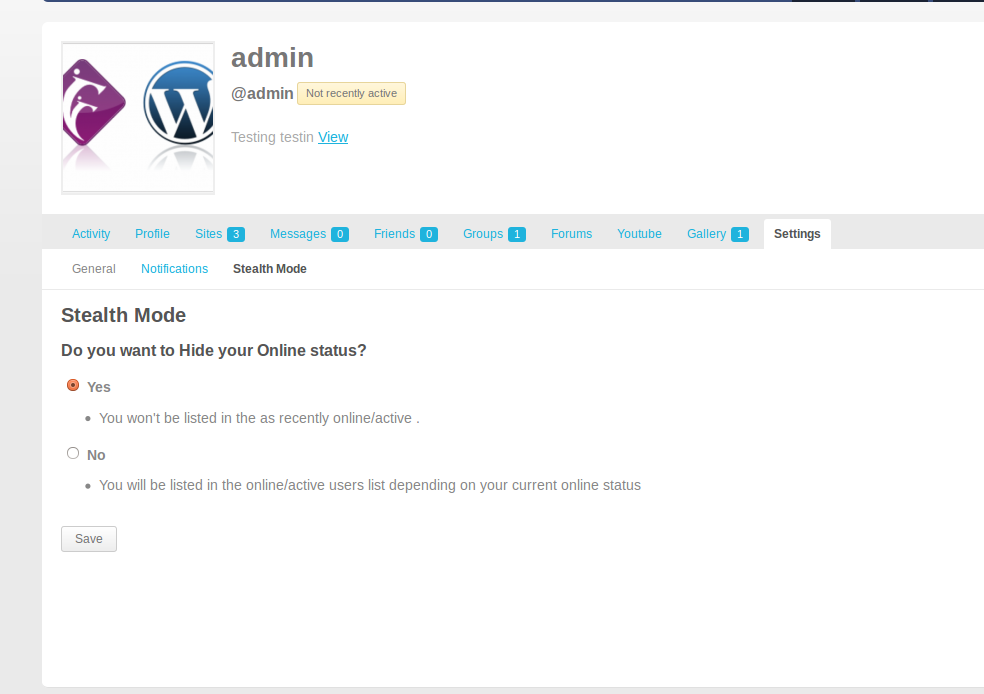

You can activate the stealth mode from here.
Note: Please Note, for every time, a site admin is logged, the stealth mode is always set to On, Still, It is highly recommended that you save the option at least once.
Special thanks Goes to mercime for the Idea.
Another Alternative, with less features
Ok, Now for all of you who have yet not joined, buddydev Premium, well, you can use an alternative.
Put this code in bp-custom.php and None of the site admin activity ime will be recorded.So if you are a site admin, you will never appear in the Who is Online/ recently active members widget.
1 2 3 4 5 6 7 8 | function bpdev_init_sm_mode() { // is SM on, remove the record activity hook. if ( is_super_admin() ) { remove_action( 'wp_head', 'bp_core_record_activity' ); } } add_action( 'plugins_loaded', 'bpdev_init_sm_mode' ); |
Hope that helps.
Pingback:Buddypress for WPMU » Blog Archive » Stealth Mode for Buddypress Site Admin Plugin | Buddy Dev
Pingback:Stealth Mode for Buddypress Site Admin Plugin | Buddy Dev Admin China
Very cool! Thank you for the plugin and the props, Brajesh.
I've already uploaded it and it's working great. Happy Holidays!
you are most welcome 🙂
Happy Holidays 🙂
Just a quick comment: admin bar space is very limited on regular screens (which I have noticed, developers rarely use :)), so I would take it out of there and just place it in options or so.
Thinking about this: how about a plugin that offers either private names for the admin bar options or even just symbols like the main admin menu?
Not saying I can make this, but an idea for all of you that can 🙂
hi Harry
Thanks for the suggestions. Since this is for siteadmin only plugin, so it is not even visible to the normal users, so not affecting their space. My point was making it quickly available and the admin bar was the best option, since once you activate the stealth mode, it will redirect back to the page where you were already browsing.
I am a little bit confused by private names, do you mean, a replacement of admin bar with the symbolic menu or something ?
Thanks
Brajesh
Hi Brajesh,
Can you update the plugin so that it doesn't crash the upgrade process of buddypress ?
thks
Eric
Hi Eric
Thanks for pointing this. Sure v 1.1 is coming on monday with a few more features and with awareness of Bp.
I have installed this but it doesn't seem to work on the latest versions of WP/BP (3.1 / 1.2.8). Are there any plans to upgrade this plugin so it's compatible?
Hi,
I just installed the plugin and when i click on "Put ON" I receive a "page not found".
Any suggestions?
Thanks in advance
Hi AH,
when you activated the plugin, did you get the notice that the Stealth Mode component need to be assigned to a page. Please create a page in wordpress and assign it to stealth mode component from BuddyPress->pages screen. after that it will work.
dosnt work for me at all
stealth mode is off no matter what i toggle
Your Stealth Mode plugin works great! This is just what I needed to keep my "admin" alias from showing at the top of my Recently Active Members widget each time I logged in to my site.
I'm running WordPress 3.5.1 with BuddyPress 1.6.4 with the BuddyBoss custom theme.
This plugin was a great idea, mercime. Very good work, Brajesh Singh. This is great!
Thank you Kevin.
Appreciate your comment 🙂
Thanks Kevin. Many thanks to Brajesh for the cool plugin, as always 🙂
Hi Brajesh and congrats for all the work you do in buddypress.
I purchased the plugin, installed it but no luck. I can't see the stealth mode options.
I have a MU WordPress installation where one subdomain is buddypress.
I am running WP 3.6 and BP 1.8.1 – Disappointing I paid this money for the plugin that doesn't work as WordPress did not assign the stealth mode component from BuddyPress -> pages screen… and for what I can read there is not much support or help for plugin issues 🙁
Hi Jackson,
our Documentation is not that awesome but I am sorry to disappoint you our support is not that bad.
Please download Stealth Mode plugin version 1.2.3 and activate it. I have updated the plugin page to reflect that it does not need to create new pages. Now, you can set the option from your BuddyPress Profile->settings->Stealth Mode.
Hope that helps.
Suggestion: Possibility for every user to set off the recording, and go in stealth/offline mode…
Having a button/dropdown in Profile header "Go offline/Online" switch (green/red bulb) might be very cool… if offline it should hide also last time seen (or having option for that)
… in addition I would suggest an option of Super-admin to set if users can browse "online" users (or do some other stuff) while being offline…
just a thought… Cheers!
This is what I am looking for too. I want to give this privacy option to all users not to have their last activity echoed through out the sites.
I can hide most of this with CSS but anyone can still look at source and see all this to violate the implied privacy.
I like the idea of offline/online and wonder how it would integrate though with a chat plugin that also has the same offline/online feature or if too much repeat may confuse people as to what status they are referring to. Maybe keeping the wording clean that they are just changing the "last active" status would be better, so as not to confuse with chat online/offline status.
Hello i buyed the plugin but it dont work, with my buddy press instalation ? Is ther an update?
I mean i have no Top Menu Bar. And i use BBPress Version 2.5.4. Bad when i dont can use it :/
Hi bKg,
My apologies for the confusion.
The settings are now available Under user profile. Please visit Your Profile->settings and you will see the settings of the Stealth Mode. Please check that and let me know if that works for you or not?
yes perfekt, thx
Hi There,
I just purchased the plugin and enabled the stealth mode for the key master of the community.
The problem it did disappear the key master from the online members but it still shows him in the recently/active members (widget).
Any solution?
Thank you
Hi Nick,
My apologies for the delayed reply.
Please upgrade to version 1.2.5.
it will hide admin from everywhere(Including widgets, directory, group members list etc).
Hope that helps
Great Brajesh! Thank you!
Brajesh Singh, This is an old plugin you're selling. Last updated back in 2014.
Is that because there are free versions now available?
Hi Adrian,
The plugin does not need an update as the recent BuddyPress haven't made any changes that will break it. It is tested with BuddyPress 2.6 too. Also, Since I wrote a few posts on how to hide the users, That has lead to less interest in this plugin. I am not sure if there are free alternatives or not but you can use a few lines and specify the user id to hide the user.
Hi again, Brajesh Singh.
Thank you for getting back to me. Yes, I had came across your latest code from using the top box (to specifically exclude users '1'): https://buddydev.com/buddypress/hiding-users-on-buddypress-based-site/
I have put it in a file as:
wp-content/themes/child-theme/buddypress/bp-custom.php
Unfortunately, it doesn't work at all for me… I'd get your plugin, but I have too many and would rather this code as it's lightweight and fast for my site.
Any advice as to why my site is ignoring it?