Introducing BuddyPress Live Notification Plugin: A facebook like notification plugin for BuddyPress
BuddyPress Live Notification plugins adds a facebook like notification system for your BuddyPress based social network. It shows the new notifications to the user in real time just like facebook does. It is exactly same as facebook notification you are familiar with. So, Here I present the same for you to use on your very own social network.
It works in real time, updates itself in real time and notifies in real time. Whether you Send/receive a message or comment on someone's activity or add someone as friend, It will notify in real time if the user is online.
Here is a screenshot:-
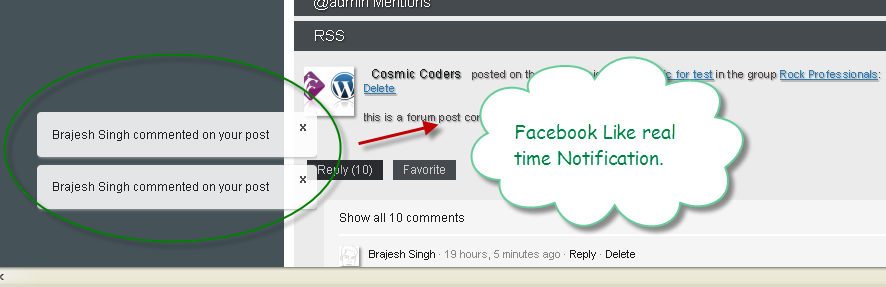
The credit goes to Gossy Ukanwoke for the idea of facebook like notification. This plugin is best used with the Activity comment notifier plugin(as you will have real time notification if someone comments on your activity post).
Features:-
- Live notification
- The notification can be anything (like adding friend/receiving message/ groups request/friend request or anything which BuddyPress considers as notification). It is exactly same as Facebook Notification.
- The Notifier will show the notices of new notification as well as update the notification in adminbar automatically.
- The notification will be shown even if you are logged in the backend(wordpress admin)
- If you have the activity comment Notifier Plugin, It will notify when someone even comments on your updates
Screenshots:-
Live Notification Message:-
Live Update of Notification bar:-

Hope it will make your sites to become more social and should help with the user participation.
Download & Installation:-
https://buddydev.com/plugins/buddypress-live-notification/
Credits:– @Gossy for the bringing the idea. http://code.google.com/p/achtung-ui/ for the jquery plugin to show notification in growl like message..
Looking forward to hear your comments and suggestions.
Really cool Brajesh. Works perfectly so far!
Thank you for the feedback Greg 🙂
Can we use this plugin with out buddypress or any other suggested me ?
Hi Joson,
Yes, you can use this plugin without any issue. It is functional and fully supported for current BuddyPress.
Absolutely great for many communities… very well done!
Hi Bowe,
Thanks for the comment. I do hope it helps a few communities 🙂
Thanks Brajesh.. I completely take my cap out for you.. my users at Students Circle Network love it.
Thanks for the Crediting. I appreciate.
Thanks Gossy,
That was well deserved credit for you, it was your idea, I just implemented it 🙂
Awesome plugin 🙂 well done!!
Thanks Brajesh!
Thanks for the comment Alan. Highly appreciate it 🙂
Maybe add an option to prepend the notification number to meta title tag so the number of notifications shows up in the browser window title if there are new notifications. That way if the window is minimized a user will still be able to see if there are pending notifications.
Thanks for the suggestion Jason.
It will really be a nice feature I guess. will get in the next release.
Oh my god I can't wait. You're an angel, Brajesh.
Not a comment on the plugin so much as the name – did you mean "facebook" instead of "fecebook"?
Dang it! silly typo on my end. Thanks for noticing. Just corrected it 🙂
Thsnks Brajesh, this is great!
Hi Brajesh,
does it notify you when there is a new "activity update" ? Im really looking for this feature…
Thank you!
OnYx
Hi,
BuddyPress has no way to notify the new update(from friends etc) at the moment, that's why it does not notify. If you are looking for the notification on activity comments(comment on update like facebook) please install Activity comment notifier plugin.
https://buddydev.com/plugins/buddypress-activity-comment-notifier/
The live notification will notify on new comments in that case. Hope that helps
Hi Brajesh,
Im sorry I didnt explain myself well… what Im looking for is something like http://wordpress.org/extend/plugins/buddypress-activity-stream-ajax-notifier/
Thats the plugin Im using now, but doesnt seem to be working properly… give random notifications where there is nothing new and gives notification when friendships are created, etc…
I just want it to notify the users for new "activity updates" only…
Any ideas?
Thank you!
Onyx
Hey,
Can we disable the notifications for the backend ???
Currently, there is no good way, but if you put this line in your functions.php, It will work.
if(is_admin())
remove_action("wp_print_scripts","bpln_add_js");
Hope that helps.
Brajesh,
Great plugin!! I had been searching forever to find something that works the way this does! Are there any plans for an Admin page? I noticed there is a bp-chat-admin.php but it does nothing. If there is plans for one, what functions might it serve?
Also, something that might be cool. If a person your chatting with goes offline during the chat, send it as a message. 🙂
In my not work. Only worked in the admin bar. But the reports do not appear floating. What do I do?
Sorry I saw your message late.
You can find the new version here
https://github.com/sbrajesh/bp-live-notification
It will work with wp 3.3+ and the problem with floating notification could be related to theme. Please check for javascript errors.
Hey Brajesh ,
Good job! I love your all plugins and works 🙂 , may this plugin works for blog-post-comments too? when a user commented a blog post the post's author a notification will appear on "Notifications".
Keep going :X
Hi Sepehr,
Thank you. That's a very good idea. My other plugin(activity comment notifier, notfies on activity comment but not on blog post comment). will ad this in a couple of days 🙂
Thanks
Brajesh
Brajesh ,
Thank you so much , GOD bless you , I'll be waiting for your new plugin
Hi,
first of all your Plugin is amazing, i like it very much.
But i have a little problem with it, the Notification on my site is only showing up on top.
So there are no boxes on the left bottom for the notification…
Do you have any suggestions what the problem is?
Thanks in advance.
Hi Andreas,
Thank you for the comment. I am glad you are liking them 🙂
Can you please let me know if ypou are using a custom theme or the bp-default. Also, Can you please check the browser console and see if there is any javascript error ?
I have same problem , I'm using a bp-default child theme.
Very nice plugin, thanks 🙂
Thank you 🙂
hmm not working !
now showing notification for me
Could it be possible to notify of Blogposts (or simply posts) comments? I mean from outside the Activity loop. Thanks!
Hi Alvaro,
No, It does not do that at the moment. In future, It may work like that.
Since many of you have suggested this feature, I will certainly try to implement it soon.
Thanks!
How can i alert user if there is notificaton??to me notification count doesnt appear its until user check manually..
thank you brajesh, urjob is amaizing!!!
i already got t work thanksss, it was something in my child theme
Hi denis,
Thank you for the comment. I am glad you figured it out 🙂
I want to thank you 4 this very nice plugin. It works fantastically and I like it very much.
one question: In my site I have Groups and groups with forum funktionallity.
If someone writes a new answer in a topic, it does not appear a "live notification" in the notification bar. Is this correct? Can I turn on somehow this funcionality? Or is this planned for the next version?
Thx a lot and excuse my english 😉
Hi Wlady,
Thank you for the comment.
The plugin does not do anything on its won. It uses BuddyPress notifications and show them as they happen.
As far as I know, currently BuddyPress does not create a notification for forum replies(other than mentions).
That's why it is happening. A simple way to handle it will be to generate the notification for users when someone comments on a forum topic.
It doesn't seem to work in my case. Is this not compatible with the latest versions of wordpress & buddypress?
Hi Relcol,
I had tested it with bp 1.5.4 and it did work. Can you please tell me if you are using a custom theme or bp-default. In case of custom theme, there may be some js conflict.
Hi,
I am using this plugin with BuddyBoss 2.0 and this plugin is not working at all..
I have used this plugin before with some other theme.. and it worked like a charm.. But i can't figure out where the conflict with BuddyBoss.
Can you help me on this?
And BTW, excellent plugin… never thought this could have been made possible in BuddyPress as well 😛
Thanks,
Nasir
Hi Nasir,
Thank you for the comment.
Please download version 1.0.2(have updated the download link) and it will work.
Regards
Brajesh
Hi Brajesh,
Yes this worked… Updated version was causing a jQuery conflict with my custom theme, and I removed the call to the .js file from header and added that call to the footer (right before the closing body tag). This worked like a charm.
Although i have two more questions.
1) Does adding the JS call in footer have any disadvantages?
2) Where can i tweak the CSS for this plugin.
And finally once again, a Great Plugin!
Hi Brajesh,
You are right, I use a custom theme. Please advise if I can resolve the js conflict.
Thanks
I think it is the Activity Comment Notifier that is not working. For notification(like adding friend/receiving private message/ groups request/friend request etc, notifications are displayed on the Admin bar. But I guess that comes up without the plugin as well? Please correct me if I am wrong.
Though I can see notification on the admin bar, I do not see Live Notification Message like the screenshot you provided. Does it only come up in Activity comments? If so, it could be due to the Activity Comment Notifier which is not working causing the issue
Hi relcol,
The problem was with BP live notification plugin. I have updated the download link(Had updated plugin in January but missed to upload it here).
Please download version 1.0.2 from here
https://buddydev.com/plugins/buddypress-live-notification/
It will work.
Hi Brajesh, Thanks for your time. I downloaded the 1.0.2 version of plugin but couldn't manage to get it working. I have tried with default template as well. Could you please double check?
Thanks
Hi Relacol,
I also had the similar issue with the update version. But I added the call to the .js file in the footer, just before the closing body tag. This worked for me.
You should try this as well!
Thanks,
Nasir
Hi Nasir,
Glad its working for you. Is it the bpln.js file you are referring to? And is it the bp-live-notification.php that needs to be amended to place the call to .js in the footer. Could you please let me know the specific line or function call.
Thanks
Hi Relacol,
yes its bpln.js file… Press Ctrl+V and view the source of your page..
There you will find a line
Just copy this line.. and paste it in your footer.php just before
Then refresh your page and see if it works.
In my case it was a success.
GoodLuck!
Nasir, sorry to keep bothering you. The code is not visible in the post above. By view source, did you mean from the Internet Explorer or the bpln.js? And is the footer.php, the one under the custom theme folder? Could you pls elaborate?
Hi Relacol..
I dont know why the code didn't appeared as i enclosed it in the code tags.
Anyways… can you send me an email.. so i can send you that code in an email…
thanks.
my email nasir(at)vush.pk
Is there a website where this is implemented for me to see how it really works? Thanks again for all the inputs so far.
Hi relacol,
There is no live site.
Regrading your other comment, if you don't see the popup with a custom theme, there may be some javascript conflict. Can you please check the console in firebug and let me know if you see any issue?
Hi Brijesh,
Thanks for the message. Nasir kindly send me a sample screen shot of the popup message. Though I can see the updates on notification bar on the default buddypress theme, I never see any popups on default or custom theme. So it seems the live notification plugin doesn't seem to be work for me and activity comment notifier works on new set up. Are the 2 plugins dependent at all?
Thanks
How can i add an avatar to the growl or make the notification link clickable?
Hi Phillip,
In order to make the links clickable in the notification popup, you will need to modify the bpln_get_notification_messages function.
as of avatar, you may not add that, as the notification messages are generated/parsed by individual buddypress components and we don't have much control over that.
can you explain more clear how to make the notifications popup clickable?
I cannot sort it out.
thank you in advantage
jap
Congratulations again for the excellent plugins that you do, Brajesh!!! I loved it and it worked perfectly! Just missed the floating notification have links to jump to that notification as Facebook and the own notification bar. Bye, hugs!!
Hi Brijesh,
Thank you for your Live Notification Plugin, still working very well.
Would you be able to tell me how to add in the functions to play a hidden mp3 or midi sound on new notification.
It would be so great to have it.
Hi Wcee,
You may use sound manager to do that.
here is how I have done it for Bp Chat.
https://github.com/sbrajesh/bp-chat/blob/master/includes/js/bchat.js#L683
You will need to include the soundmanager first and then call above function in the notify code here
https://github.com/sbrajesh/bp-live-notification/blob/master/bpln.js#L47
Hope that helps.
Hi Brajesh, I've tried exactly what you said. I've download Soundmanager2, put it in my bp-live-notification folder, I've called it like that in the header since it is in the same folder as the bpln.js, and I've put the function that you showed me just under the notify: function (msg){ line in bpln.js like you said, but nothing happened.
MWould you think of another way to achieve this? And by the way, my bpln.js is not in bp-live-notification/blob/master/bpln.js but in bp-live-notification/bpln.js, I don't think that it's because of this that it didn't work anyway.
Have an idea, I've search every where to do this but didn't find nothing and I know that you are the man to help me do it, please!
…I’ve called it like that
open bracketscript src="soundmanager2.js"close bracketopen bracket/scriptclose bracketin the header since…Sorry for that, it didn't work with the real bracket in previous message. 🙂
Thanks Brajesh Singh !!
I really appreciate you for this plugins…
But I want some suggestion from you that can I add notification count bubble like facebook in frontend as you add in admin bar.
Waiting eagerly for your reply !!
Hi Dinesh,
sorry for the delayed reply.
Please take a look at the bpln.js, specially line 28-31.
That is the code you need to modify.
Hey, I've just started with BuddyPress, feel free to peek at http://www.LeagueCanada.ca
I just found this site today, and will install SO MANY of your plugins. 🙂
Thank you for joining the conversation Andy.
You site looks a nice start. I am glad that some of my plugins might be helpful. All the best 🙂
Hi,
Compliment for the plugin, I'll give a look also to your chat.
However, I have tried to make it work your plugin as many others here, unfortunately because of some JS conflict it is not working. Can you please give me some suggestion to understand what is creating the problem? How to detect the reference? Is there any better solution to enclose bpln.js at the end of body?
Thanks for your help
Hi Vincet,
Have you downloaded the plugin from Wp.org? If yes, are you using BP Live notification 2.0.1? Please let me know and point to your site , I will do my best to help. What kind of error are you seeing?
About chat:- The chat is broken as I haven't updated that recently.
Hi Brajesh
I have actually downloaded your last release 2.0.1 and is working fine. So nice ^-^.
Listen what about your chat, I would like to see it working too.
Hi Brajesh,
I actually use your latest version of buddypress live notification plugin but it didn't work in my site. Can you please help me to resolve my problem.
Hi Nikhil,
Is there any chance that WordPress Heartbeat API is disabled on your server. Some of the host disable it out of the box(For example, WP Engine has it disabled out of the box and can be enabled by requesting the support).
Most probably the issue is related to heartbeat API. Please check and let me know here or in our forums.
Thank you
Brajesh
hi, i have a bell notification on my menu bar. using buddypress for connectivity. is their any shortcode or plugin which will give live updates on bell notification on menu bar.
Hi Madhavi,
My apologies for the delayed reply.
The bell icons are mostly specific to the theme and can/should be handled by the theme. The plugin fires js action to allow you update notifications.
Please see this
https://github.com/sbrajesh/bp-live-notification/blob/master/assets/js/bpln.js#L66
and here is a plugin that shows how to use this
https://github.com/sbrajesh/bp-live-notification-example-module
For further help, please post in our forums.
Thank you
Brajesh