You can access the BuddyCircles settings from Dashboard->settings->BuddyCircles. The settings screen allows you to control the behaviour of BuddyCircles.
Slug:-
Here you can specify what slug you want to use in the url of circle tab. It must be a valid value without any space. Example-lists, list, user-groups are valid value but ‘user groups’ is not.
Who Can Create:-
You can either allow all user to create circles or limit it by roles as shown below.


Circle Tab or Use inside friends:-
Keep circle under option allows you to use circle as a top level component or make it work inside the friends component depending on your choice.
- Top Level Component:- A New circles tab will be added to the user account menu.
- Under Friends Component:- If it is selected, No top level tab will be added. A new sub tab will be added under Friends tab.

Who Can be added to the circle:-
This option allows you to control who a user can add to their circle
- All Members:- Any member of the site can be added in the circle.
- Friends Only:- A user can only add their friends to their circles.

Circle privacy:-
You can enable which privacy levels are available to the user while creating circles.

Default Circles:-
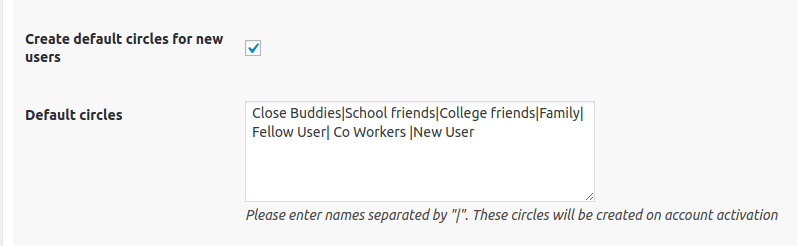
It allows you to automatically create default circles for user when their account is activated. It will only create the default circles for new users registered/activated after the pluginactivation.
You can specify the list of default circles as strings separated by “|” as shown below.
Notifications:-
Enabled notification Types:- You can select the notification methods enabled.
- Local Notification:- Uses BuddyPress Notifications to notify the user.
- Email Notification:- Sends email to the user.

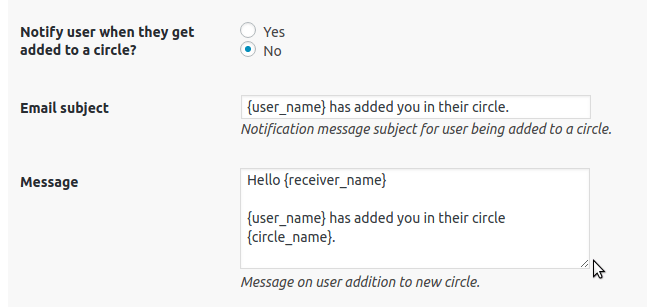
User Addition to Circle Notification:-
You can control if the notification for user getting added to a circle is enabled or not. You can also customize the notification message subject and content.
User Removal From Circle Notification:-
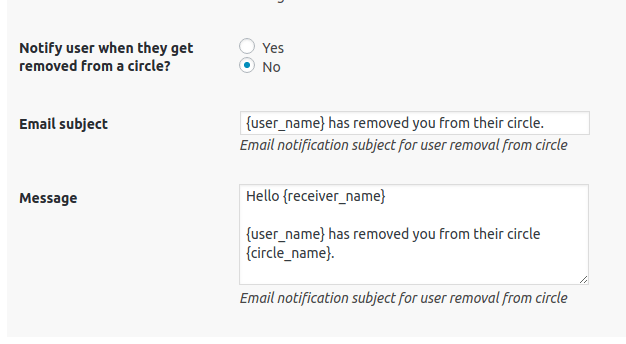
You can control if the user will get notified when removed from a circle or not. Here is a screenshot showing the available options.