BP Nicey: a simple and clean child theme for buddypress
I am glad to announce the release of BP Nicey, a blue shade adaption of the default BuddyPress theme. It is a child theme which depends on BuddyPress theme bp-sn-parent( bp-default).
Features:-
- Easily Customizable
- Clean and Elegant
- Child theme
- Custom header and footer
What is more, we are actively developing it, So if you have any suggestions/improvements, point us and we will be glad to incorporate.
Why This theme:
Because we love BuddyPress and there is a lack of theme for BuddyPress. We are trying to fill that gap. Keep yourself tuned for more to follow soon.
Yes, our next free theme cosmic buddy will be available this week. I will be writing about it in my next follow up post 🙂
Screen shots:
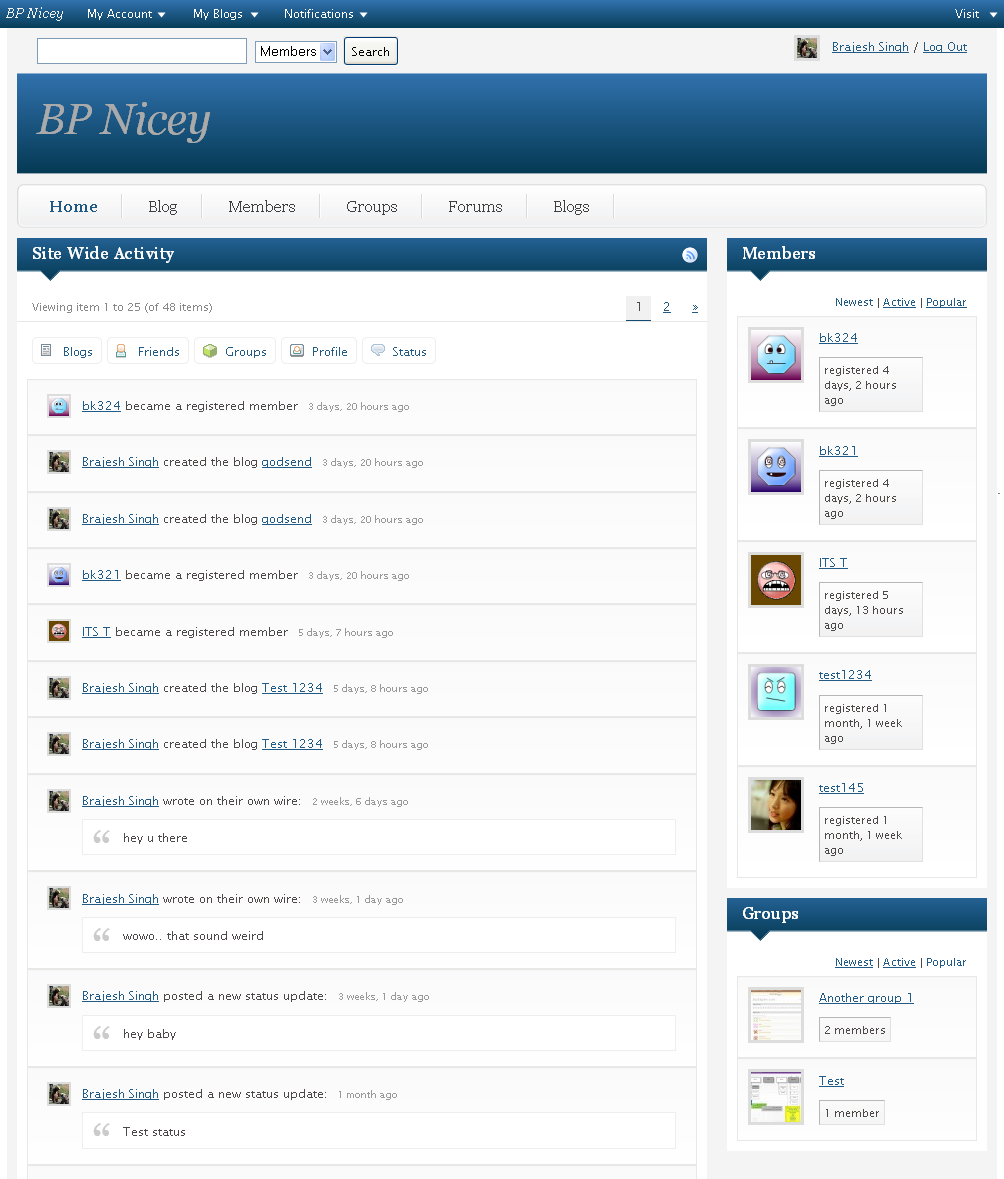
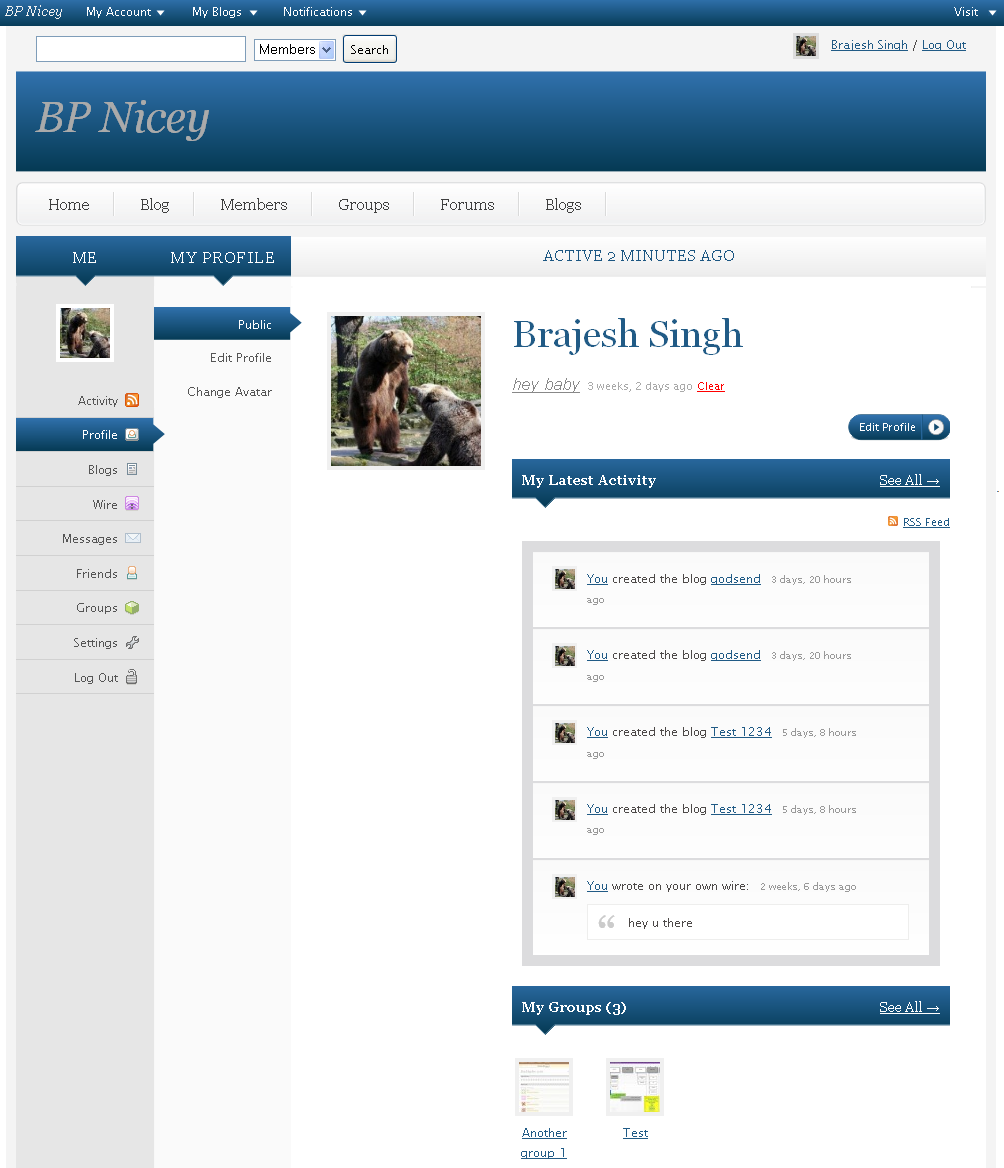
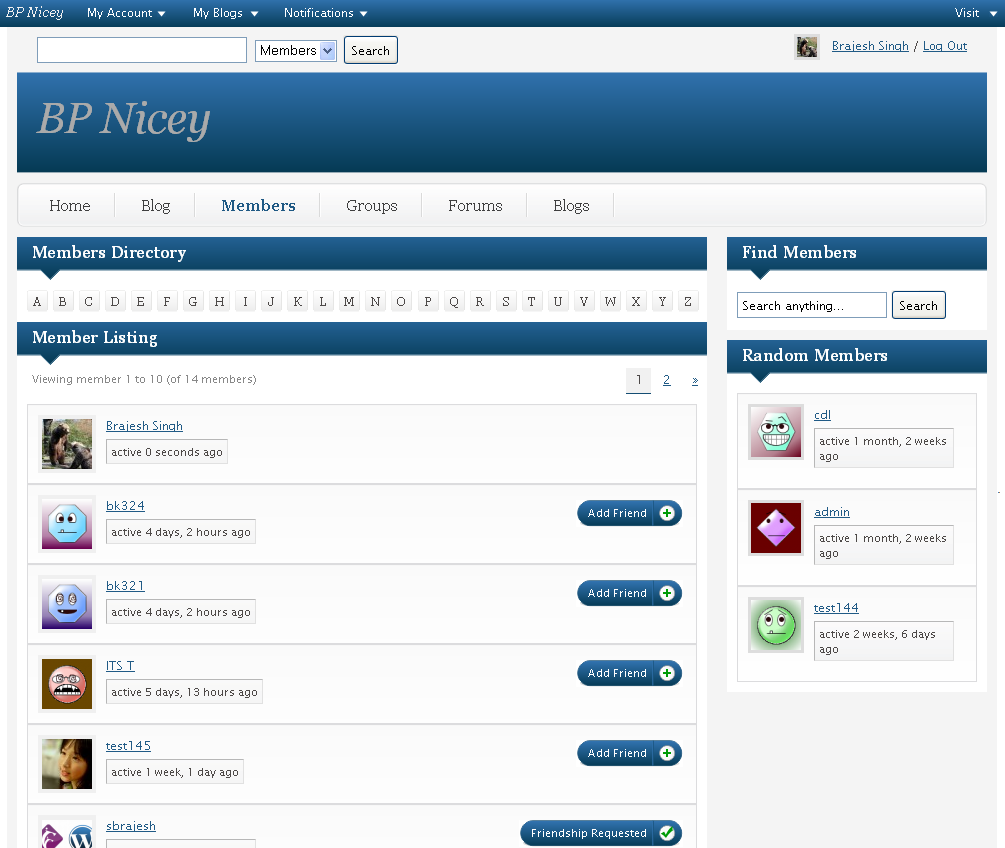
Download Link:
https://buddydev.com/themes/bp-nicey/
Installation
1. Unzip bp-nicey.zip
2. Upload bp-nicey to your wp-content/themes
3. Go to SiteAdmin->Themes and Enable this theme or Go to SiteAdmin->Blogs, click edit and enable this theme for the blog on which BuddyPress is active.
4. Go to Themes->appearance and activate this theme.
5. Appearance->widgets and add/remove widgets. That's all. You are done.
Please help us to improve it more. Leave a comment with suggestions here or if you are a premium member, please post in the forum.
I will like to hear from you, what features you want in your BuddyPress theme. Do not hesitate to tell us. We are here to help you 🙂
Pingback:2 temas pra Buddypress BBG : Buenos, Bonitos y … Gratis! « super wordpress mu
Having trouble adding the /activity page. I even tried to manually add a Activity
but it doesnt add it to the menu. Any suggestions? Also would like to have Activity show once a user logs in.
Thanks…and BP Nicey is a great template.
Tested BP-Nicey theme in BP 1.2 latest trunk and it's working great. If you add Sitewide Activity and get its layout working, you would only need to add the CSS of the Activity Stream from bp-sn-parent to your BP-Nicey theme's stylesheet.
Cheers.
hi Mercime, will certainly do that for bp 1.2. Thanks for the testing and the suggestion 🙂 , Your help is always most appreciated.
Could you tell me to add Sitewide Activity?
How to ….?
Thanks
hi MIxsp
The sitewide activity widget has been dropped in Buddypress 1.2
If you still want to use it, Please download this plugin.
https://buddydev.com/http//buddydev.com/public-download/cb-addons1.1.zip
Activate it and you will see the sitewide activity widget available.
You can use it then.
Thanks
Brajesh
using it and loving it. Modified – http://freelancerunplugged.com
-Diesel
hi Diesel Laws
Thanks for the comment.
Your site looks cool! great customization 🙂
That modified theme was GREAT looking. Any thoughts of releasing to the public, and that way give back to the community ?
//W
Sorry whiking, didn't know you were talking to me! I will see what I can do!
Thanks! Sent you an email regarding the background colour issues on the homepage – it should be all white, not the grey (#f4f4f4) – anyway to change this?
I've found this theme to be very suitable and well coded. I'll be recommending it and posting about it on my upcoming wmpu blog.
I have one question – is there meant to be no sidebar for single posts? I thought I might have done something to the theme but I installed the original and – same thing.
Every other page displays a sidebar including the 'blog' page – here's a single post page for an example.
http://bcosuluvit.com/blog/why-do-we-do-it/
If you could help me add a sidebar to this page that would be Christmas who months late.
hi Alistair
Thanks for the comment and the nice words. I checked your site. The sidebar is present there(in code) but does not show up. It is most probably a css issue. I will take a look again, a little late today and post some solution.
Thanks
Brajesh
Hi Brajesh
Not to worry – it's not your theme. Posts working well… I had somehow altered the parent theme.
Example: http://bcosuluvit.com/blog/why-small-businesses-owners-should-blog/
Thanks for your support though. Did you like what I did with your theme BTW?
hi Ali
Thanks. I am glad you sorted it out yourself.
Your adaption looks cool green shade. and Loved the adaption of slideshow 🙂
I actually went back to your blue. It's stronger.
When I uploaded it in my control panel, it said template missing. What's with this?
You don't seem to have the bp-san-parent theme in your themes folder. Please check that. Bp Nicely is a child theme and requires bp-sn-parent to be there in your theme folder.
Thanks
Brajesh
Pingback:12 Amazing Buddypress Themes and Getting Started Guides - Speckyboy Design Magazine
where can i get the bp-sn-parent template????
hi Rocky
You will not bp-sn-parent need any more.
I am updating this theme and expect and update tomorrow which will solve all the issues.
Thanks
Brajesh
Hi Brajesh Singh,
I have a problem with my theme..
I have update my buddypress and now is the theme not 100% working…
Please can you help me where can i resolved the error?
Site Wide Activity (showing wrong)
Profile (if you see the profile that is wrong)
Can you help me please?
(Sorry for my english)
Thanks,
Alba
hi Alba
I am updating this theme, please wait for 1 day. It will be functional after my update. Everything wil be functional as shown above for bp 1.2 too.
Thanks
Brajesh
Oké, i wait.
Thank you very much!
Pingback:Buddypress Themes
Hi Brajesh Singh,
WE are 2 day's later.. is there a update please:)
Thank you for you work….
Alba
hi Alba
sorry for not updating it. I had been engrossed in updating the other theme which is till incomplete. Going to update this first now and will leave a comment here soon.
Thanks
Brajesh
Oké Thanks,
I wait…
Thank you very much!
Alba
hi Alba
It is updated now. Please go ahead and download. there may be some small issues remaining. Please do let me know the issues you find so I can improve them.
I will update this theme again after 10th march for far more better look 🙂
Thanks
Brajesh
Pingback:12 Amazing Buddypress Themes and Getting Started Guides | Son Of Byte - Web Design & Development
To work with single wordpress have a little bug – don`t have 'home blog' and blogs … only 1 blog 🙂
http://lab-br.net/BP_HOME_BLOG_SLUG
all the best
joao barroca
Thanks Joao
My Mistake, I did not think about single wp :(, Will be modifying header link in next release. In the mean time, you can just disable the link.
Thanks
Brajesh
Love this theme, using it on my BP powered site.. Btw, im Wpress newbie. 1 question, how to disable the header ling that contain blog .. BP_HOME_BLOG_SLUG
Pls help 🙂
Please open wp-content/themes/bp-nicey/header.php and comment the line 99 of header.php and you will get rid of it.
hope it helps 🙂
Thanks, will i'll have a look on it
Hi there , i looking for a vertical-sidebar menu like your screenshots.
I need it for my buddy press but i not found anything 🙁 , heeeeeeeeeeelp!!!!
i have use nicey theme , bu my sidebar is irregular
hi Sepehr
The screen shot you see was for version 1.x in which buddypress bp-sn-parent theme had vertical menu and so had bp-nicey(It is a child theme)
In current version of buddypress the parent theme does not offer a vertical menu and so it is not in bp-nicey.
Please take a look at the backward compatibility plugin and bp-sn-parent theme for the vertical menu.
Thanks
Brajesh
hi again , Thank you Mr. Singh ,new problem acoured occurred : I have Buddypress Backwards Compatibility Plugin installed on my buddypress 1.2.3/WPMU 2.9.2 , and my site goes blank and i removed plugin from my cpanel ,
you are most welcome:)
Please make sure you are on bp 1,2+ when you activate backward compatibility plugin. Is there anything in error log ?
I would also like to have this cool vertical menu.
It seems to me the Backward compatibility plugin doesn't work with my WP3.0 installation (WP 3.0-RC1-15022/BP 1.2.4.1). It disables main menu links.
Any ideas how to get around this?
Does WP create its own error log?
Btw. Nicey looks like a great theme but it doesn't work with WP3, right? My main menu tabs are located in bottom of the screen when using Nicey. Also admin menu items are located in a vertical listing after the layout.
Pingback:12 Adet Budy press teması ve kullanma yöntemi | Web design source
Pingback:Бесплатные темы для Buddypress | EXAY И ЕГО ДРУЗЬЯ
Pingback:Bina Laman Web Social Secara Percuma (Open Source Platform) Menggunakan Buddypress dan Themes Buddypress — Malaysia Web Designer | Malaysia Web Developer | Kelantan Web Designer Baloot's Blog
I'm using the BP Nicey theme and want to use a logo rather than just the text, anyone have any ideas how to do that.
Thanks
d
hi Dean
Please take a look at header.php in bp-nicey. You can edit the header.php to put the logo there.
Let me know if you find issues.
Thanks
Brajesh
Brajesh:
Thanks, I got it working. One other question you might be able to help me out with. I set buddypress to set up the user blogs as theresite.mydomain.com, however when I create a blog it does not work. Any settings I might be missing?
Dean
hi Dan
you are most welcome.
For the subdomain.domain issue, It should be most probably a wildcard domin setup issue.
Have you setup a wildcard domain for your site?
No I have not, not sure how to do that
Login to your hosting control pane.
create a sub domain with name just "*" and save.
That should do the trick. If your hosting provider do not support wildcard domain, ask their support to enble it for you. They will enable.
That's it.
Hope it helps.
Thanks
Brajesh
I went to upload the bp-nicey theme and I got a broken theme warning it said that it was missing a template and style sheet – what did I do wrong?
Thanks,
Jeff
hi Jeff
Please make sure you have bp-default theme/buddypress enabled. This is a child theme of bp-default, so will work only when buddypress is active.
Please check and let me know.
Thanks
Brajesh
Hi Mr. Singh ,
I have a problem with my buddypress 1.2.3 and wpmu 2.9.2 ;
Warning: preg_replace() [function.preg-replace]: Compilation failed: this version of PCRE is not compiled with PCRE_UTF8 support at offset 0 in …
what's the meaning of this?
I'm so sorry for asking this question in here , brajesh!!!
Please Help.
Brajesh Singh
hi
Problem Resolved
when Php updated ,' my PCRE php library ' stay out of date ,this problem solved by a simple PCRE update ,
I'm sorry for my english .
Is there a way to set up the sign in form so that it will send them an e-mail that they will have to verify in order to use the site? I'm trying to keep out spammers. Thank you for any help.
Dear Brajesh:
Thank you for your great theme BP Nicey. It looks great.
I somehow can't get the Blog link to work though, and everytime I click on the link I see:
"Page Not Found, The page you were looking for was not found".
I am not sure how I can have posts that automatically go under "Blog" link on the menu. Would there be a specific path, or category, so that some of my posts appear under this link?
Thank you so very much for your help.
Vida
hi Vida
Thanks for the comment.
The problem is bp1.2 does not catch the "/blog" link, so another way will be to use a page template. I will update this template today and add a page template. Please check back in the evening.
Thanks
Brajesh
Thank you so much Brajesh. I am also using Cosmicbuddy for another site. Would the process be the same for "Blog" link on the menu? As I am getting the same response in there too.
I thank you very much for your support.
Vida
hi Vida
Sorry for delayed response. Just updated the theme with a blog page template. Upgrade bp-nicey to v 1.2.1 and make sure to create a page "blog" and select"Blog Page" from the page template and it should work fine.
I had provided an update for cosmic buddy too, Please checkout this post for more.
https://buddydev.com/buddypress/cosmic-buddy-theme-for-buddypress-1-2-available-now/#comment-2377
Hope that helps.
Thanks
Brajesh
Thank you so much Brajesh. It works 🙂
Thank you.
Vida
you are most welcome 🙂
I really like this theme alot. Great work. Thank you.
Im wondering if you might know whats causing my issue: the theme looks great until i maximize my browser window. once i do that, the content misaligns with the background (light blue color).
hi Shane
Thanks for posting the issue. Had not tested like that. Will get back to you after testing it today.
Hi Brajesh , may u help me about an idea?
I have Buddypress Album+ plugin installed on my buddypress 1.2.4.1 and WPMU 2.9.2 and i need the BP Album+ load pictures with ajax(jquery). but refresh the page.
may u help me please?
Special thanks Mr. Singh
– Sepehr
Sepher
Which version of Bp Album you are using ? I have not used it but will be glad to look at the code and help you. let me know which version of it you are using.
Hi Brajesh , It is BuddyPress Album+ 1.7
This theme is the best thing to come after buddypress. great job mate.
how ever my question is this.. i have the blog page working now by creating a page called blog and adding the template as blog page.
my problem is that i used a post to put a welcome message on my home page. and this welcome message shows in the blog page. if i add a new post. it shows on the two pages as well.
is it possible to cattegorize which posts show on the blog page only. and which show on the home page only.
you ve done so great already
Please Help!
I need to know how to change the logo on my site! Im am releasing an application and i would like to know how to change the logo! Please Help!
Thanks, Jake
Please edit header.php. It does not uses any logo but just text. So for now, Please edit header.php. and put the logo url where the site name is displayed.
I fooled with it and my site crashed… could you tell me exactly what to edit please.
Jake : Tell me what do you want to do with your logo?
wanna change it or remove it from you Buddypress Admin bar?
Which logo you need to Edit?
Your Buddypress admin bar logo…?
or your site name LOGO in your site header?
I would love to know how to do both…
I want to create new widget areas. especially on the left sidebar and foot widget area.
please how can i do this.
thanks
Hi Gossy
I just got into adding widgetized areas to manage bits and bobs of content around the site…
http://alidark.com/wphack/my-first-widgetized-three-column-footer/
Hi Brajesh, big fan of the theme. I have a question for you or anyone with sound knowledge. I'm looking to use the blog section as a news aggregator as I don't have time to update it regularly so I'm using a dreaded auto system.
I'm not a fan of these programs and I'm keen to not label myself as a content thief. How would I adapt the code to show just the excerpt on the blog page with a link to the external site.
Any help would be appreciated
hi Ben
This is the plugin which allows to do exactly as you want.
http://wordpress.org/extend/plugins/feedwordpress/
Just play with the options, it allows to post excerpt and give link back.
Hope that helps.
Thanks
Brajesh
I have two questions…
How do i make the profile page look like the one here…
https://buddydev.com/files/2009/11/bp-nicey-profile-257×300.png
And also how do i remove these annoying lines…
http://img801.imageshack.us/img801/6977/screenshot20100717at931.png
BTW: LUV THE THEME!
I would like to know when bp-nicey theme will be updated to support wp 3.0 featured images.
I like the theme but need to have this function..
Thanks
256studio
Hi,
I will update it by august 15 to have the wp3.0 specific features.
thank you also will we be able to see the custom profile? as the photos above show us?
256studio
I was wondering how do you get the sidebar thing where it has the links to your blogs and stuff to show up? I couldn't figure out how.
Hi Keyle,
You will need to use widgets in sidebar for that purpose.
Please go to Dashboard->appearance->Widgets and add the widgets to sidebar. That should be it.
Any word on the new version that support wp 3.0 and the profile photo at the top?
Hi,
Thanks for the comment. I am sorry I missed the earlier deadline of 15th august as August proved the worst month healthwise.
I will be updating this theme once bp 1.2.6 is out . Most probably I will be working on this theme in the 3rd week of September as it needs heavy facelift and updates in css.
Thanks for the fast reply. I dig the theme and I change only a few things in it.. Mostly the color scheme..
I'm a photographer and I'm starting a networking group… So, I think this theme will be nice to you for my new site…
Thanks
256Studio
Hoping to have the new theme… I know you said 3rd week of Sept…
256studio
hi,
You are right. I was busy with the chat plugin, so could not work. I will be working on it today onwards and will update here.
the theme don't look like the screenshots in the image 2
. see my site.
yes, it does not look like the screenshot anymore with buddypress 1.2.
The original screen shot and theme was for buddypress 1.0.3 but with bp 1.2 series the look/structure of parent theme changed, so the child theme.
I would love to have that look back.
Do you do custom theme for bp and wordpress?
256studio
Hi! I installed your latest version of the theme, looks good except the blog link is not working.
I am getting
404 – File or directory not found.
The resource you are looking for might have been removed, had its name changed, or is temporarily unavailable.
Am I missing anything?
I would like to know if there is any update on when this be-nicey theme will be finished?
Thanks
256studio
HI,
I am extremely sorry for keeping it delayed.
The problem is, bp-nicey was a child theme for bp1.1 series and with bp 1.2, when I am trying the vertical navigation, keeping the ajax based functionalities work on profile/group pages is getting lengthier. so, I have almost hit a deadlock now, as I did not think to put that much amount of time on this theme.
One solution which seemed feasible to me, was making the profile page and group page non ajax based(as in 1. 1series) and It can be completed.
Please let me know if you would like it that way.
Also, I am extremely busy with reorganizing this site, so please give me at least 4-5 days. I am going to have a visible schedule/progress for each and every component on the site within next 2-3 days.
Honestly that is fine! Thank you for all your help with this template.
Only think i ask you to check would be install the bp album + and check out the gallery for members. Right now that the only thing i have small issue with.
http://strobber.com is the site im working on. I took the header image out of the theme and left the link back to you at the footer.
Thanks
256studio
Hi 256studio,
Thanks for the reply. So let it be as I promised earlier.
I checked your site and It looks cool, you have made quiet a nice thing out of it.
Will be posting the update as promised now.
Thanks
Brajesh
Thanks I hope to get a few more mods going and start working on member to sign up.. I really don't want to release it yet till I get everything working right.
Thanks again..
256studio
I have did a quick fix on the blog on the menu. I create a blog category. and opened up the header.php and remove the blog section and simply put a hyper link to my blog page.
next I opened up the index.php( in the buddypress template folder) and replaced the_content with the_excerpt.
from this:
[code]
[/code]
to this:
[code]
[/code]
so now it shows about 250 characters instead of the whole article on the front page.
then I didn't like the archive.php title header so for now I removed the
[code] [/code]
I also added to the function.php this code.
[code] return 'ID) . '">' . 'Rest of the article…' . '';
}
add_filter('excerpt_more', 'new_excerpt_more');
[/code]
256studio
errr i thought that bb code was on… so i could show where i edited the files..
256studio
Pingback:O que fazer com o wordpress? Rede social : Blogueiro
any new word on new theme?
Does BP nice completly run with BP 1.2.6?
Hi
thx for your work, it's so great!
I had troubles, i don't know how to have the column systeme in you theme or in other theme. (systeme you can see on your Second capture) profile,message,friends… like a column, how?
Thinx a lot!
Any news on the release date for the updated theme?
Hi,
I was never able to update this theme but I will send you another theme in couple of days which does exactly like this. That is a premium theme(will be publishing before Christmas) but I will send you anyway, as you have been waiting for this functionality and the new theme does that.
Sorry for keeping you on hold for so long, please wait for 2-3 more days and I will send you the new theme which has a child theme to emulate this.
Brajesh, Thank you for replying back. Thank you offering the new theme to me. I know it take alot of time to develop a theme.
Thank you again!!
256studio
Hi,
Here is the child theme with the vertical menu. Please check
http://bpthemes.buddydev.com/bpmag/classic/members/sbrajesh/
is that matches your requirement.Please let me know I will send you the parent and the child theme.
here is the parent theme btw http://bpthemes.buddydev.com/bpmag/
Thanks
Brajesh
Yes that will work for me. I really like the profile area.. That is my main concern for any theme I use for my site.
Thanks again!
256studio
[edited: removed the email address ]
@256studio
Thanks. sending you in couple of minutes.
Hey Brajesh,
What are the chances, or what do I have to do, to get my hands on that theme you just sent 256studio? The BP-nicey theme is great, but I really like the profile look of the new theme.
Thanks,
Dustin
Hi Dustin,
Thanks for the comment. I sent the initial version of bpmag/bpmag-classic child theme theme to 256 studio, We have an update coming with support for buddypress links/jet event/eventpress/achievements etc. I will send you once I am done with that.
Thanks
Brajesh
That would be great!
Thank you Brajesh.
Brajesh, Thanks again for sending the theme to me. I ran into issue. My site got hacked… so Now I have to start all over again..lol..
I hope to have it back up soon!
Thanks again!
256studio
Brajesh,
Your BP Nicey looks just what I have been looking for in a BuddyPress theme. Is your latest release (download location?) a "stand-alone" download without having to have a BP parent theme installed first? By the way I read through all your questions and replies, you really stand out in care and concern for your users. I am a new user to wordpress, especially BuddyPress so much of this is somewhat difficult for me to grasp all at once. Please let me know what I have to do to install your BP Nicey on my site. I know it's probably a snap for others but not when you are a newbie. Thanks again
Dave
Hi dave,
thanks for the comment. sorry, i took a little longer to reply. No, you don't need anything, as this is a child theme of bp-default(and if you have installed buddypress, bp-default will be automatically present). So, you just need to upload BP Nicey to your wp-content/themes folder and activate it.
Please note, the current version does not support vertical nav(as shown in the image, It was supported in 1.0 series). We are putting it back because of the previous comments. Since I never found enough time to do that, I could not put it. But recently, one of my team member started working on it. So we hope to bring the exact vertical layout back by next week. no delays this time. If you are looking for vertical nav, please wait for a couple of days.
Thanks
brajesh
Hi Brajesh, I installed the theme but I like this interface profile https://buddydev.com/files/2009/11/bp-nicey-profile-257×300.png. How do I get this interface. If possible, you can send the issue with this interface, or if you can explain how to get it.
Thanks.
Hi,
I am updating a new version today. Please wait for a couple of hours and you will have it today 🙂
PS: I have removed your email from the message.
Pingback:BP Nicey theme for BuddyPress Updated with Vertical Nav | Buddy Dev
Hi Brajesh!
Thanks for your very good work! I'd love to use your theme for a local band network. Can I modify the images / colors of BP Nicey? Means: Am I allowed to do that?! Could I use your theme for commercial work, too?! Of course I'd leave your link in the footer untouched.
Thanks again & greetings, Fabi.
Sorry Fabi, your comment was lost in spam and I just checked it today. All the themes here are for you to use for any purpose and you can modify anything in any way you want. No restrictions on anything, no link back required. So, please feel free to use as you want 🙂
Perfect I will use it In my website and I hope That Work very Well
Thanks ^_^
I LOVE BP Nicey and BP Album+ , but I have a huge problem!
The navigation (optionsbar and userbar) arn't displaying for my pictures 'pictures.php' and individual pictures 'single.php' , can someone help me!
http://www.sexiestgirls.net
Although it does say to display the menus in the php, they just aren't??? Not sure why!
Robin.
Hi Brajesh,
Was just wondering if you could help me with my website…
You will see that the menus dissappear for the 'my pictures' page…. I just need to re-word the php to display them…
Need your help 🙂
http://www.sexiestgirls.net
Robin
Hi Robin,
thanks for the comment.
I have no extensive experience with bp-album, so I am unable to see the reason. I will try to test the theme and put some compatibility by Friday(3rd June). please do remind me on 3rd If I do not put an update here:)
Pingback:Download Tema BuddyPress / Jejaring Sosial Gratis | Monzabyte
Hey Brajesh,
Any luck with bp-album. The reason why I'm using it is because it's free, and I wanted a simple photo album for my members. I would have paid for bp-gallery ( but that's $30 for a monthly fee, plus other things I didn't want or need).
BP-Album does the job, part from not display the menu with BP-Nicey.
Robin x
Hi Robin,
sorry for Not responding. Please check back in the evening today. I will post an update by evening PST.
Hey Brajesh,
No worries, I've fixed it myself. 😀 I just needed to add the template of the optionsbar and userbar.
oh, wow!
Great.
If you find any other issues, please do report here
https://github.com/sbrajesh/bp-nicey
Thanks
Brajesh
Pingback:Buddypress nedir? 12 Adet Ücretsiz Tema Ve Açıklama | Çetin Demirpençe
Pingback:Best Buddy Press Themes for WordPress MU – Welcome to Jprealworld.info
In settings of a user account notification,delete account options are not working..
Plz help me to solve this problem….
Hi Debabrata,
Thank you for the comment.
Will look into it today and update accordingly.
Regards
Brajesh
Hi again,
I have just updated the theme and fixed the issues.
Please download the theme from here
https://buddydev.com/themes/bp-nicey/
Please do let me know if you find any other issues.
Regards
Brajesh
plugin photo tag doesnt work after installing this theme.please can u help ?
plugin photo tag doesnt work after installing this thempe.please can u help ??……
Hi Pravesh,
Thank you for the comment.
Can you please link me to the plugin ?
Please make this theme compatible with Buddydrive, Rt Media for buddypress ,Buddypress Docs etc..I like the UI of this theme.I am eagerly waiting for your update.
Hi Debabrata,
we are looking at this theme again and will publish an update in next few days(5-7 days).
Thank you
Brajesh