Buddypress Recent Profile Visitors Plugin
I promised this plugin when we had just launched BuddyDev. I got some time yesterday and here is the recent visitors plugin for you.
BuddyPress Recent Profile Visitors Plugin shows the most recent profile visitors on a user profile. The profile visiting recording can be turned on/turned off by a user.
Here is a screenshot to show how it looks.
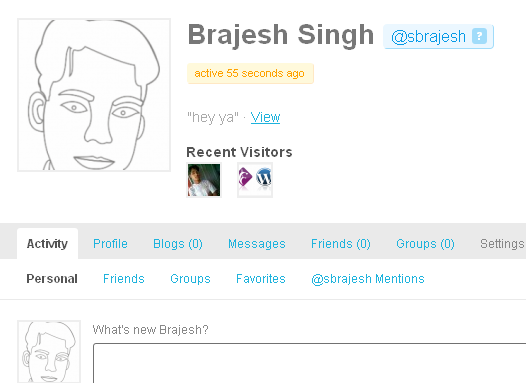
If you don't want to show your visits to other user's profile, You can disable from the settings->Recent Visitors options as shown below
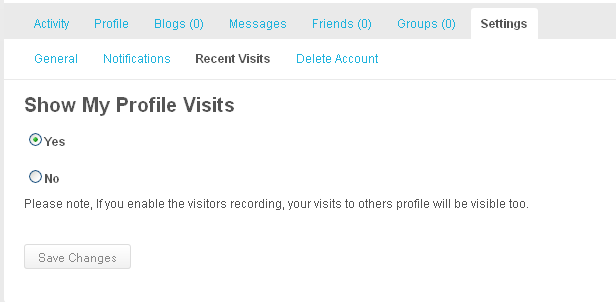 Please note, if you turn off the profile visits, It will not show you who visited your profile. I just wanted to make it fair enough, so it is mutual. If you want to see who visited your profile, keep the settings on. Once you turn the settings off, It will not record any data for you.
The settings are user specific.
How to Install
1. Download the plugin from here https://buddydev.com/plugins/recent-visitors-for-buddypress-profile/
2. Unzip recent-visitor-for-bp.zip
3. Upload recent-visitor-for-bp folder to wp-content/plugins
4. Go to Dashboard->Plugins->Installed and activate "Bp Recent Profile Visitors"
5. Let the plugin do its magic.
Alternatively, you can use Dashboard->Plugins->Add New, click on the upload tab and browse this zip file, upload and click activate, you are done.
How to Use
If you are using BuddyPress 1.2 default theme or the BuddyPress child theme for bp-default, The recent visitors are automatically displayed at the profile using the action hook "bp_after_member_header", otherwise, you can always call
1 | visitors_show_my_recent_visitor(); |
It will list the most recent 5 visitors
Code snippets:-
Some example codes
1 2 3 4 5 6 7 8 9 | // if you do not provide user id, it will show that for displayed user. $total_unique_visitors = visitors_get_unique_visitors_count( $user_id ); // this returns total profile visits, which includes multiple visits by same user. $total_profile_visit = visitors_get_profile_visit_count( $user_id ); // Get the $n most recent visitor of $user_id // returns array of users, manipulate them as you wish. $users = visitors_get_recent_visitors( $user_id = null, $count = 5 ); |
Hope you will like it 🙂 Looking forward to hear more for the enhancement.
NOTE: This is a premium plugin and only available to buddydev premium members.
Cool one, Brajesh.
Btw, Stealth Mode for Admin must be "off" or else Admin's visit won't be recorded, as I found out 🙂
Thanks.
Thanks for the comment Mercime.
This plugin does not take into account the stealth mode. Should I make it compatible with stealth mode for admin.
Looking forward to your views.
It has its own settings page, under settings for enabling/disbling recording. By default, the visit recording is enabled.
Thanks
Brajesh
10-4 Brajesh. I didn't clear cache/cookies before logging in again as different user 🙂
Very nice Brajesh!
One problem though: although recent visitors' avatars do show where they should, the Recent Visitors Options don't show in Profile Settings.
Any ideas?
That was an expected issue. The problem is Buddypress does not provides any hook to add the settings on general settings page, And I don't want to add the settings to notification page, as These can not be considered as notification.
So, I tried to add the new settings page, which works, but depends on the loading order of plugins. If Buddypress loads earlier, It works, otherwise it does not.
try to deactivate the plugin and rename it to something like "xyz visitor", that will delay its load and will make it work.
I will post a question in IRC/buddypress forum to get Andy's/JJJ's view/solution on this.
@Brajesh
Sadly, that didn't work. I'll wait… this isn't something that I consider essential, like Gallery! Thanks for all your hard work on that, by the way!
Hi Brajesh
do I get that right, that it only shows to the owner of the profile, but not any visitor?
Second question: I shortly did a german translation for it. I named the file recent-visitor-for-bp-de_DE.po and put it in the folder. It doesn't work.
I don't have any experience creating language-files… Where do I have to put the file and how does it need to be named?
Thanks…
Ps: Cool addition…
hi Michael
Thanks for the comment. The initial release is not localized. will be localizing tomorrow 🙂
Another question: Would it be possible, to deactivate the settings-page altogether. I think it is not necessary and just one option more for the confused normal visitor. If you could make it optional or just hand me, how to hack the code 🙂
Yes, settings page can be easily de activated.
Just comment two lines
 add_action( 'wp', 'bp_visitors_setup_nav', 2 );
 add_action( 'admin_menu', 'bp_visitors_setup_nav', 2 );
I.e. line 30 and 31.
works great -thanks! 🙂
Hi,
does it runs with the single WP?
Thanks
Helge
hi Helge
Yes, It will work with single wp+bp 1.2+. If you are using default theme, It will show up automatically on profile page(obviously after someone visits your profile after activatinbg this plugin).
If you are not using the default theme, please take a look at the post, you may have to put a function in your themes profile page.
Do you think this could be modified to work with posts? Posts' Recent Visitors? If so what could be done you think. thanx
yes, what about other bp components like groups , maybe even forums & a sitewide blogs widget- latest visitors ,maybe even specific post/page visitors like Navo mentioned , almost feels like the next step could be filtering users based on same topic visits , same group visits ,ect…. a visual interpretation of avatars/users having something in common but this is just me thinking so it needs to resonate and i may be completely off .
it sounds interesting to me , lets see if i feel the same after my first cup of coffee,lol great work Rajish !
"…a visual interpretation of avatars/users having something in common" that's exactly it. it makes perfect sense… 🙂 with a post i guess the same effect could be done simply by taking comments avatars and displaying them by user photo grid but it wouldn't include members who don't comment.
Well, I think We need a versatile component.
Implementing for next release 🙂 Will allow you to hopefully track everything, but will that be good, I dunno 😀
hey we can go very,very far with something like this but later … Here is just an example to how far we can go but later (unless Rajish askes me to get involved ).
I am obviusly talking 3.0 semantics widget/plug that generates avatars/topics of members friends who match up to visitors interests and this would be the easy part that my team will modd ourselves if we need to do it .
The more interesting part (also not hard at all) would be using an api i know that will not only give visitors matching members based on internal community meta but will show a visiting user membersof community who match up to that users External meta – based on keywords they used when serching around or even meta from websites they came from , the results are based on fresh super relative action based external meta users bring with them from interacting on the way to our community data.
There is such an option already available , we can all use in our projects but this is something that would have to be discussed in another post or a more appropriate place and Rajish if you need any details on such things, u know where to find me so now lets get back to BEGINNING:
for now i think we should suggest things that could be implemented in the next upgrade…
think towards providing this option for other bp components not just the profile..
I would be interested in being able to see who last visited a specific group or specific blog or forum thread, this would be more then just useful to many and my current project where i could test and display some extra mods we my add ourselves, who knows .. Lets rock this thing out !
ps. im starting to take an hour or two for play time per day and will start devoting much more to such developments , its just a joy to be part of this,
thanx Rajish i finally got a Premium/Pro account with you yesterday based on your original direction which i mentioned months ago, remember !
hi Robert
Thanks for the comment. Yeh, I guess, The first idea needs a better place(May I suggest, we may discuss that in forum :))
For the second, making the functionality available to each of the component, yes, that is what In my plan for the next update. Just thinking about the flexibility we want to provide siteadmin/group admins and users to opt in/out of such thing.
It is going to come soon. 🙂
btw, thanks for joining BuddyDev, I hope you would like the plugins available and look forward to assist you more in your projects 🙂
Hi Brajesh,
I am premium member, this plugin is really good, working fine.
I have small problem, in my theme at member header, it dispalys like
————————————————–
Recent Visitors
[img]
————————————————–
as in my memb-header is wide, it looks like heading and img have no relationsship!!,. so I want to display like
————————————————–
Recent Visitors
[img]
————————————————–
I guess I have to change in below code, but am not good at php coding, I can`t change css settings of my theme..
if(empty($recent_visitors))
return;//if no visists yest, do not show at all
$output="
Recent Visitors";
foreach($recent_visitors as $visitor){
$output.=visitors_build_visitor_html($visitor);
}
plz tell me how can i modify, without distrubing my theme settings, may be have to add seperate settings than h5..
Thanks
Praveen
http://www.techflourish.com
In above comment Heading "Recent Visitors" displays at the center of member-header,
but i want to display at the left-hand side…
plz check at
http://techflourish.com/mem_header_display.jpg
Thanks
Praveen
hi Praveen
Thanks for the comment. Just checked your screenshot.
It is most probably a css issue. Is it easy for you to change the css?
Since you mentioned, you have issues with PHP, php editing will not be required if you can change css.
Please check using firebug, and try to put something like
.recent-visitors h5{text-align:left;}
That should do it.
If it does not work, please point me to the live installation(or PM me if the site is private) and I will post the css for doing that.
Hi Brajesh,
Thanks a lot for your support, If you tell me where exactly I have to add, i can do it,. or give me ur email-id where i can send my theme css files, or do u need ftp login to my site?
regards
praveen
[email protected]
Praveen
It should be added to the css file(hopefully style.css) of your theme.
Just sent you a mail. Please send me the theme, I will edit and send you back in minutes 🙂
Thanks
Brajesh
Hi Brajesh,
– is this Plugin compatible with WP 3.0 and BP 1.2.4.1 ?
– is this Plugin working when ACtivity-Stream is disabled ? ( I just have Groups and Forums at my website).
Many thanks,
hi Erich73
Thanks for the comment. Have not tested with a new install of wp3.0 but there are no reasons why it should not work and it has nothing to do with activity stream.
Let me check it now, will post back in 15 minutes.
Thanks
Brajesh
Just checked now. yes, It works with wp 3.0/wpms 3.0 and it has no effect whether you have other components disabled/enabled.
Hi, I'm using this plugin and it's working. However I created a widget to call visitors_show_my_recent_visitor($user_id); in my sidebar, but it displays visitors for current profile being viewed when I want to view my visitors only. Am I doing something wrong?
It will not work.
visitors_show_my_recent_visitor();
does not take any argument and work for displayed user only.
Though you can use visitors_get_recent_visitors($user_id,$num) and then iterate over the return array to show the list of the visitors, It is in no way elegant.
I will be providing another function in the API to allow you do this. The update should come by 10th July.
I had another question, is there a simple way to display more than 5 recent visitors? Thanks.
Currently you will have to manually change it in the code of visitors_show_my_recent_visitor where we are calling visitors_get_recent_visitors, I am modifying it and it will be easy to do in next version.
Awesome tip! and it totally works!
We changed it to 25 last visitors – and our users LOVE it.
Thanks again for the most excellent work!
From Dallas,
Cooper
i Brajesh,
Can we have this as a widget? I would like to see the users who visited my profile in the sidebar, since header is getting cluttered.
Also when i visit some other users profile I should not be able to see who visited their profile or my profile visitors either.
thanks.
hello. i want to ask how to make this plugin working with bp mag theme. and i realy don't know where should i add the code and what is the code.
Hi Pei Lee,
It already works with bpmag/bpmag dependent child themes. Just make sure to have 2 accounts to check it working.
Tried it with 2 accounts but it still doesn't appear where it should.
The version of buddypress of my site is 1.2.8.
Is this turned on for each member by default? If not is there a way I could have it turned on for all members?
Also how can this be set to allow everyone to see it on members profile pages? Right now it seems to only be visible to the member when viewing their profile page.
Putting this in your theme's functions.php will make the profile visitor available to everyone.
https://gist.github.com/1121663
But do you think it is a good idea ? Won't it be playing with privacy of a user ?
Perhaps but some are no concerned, perhaps a toggle in the settings?
Hi Reboot,
Yes, It is turned on By default.
Singh, love you plugins!
And now I also found this!
I want to add them to a widget instead of below the profile.
You mention in one of your posts you will release an API..can I add the plugin to a widget now or?
My plan is to make it work with the Achievement plugin, so my users can "unlock" this feature when they reach a certain score.
This might be more advanced, but If I can have them shown in a widget to start with that would be a great start.
Any direction or tip would be MUCH appreciated :o)
Keep up the good work!
Kind Regards Dan
Hi Dan,
sorry i could not reply to you earlier.
Please let me know if you are still interested in the iidea of widget? I will put it for you.
Hi, i just installed the plugin, the options in the settings are displayed, but i am not using the default buddypress theme, and i was wondering if that is why i cant se any visitors?
any tips?
regards Chris
Same here @sbrajesh I pm'd you about this with access details.
Hi, thank you so much for this amazing plugin.
I would like to add some Xfields information next to the Small Avatars (such as Company or Country). I tried with bp_member_profile_data( 'field=XXX' ); but I failed…
Is there any mean to add this info ?
Best regards,
Paul
@brajesh – i want to send out weekly emails to users with list of profile visits. How can I do that?
thanks
Don't work width buddypress 1.7
Hi Carlo,
Thank you for reporting the issue. We are working on it and will provide you the update tomorrow.
Hello, there are news about this problem? thank you
Hi Carlo,
Please download version 1.1.3.
It works with BuddyPress 1.7+
My premium membership has expired, I need to activate it again to download this update?
Thank you
Hi Carlo,
It was delayed on our end, so you don't need to upgrade. I have updated your membership and you can download the plugins for next 2 days. Hope that helps.
Regards
Brajesh
nice plugin…working sir;;….thanks
Thank you for the comment Pravesh.
hello sir … need little help in bp magic t heme ma i know what time u ll come online please
Hi ! 🙂
To begin, the Plugin works (Thanks!). But with a small exception. Only if i place the first short code, see to begin the post. The second long code doesnt work.
1. I would like to limit the recent visitors – how can i do that ?
2. And i would like to add a extra template for example: gallery.php and insert the last recent 5 visitors.
Have someone an Idee =?
I solved to limit the recent visitors.
In Plugin : Linie : 372 : with get
$recent_visitors=visitors_get_recent_visitors($user_id=null,$count=5)
In member-header : with : show
visitors_show_my_recent_visitor();
But to display this in other tempalte, I have no Idee.
In this item I am thankful for a solution.
Hi,
Here is some example code which you can use to list recent visitors for logged in user anywhere
https://buddydev.com/snippets/762-custom-listing-of-recent-visitors/
Hope that helps. If you need more help, please do open a topic in the support forum.
Thanks
Brajesh
Thanks!
Can the recent visitor plugin be made to email the profile owner when his profile is visited as well?
Thanks,
Rogelio
Hello, I've paid for membership twice and it's has expired already, how I can update my plugin?
Thank you
How to display the profile visitor count. i have user login and registration, they can post the questions and answers, i want to add the functionality that how many users have visited my profile.
Hi Naveenbos,
Here is the code snippet.
https://buddydev.com/snippets/tag/recent-visitors/
Thanks.
having trouble with this plugin on latest bp version. The db table is not getting installed. Anything needs to be changed?
Hi Gwu,
My apologies for not replying. In March, we were going through many updates and could not see the comment. If you have any issue, please do not hesitate to ping me any time now.
Thank you
Brajesh
Hello, before I wanted to ask some ocmprarlo functions, meets and see if I can be interested in:
– Visits only sees the profile owner or publicly?
– Used counter, or avatars of the profiles that have visited that profile appear?
that's all, thank you very much
Hi David,
Thank you for asking.
1. Visits are only visible to the profile owners at the moment. If you need it to be publicly visible, please do let me know. It is easy to do so.
2. Currently it shows the avatar of the visitors. Again, there are filters to modify the look.
3. After version 1.2, you can even enable it as a component in BuddyPress profile and use shortcode to list the visitors for any user. Please check the plugin page for more details(I have updated the page today).
HI
1. what .php file can we put in the codes ?
2.
-About when a user had look in a other users profil and suddenly wanted to change it to no.
I thing I have founded a bug… when user Recent Visitors Settings
Show My Profile Visits to No. It still shows that he/she had look into a other users profil.
In my world and experience in other places in the last neely 14 years usering social pages. It would be logical that it will hides all automatically on other user pages. When user change it to no. Even though they have looked before.
3.
It will be a good idea to, if admin also can see who had look in users profil.
4. How come that when the admin look at a other users profil.. they can`t she that he/her had look into the useres profil. Even though it is set on to show.
The code can be put in bp-custom.php (If it is not present, create on inside your plugins directory).
2. It will keep the old records but won't record new visits after changing the option to no.
3. That is a good Idea and I will think about implementing it in future.
4. Not sure what you mean by that. It should always show the list if someone has visited the profile and the settings are turned on.
Hi
I have found a error on the plugin.
http://imgur.com/sQkbM4Q
Thank you for reporting. That is not an error. It is related to the theme css. You will need to add some custom css for your theme to make it look better.
I will buy this plugin,but i have some questions:
With the shortcode if posibble create a new page with the name “Visitors” and should appear there the last visits, right?
Is posible that this plugin show a small counter like the message notifications?
Is possible hide the option to active or no the options of visit to the user? just available for admin
I already
Hi Alberto,
Thank you for your interest in the plugin.
1. The shortcode will show recent visitors for a particular user if you specify the user parameter otherwise it will show the recent visitors for the logged in user.
2. No, currently there is no setting for admin but that can be done with a small snippet of code.
Hope that helps.
Is it possible to use this plugin as a widget? I know that I can set up a new page with this plug in, but I would like to set up a widget so that I can add it to my sidebar.
Is that possible?
Thanks
Hello
Can we display only for wordpress roles?
Thanks
Hi Herve,
With a few lines of code, it can be restricted. Please post in our forum with the roles you want it to be enabled/disabled and we will post a quick snippet.
Thank you
Brajesh
Hi there, awesome job on the plugin. I would also love to see a ORDER BY filter with 'Most Visited' and 'Least Visited' and I am trying to put an ASC / DESC filter in the loop myself using the bp_pre_user_query action.
I'm stuck on how to use the visitors_get_visit_count( $user_id );inside the Member Directory filter, and this seems to be due to my approach of using SQL queries, like so:
function add_most_visited_member_sortby_filter() {
?>
Most Visited
prefix . "bp_xprofile_data WHERE field_id = " . $field_id . "AND value = 'artiest' OR value = 'spreker' OR value = 'techneut' OR value = 'organisator' OR value = 'locatiebeheerder'";
else
return ";
if ( $field_value != " )
$query .= " AND value LIKE '%" . $field_value . "%'";
/*
LIKE is slow. If you're sure the value has not been serialized, you can do this:
$query .= " AND value = '" . $field_value . "'";
*/
$custom_ids = $wpdb->get_col( $query );
if ( !empty( $custom_ids ) ) {
// convert the array to a csv string
$custom_ids_str = 'include=' . implode(",", $custom_ids);
return $custom_ids_str;
}
else
return ";
$count = visitors_get_visit_count($object['uid_name']);
}
add_action( 'bp_pre_user_query', 'my_custom_ids' );
Would appreciate it very much if someone would share their insight. Does anyone has an idea of where to make changes?
Hi Johan,
Thank you.
That is a genuinely good suggestion. Will love to have in the plugin soon.
It seems you code cut off in the comment, can you please open a topic on the forum? we will love to assist you on this.
Thank you
Brajesh
Hello – Can I also return all public visits to a users profile. I'd like to display all public visitor (not logged in) AND member/user visits as 2 separate figures for the user.
Hi Leland,
No. The plugin only deals with members visits to other members profile. Public/non logged in visits are not tracked.
I understand,
Do you recommend a smart way to make allowances of inbound visits with a query string of user_id? We want to track inbound visitors (who are users) from email campaigns. Some will log in but some won't. The inbound link would be something like this:
mysite.com/members/mysusername/profile/?member_id=4
This case would record a visit from member with id 4 even if not logged in. I see visit recording happens in the bp_visitors_record_visit() function. I assume I just need to build a case for inbound query string condition to bypass the user logged logic?
I was able to accomplish this to log traffic from a query variable for user_ids. It was just a simple conditional check added to your above function. Easy.
Great job doing it 🙂
Hi,
I am interested in purchasing your plugin, please can you tell me if the following is possible:
1) I would like to have a user's visitors displayed on a separate page, with the layout of the user profiles matching that of the theme (in my case with 'message user' button underneath).
2) The most recent visitor is shown first.
3) I also want a counter to display next to the Visitors menu icon, similar to that on the Notifications feature, which shows how many people have viewed the user's profile, and resets to zero once the user has clicked on the link and viewed his/her Visitors page.
Many thanks,
Michael
Hi Michael,
Thank you for the comment and interest in the plugin.
The functionality you are looking for is more like a profile embed shortcode with support for recent visited functionalities.
I am sorry, The plugin does not provide this out of the box.
Regards
Brajesh