BuddyPress Sitewide Activity Widget for BuddyPress 1.2 and above
Today, I am glad to introduce the new, reworked and rewritten version of BuddyPress Sitewide Activity Widget. BuddyPress 1.2 had dropped it and some of you may remember, I had put a port of it for Cosmic Buddy Theme for buddypress 1.2
I am on the verge of releasing our very awesome theme BP Mag in just a matter of hours/days and so I was working for a few new widgets while Chris pointed me about this one.
I reworked on the Widget, re wrote it for BuddyPress 1.2 and here it is for you.
What It does
The BuddyPress Sitewide Activity Widget brings back the sitewide activity widget for you. You can now show the activities as a widget.
Screenshots
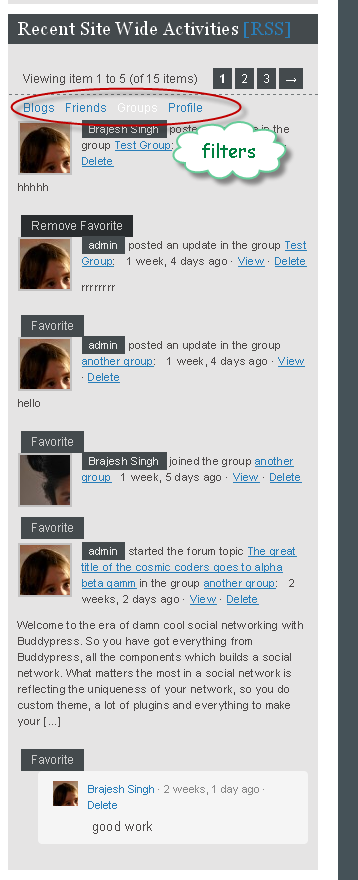
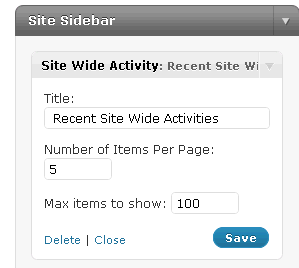
and Here is the widget settings
Installation
- Download the file from here https://buddydev.com/plugins/buddypress-sitewide-activity-widget/
- Unzip it
- Upload
bp-swa-widgetdirectory to your/wp-content/pluginsdirectory - Login to wordpress admin.
- Go to Dashboard->Plugins->Installed
- Enable the plugin "Buddypress Sitewide Activity widget", Activate the plugin sitewide if you want to use it sitewide.
- Go to Appearance->Widgets and add the "Sitewide Activity Widget" to your theme.
- Get a cup of coffee and test the Plugin 😀
Alternatively, you can install the plugin by using the plugin browser.
Note:-
The plugin does not ship with css file. It will take the css from your theme if you have the standard naming for the activity elements.
You my need to modify few things in your css though for making the layout of activity filters horizontal
1 2 3 4 | #activity-filter-links li { float: left; padding: 5px; } |
Yes, It is ajaxified for paged loading for activity and paging understands the current filter.
Download:
https://buddydev.com/plugins/buddypress-sitewide-activity-widget/
More
Now it's time for you to test the plugin and leave your awesome comments here 🙂
Keep yourself tuned for our upcoming 3-4 more plugins this weekend.
And yes, do not forget to let me know the improvements you want in this plugin.
Thanks Brajesh. Didn't expect this new plugin today … a pleasant surprise 🙂 Have a great weekend.
Thanks for the comment Mercime. Have a nice weekend:)
Brajesh,
Is there a way to tweak this so it just show the activity stream with NO filter?
Plugin works great…but for some reason I've got too many darn filters.
I'll move this over to the Forums. Thanks Brajesh!
yes, why not 🙂
Put this line in bp-custom.php or your theme's functions.php and It will remove the filters.
 add_filter("bp_get_activity_filter_links","i_dont_want_filters");
 function i_dont_want_filters($links){
 return "";
 }
That should mute the filters.
Two last issues…
When the member's avatars are small (representing less-important activities in the activity stream?), the width of the entry gets compressed and it doesn't display properly.
Also, it might be nice to be able to give the widget a different title.
This is awesome Brajesh…I lot of people have been asking for an activity stream widget.
hi Greg, I think, you can change the title of the widget.
For second, If the you are using bp-default, then you will see the entries will not look stretched, If you are using other theme, then It may be. It is all dependent on the theme's css.
I tried this out last night and the CSS was killing me.
Avatars were set to 50×50 in most cases, and when I tried the CSS override to hide them, display:none didn't work. I'm not fantastic at CSS, but I know I'm not THAT bad. If I went in and hacked the plugin to remove the avatars, it doesn't move the text to the left, it stays indented.
The kicker was that if I put the CSS in my style.css it doesn't work, but if I put it in _inc/css/default.css it does.
This is a GREAT idea, and I really want it to work 🙂
Oh, I'd add in an ajax spinning ball or something to say that it's working when you click on a nav menu link. Otherwise it looks like nothing's going on!
Thanks for the comment Ipstenu
I replied to your post on bp.org.
The css is not loaded by this plugin, so It will depened on your theme/your way of adding css.
Thanks for the suggestion of a loading box. I will add it in the next update.Further, I will make an option in next version to allow whether to show the avatars or not. So that It will be super easy to hide avatars.
i missed this widget and here you are bringing it back to life, thanks very much for your efforts
consider me big fan from now
hehe thanks for the comment. 🙂
just great Brajish , i told you when i met you a while back that i like your direction with bp because just as i need some sort of a solution to fill a crack, somehow you read my mind and the next thing i know its out !!
hi Robert
Thanks for the comment 🙂 haha I am glad you liked it 🙂
Since I was using WP Single, I couldn't use the site wide activity widget
But now, I can.
Thank you very much.
A few requests:
How can I edit the template? By CSS or editing php source?
And I would like to show only wire activities, not replies or posts.
How could I do that?
Thanks from South Korea!
hi J Kim
Thanks for the comment.
seems I overlooked your comment, sorry for that.
yes, you can edit the css. Please check using firebug and just modify the css as you want.
For showing wire activity only, just modify the php file and change the line 36 from
bp_swa_list_activities($instance['per_page'],1,null,$instance['max_items'] );
to
bp_swa_list_activities($instance['per_page'],1,"wire",$instance['max_items'] );
Where wire is the name of component, you may change that to activity or other component.
Soooooo nice 🙂
Hi Brajesh,
I'm not a fan of widgets. Can we edit a theme and put a code?
BTW, after integrating bp-gallery, site-wide activity plugin doesn't look good with lots of photo and video galleries on sidebar 🙂
haha, yeh I agree 🙂
@buddydev Thanks for the working on the Buddypress Sitewide Activity Widget. I'm working on a new site, and widget seems to work well with in the left column of the BP Columns theme.
We're not yet in production … but maybe we will be by the time you formally release the widget.
Thanks for the comment David.
Sure, looking forward to it 🙂
Love the widgetized stream! I think I posted on Andy's page somewhere for a request to this, so thank you for putting in the time to release this to the public =D One question/feature request (if you take any)… is there any way to incorporate the "What's New?" status box into the widget, as well?
hi Mike
Thanks for the comment.
Yes, It can be. I will put a version within next week(just avoided earlier for saving screen space).
Sorry, one more question! I'm using this plugin on WP3 Beta2 with the latest BP trunk, running BP Default theme v1.2.4-pre. When I click on the "reply" link, nothing happens. Just wondering if that's my installation or if you're experience the same thing.
Mike
reply Links should not show in the widget, If it is showing, It may be because of my mistake. An update with your other request is coming this weekend.
P.S:sorry for the delays, was not doing well earlier, so could not reply.
You're awesome! Will try it out once you've posted it! Thank you =)
Plugin works with my site, but it would be preferable for me if it just listed the activity without containing the text. So it'll say X commented, without listing the text of the comment.
As it is, the Activity stream takes up too much space when including all that information.
hi Henry
Thanks for the comment. I agree with you about the space. currently you can edit the function
bp_swa_list_activities() and make it happen for now. May be an option in next version can handle it better 🙂
Thanks for responding (and for the plugin). I'm not great with php – what exactly do I edit in the function?
please use html comment tag to comment from line 166 to 185, that will make it happen.
the "whats new " box will be huge as far as overall UX Rajish .
Here is just 1 example but there are many other benefits and ways to mash this in ..
e.g. people who are using a group blog plugin along with auto join group plugin will see a SPYKE in activity stream via group blogs sidebar "whats new box" .
Once the Activity stream & box are in that group blogs sidebar , the group topic will generate a HIGHER VIRAL factor to be taken further and be complimented by those very group members via stream because people joining the group would get author rights to the group blog .
the activity stream that relates to the subject at hand right there and then will provide a sticky, on target environment with its own root and people who are all after exposure.
Would you provide exposure to your own post on a blog that you are part of ?
YES ! this becomes mutually beneficial to the blog admin as well as the authors/members which is when your topic starts growing very targeted and effective legs…
Rajish, thank you for giving us a jumpstart to invent better UX- or do they call that brain food ?
hi Robert
Thanks for the comment. I am inclufding in the update coming this weekend. Thanks for emphasizing the usage in such a nice way 🙂
Looks like a great plug in, however, as with every other widget plug in that I try to use that show activity, it looks nothing like the example image when i place it on my site.
Everything is stacked on top of each other like a list instead of how it looks in your image with the text wrapped around the avatar so that the avatar and activity text are next to each other and not avatar first, with a bunch of wasted space next to it….and then the text below it.
Is there anyway to get this to display normally ?
copy the css for activity from bp-default and put it in your theme.
In next version, I will include the css with the widget. I assumed most people will use it with bp-default, so did not included the css. Sorry for that.
Thanks for the reply. I will try your suggestion. Can't wait to see the next version.
Thanks for this plugin ! it really rocks! … 🙂
Now my question, is it possible to display a certain activity filtered on first load and not all activities. For example, I want this widget by default to show Groups (or any other activity thats needs listing)
I'd really need this… thanks again and keep up the good work!
Brajesh,
How could i use sitewide activity widget for member blogs? Could you possibly use the same logic that is on Bp Profile Widget for Blogs and intergrate that into this for activty widget for blogs so members can place the activity widget with only their site activity or even an option to select all-member activity or just my own. what do you think?
I will give it a shot in the update coming this weekend. Let us hope for the best.
Hi,
thanks for a great widget. I was wondering if perhaps in a later release we could have the option of choosing which activities to display?
I would like to have group activities and then photo activities in separate sections of the page. And also the option of all activities. So multiple instances of the widget.
anyway, its great.
thanks
Sam
hi Sam
sorry I missed your comment earlier and found it today.
It is coming as a feature in the new release coming by this weekend.
Hi. Firstly, let me say this is an amazing widget….just what I was looking for.
The issue I am having (and I think someone mentioned it above) is that because this is on my homepage I want people to be able to update the stream directly from the widget (as if they had done it through the activity page).
This would basically add the box above the stream that allows users to update their status.
I really need this as my users are not doing any updates (they don't know to click on the activity tab) and therefore it looks a bit static.
If the box was there then people would start updating the stream more I reckon.
Is this something you can implement?
Thanks in advance.
Andy
hi Andy
Thanks for the comment. I am in the process of updating all the plugins.
please allow me to put an updated version of it by Monday. I will implement all of the feature mentioned in comments.
Hi Brajesh,
I am using this excellent widget on the front page of my site. However, one issue I have found is that user avatar images do not display in Internet explorer 8. Is there a way around this?
Thanks
Hi Matt
Are other avatars in activity page displaying properly ?
Hi Brajesh. Yes they display in my main activity page in IE8. Just not in the SWA widget. It seems fine with IE7, FF etc.
Hi Brajesh, I looked everywhere to find out where I would change the avatar to something smaller, but to no avail. I'm using BP with WP 3.0, the plugin works great, just want to make avatars smaller. Is there somewhere I can change the size of the avatars? I'm not a coder, just having fun with this. Thanks, rg.
Warning: implode() [function.implode]: Invalid arguments passed in /xxxx/wp-content/plugins/buddypress/bp-activity/bp-activity-templatetags.php on line 806
I have installed the plugins and it shows up this error, please help.
Thank you very much
Hi Boby,
There is a bug with Bp activity when the activity table has no entry. I will replace it with a custom function in next release. for now,. If you have created at least one activity, That error should go away.
Brajesh, were you able to get bp-activity for member blogs working? From the comments above…
Sorry for not replying earlier. But I include it as you suggested in the new widget here
https://buddydev.com/buddypress/buddypress-sitewide-activity-widget-updates
I am sorry for too much delay, but hope that helps.
Hi Brajesh,
Fantastic plugin. I woud like to use to display only activity notices. Not content (it takes a lot of space). I went in the code but didn't find any line to remove. Do you know if this can be achieved ?
Thanks
Hi Tib,
Thanks for the comment.
Please use this widget from here
https://buddydev.com/buddypress/buddypress-sitewide-activity-widget-updates
and make sure to comment out the line 472-474 for now. That will accomplish the task. I will include the option in widget to show hide content in the update coming this weekend.
Thanks
Brajesh
Hello,
Thanks for the nice plugin!
I want to display it at my homepage content area instead of sidebar. How can I do this?
Regards
Hi Jenny,
you can either widgetized the content area or you can use the php code the the_widget() as the_widget("BP_SWA_Widget",
array( 'title'=>__('Site Wide Activities','swa'),
'max_items' => 200,
'per_page' => 25,
'is_personal'=>'no',
'is_blog_admin_activity'=>'no',
'show_avatar'=>'yes',
'show_feed_link'=>'yes',
'show_post_form'=>'no',
'allow_reply'=>'no',
'show_activity_filters'=>'yes',
'included_components'=>false,
'excluded_components'=>false ))
You may change the default instance array.
or you may want to check this plugin which allows widgets to be shown using short codes
http://wordpress.org/extend/plugins/amr-shortcode-any-widget/
Thanks, Brajesh! You are a great helper!
Hi there,
Is it possible to rename one of the filters? I am using the plugin bp-like and the filter link for that activity is called "Bp-like". I would rather the filter link text to be "Likes". Any idea where I could change that?
Thanks for a great plugin!
Hi MW,
Thanks for the comment.
You can over ride the labels, but not an easy thing. There are two ways o do it.
1. using the "swa_get_activity_filter_links"
or, you can edit the bp-sitewide-activity.php and change line 266 here is the code
http://bpdev.pastebin.com/f6Ez3PPR
Hope that helps.
Is their any way to take out the link image.
This is our test site bail.mis.temple.edu
The sitewide activity is enabled in the bottom,
the link icons makes it look a little out of place..
Hi Manoj,
Try adding this css to your css file
#featured-bottom .widget ul.swa-activity-list li{background:none;}
That should remove the arrows in the list item for sitewide activity for your current theme.
Hi Brajesh,
I'm still trying to change the filter label for Bp-Like as per my comment earlier. I opened bp-sitewide-activity.php but don't even see the code that you're referencing that I need to modify. I even searched the file for $component_links but it doesn't exist? All I see that might be close is a reference to bp_activity_filter_links(). What am I missing here? Thanks for your time.
Pingback:get site wide content widgets in wordpress MU | Site build logs
Hi! I am trying to find a solution for logging all site activity (who did what when) for research purposes. I was wondering if I could easily tweak this plugin to put all activity info into a file (database).
Hey Brajesh!
So i tried to follow the advice you gave MW about taking out the BP in BP_Likes.
It seems it didn't work.
I am trying to take out the EP in EP_Event. (from eventpress)
How can I do this?
My client keeps telling me there is a 'misspelling'. haha.
I wish it were that easy.
Hey Gayatri –
I couldn't find the code that I needed to modify in the location Brajesh said, but I did find it under the buddypress plugins folder: /buddypress/bp-activity/bp-activity-templatetags.php
This is what I did to change it to Likes:
http://bpdev.pastebin.com/vtqNGdMj
Unfortunately it gets killed everytime a new buddypress comes out since we're changing core files. I'm not sure that the other way Brajesh mentioned would get around this though. I wish there was another way, but I haven't found it.
MW
Hey MW.
Thanks for the feedback.
I'm going to try that out for now.
Brajesh any ideas?!
Hey Brajesh.
Would love some feedback from you on this…
Great Brajish, this plugin works perfectly.
But i have a problem to display last activity from a grup not from all groups.
Thanks
Hey Brajesh..
Need a little help on something.
I am trying to add a border to the bottom of every activity in the site wide activity.
But i want the border to be uniform.
how can i do that?
Am making good use of this widget, but I was wondering if there is some what we can isolate blog posts and blog comments. In future releases it would be nice to be able to an two separate options for blog posts and comments in "Include only following filters"
Is there some way to do this manually? I remove the posts, but not the comments, from the SWA display because I display the blog posts in another way.
Hi Brajesh,
When viewing the SWA Widget on the homepage, it displays everyone's recent activity, which is what I want. However, when I am viewing someones profile page, the SWA Widget only displays that particular persons activity.
Is there a way to still display everyone's activity even if you are viewing someones profile page?
Pingback:wordpress plugin review and discussion. | Loadwp.com
Hi,
My blog is in French : all "special caracters" (for example, "é" ou "è") don't display correctly. Is there a way to fix it ?
Best Regards
Hi Laurent,
Are those characters appearing correctly for BuddyPress activity stream?
Yes, they are…
Tnx for the great plug-in!
Is this plugin also workin on MU?
Yes It does.
The plugin is great. That's what I need. However, is there any way I can put the widget not in the sidebar but somewhere else? Any php code kinda get_ blah blah ? 😉 Oh, and with wordpress 3.2.1 it seems you can't post from the widget form.
Sorry for that, I moved the widget. But, can I exclude any media from showing up in the stream? If users add photos or videos I want them to be visible only on their profiles not in the widget.
Hey Brajesh,
I love this plugin. Thank you for developing it. Is there a way to have a file upload so they can either upload images or videos? If your amazing plugin can be a cross between Buddypress Activity Plus and yours it would be phenomenal! But your plugin is amazing anyway.
Is there a way to make this plugin show only user logged's friends activitys only?
Thaaaaaaaaanks!!
Good Job!
Hi Brajesh,
I have installed the plugin on http://bit.ly/mpFMuN
Now I have deactivated all the filters from the widget, excluding them from the view. This is all I need for the time being.
I still have an annoying message on the widget "You have no recent Array activity "
Any idea how to deactivate this message ?
Thanks
Elena
Hi Elena
which version of this plugin you are using ?
Hi. I like the l]plugin very much but do you have solutions for two problems I have with it? 1) The favorite button doesn't work. After pressing it shows a page with message 'not found'. 2) after publishing the message it automatically rolls down the response field for the published message.
I would be really grateful if you could help me. Thanks in advance.
P.S. I'm testing the plugin on local host.
Buddypress 1.6 introduces a problem with this plugin where zero's are displayed at the bottom of the content because of the new way ajax functionality is handled.
To fix this issue add an exit(); as the last line of the function bp_swa_list_activities() in bp-sitewide-activity.php.
more information on the changes at http://bpdevel.wordpress.com/2012/05/01/ajax-changes-in-buddypress-1-6/
EDIT: put the exit(); at the bottom of swa_ajax_list_activity()
Thank you John.
II had updated this plugin on github but did not upload to this site earlier. Have done it now 🙂
How can I make it so that the widget shows a username's publicly displayed name.. some users opt to use their nicks, some their full names.
However SWA always uses the username registered with wordpress.
J
Hi Brajesh
FYI I have had to revert back to 1.1.3.3 as when I installed 1.1.4 I was getting an error message displayed just underneath the pagination.
And, is there anyway to limit the number of characters that are displayed in the notifications? I am featuring bbPress updates too and it is listing the whole post which is way too long.
Alternatively I'd be happy to remove the content all together and just go with the headings, i.e. it'd show the user name and their action (e.g they posted a forum topic) but would not show the topic detail.
Thank you.
James.
Hi James,
sorry about that. I had left an echo statement. Have fixed it in 1.1.5.
The content comes from normal buddyPress activity, so you can always filter that via 'bp_get_activity_content_body' filter.
Hi James,
The version 1.1.6 allows you to remove the activity item content completely if you want to do so.
Please upgrade to 1.1.6 and check the widget settings.
Hope that helps.
Regards
Brajesh
Thank you Brajesh, I will take a look and come back with feedback. Cheers. J.
When viewing the widget, I see this code inside of it, 'type=sitewide&max=200&page=1&per_page=25&object=activity&user_id=&primary'. There must be some syntax that's not closed properly?
Then below that code I see the normal activity that is based on my filter criteria.
Hi Rolando,
Thank you for the comment.
have fixed it in 1.1.5.
Regards
Brajesh
Perfect, thank you Brajesh. The new version is working perfectly! For the next version, do you think you can make it so that the widget is only visible by logged in users? I like to keep my sitewide activity private or at least respect the privacy of my users.
Hi Rolando,
I have just added support for hiding the actvity widget if it is enabled for logged in members only. Also, added support to hide the activity content from the widget settings.
Please update to v 1.1.6
Hope that helps.
regards
Brajesh
No worries, thanks for the update Brajesh!
J.
Awesome! It works, thank you!
Hi there
With the latest version of BP – it seems the option to show only activities from the logged in users groups has got broken?
http://test2.investoreports.com/alertscentral/your-centre/
It seems to have also broken our code on the page which had the same function.
Regards
Simon
Download link is not working
Hi Sonu,
I am sorry for the inconvenience.
Have updated the links.
Hope that helps.
Hi.
Is there a short code for this plugin that could be put on a page…like the home page for example? I would want to show it below some content on the home page, so it would take up 990 pixels wide, if possible.
thanks!
Hi Kris,
Thank you for the comment. Currently, we don't have a shortcode for that purpose. If you are using a custom theme, you can widgetize that area and use it.
Since you have asked, We will include shortcode in the next update.
Thanks
Anu