BuddyPress User Notifications Widget plugin
Hi All,
I am sure most of you are busy building the social networks on BuddyPress. Well, here I am presenting another add-on to help you a little more.
The BuddyPress notifications widget was suggested by @Reboot in the forum. There is one existing notification widget for BuddyPress but that does not allow multi-instance or some other customizations. Reboot suggested updating that widget but when I checked the code, writing a brand new version seemed a much better choice & that's why I am presenting it here today 🙂
Some features:-
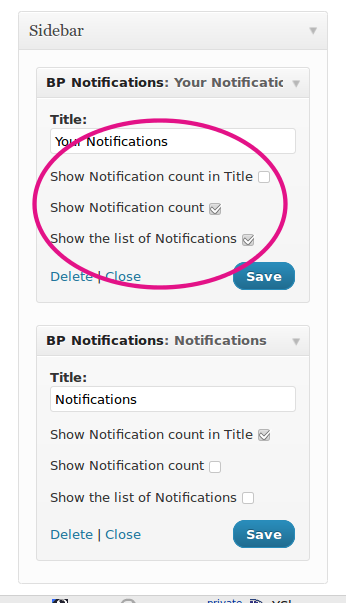
- Multi-instance means you can have as many instances as you want.
- Allows you to show/hide the notification count in the widget title
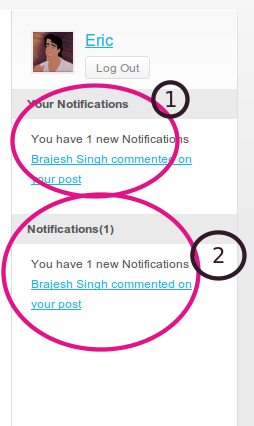
- Allows you to show/hide the message showing notification count (please see screenshots)
- Allows you to show/hide the notification list(well, I am not sure if you would like to use that anyway)
- Completely localizable, please use poedit/any other tool to translate
Let us see some screenshots
Ana an example of output(2 widget instances)
 I hope some of you will find it helpful.
Download & Installation:-
https://buddydev.com/plugins/buddypress-notifications-widget/
Git Repo:- https://github.com/sbrajesh/buddypress-notifications-widget
Please do let me know your suggestions or anything you want in the comments.
PS: Last weekend, I promised to write some of the tutorial tips/tricks for BuddyPress. So, I am going to put either one plugin each day this week or at least one tutorial. Please do keep checking 🙂
love it.
Thanks so much @sbrajesh !!! I LOVE THIS!!!
What they both said 🙂 Thank you Brajesh.
Are you gonna update the bp-live-notification code?
it doesn't detect when you mention another user, its a great plugin but I think thats essential, mentions must me detetcted like notifications!
I found this, i think it will help because is very similar to what i say.
https://buddydev.com/forums/topic/at-mention-notification
thanks , stay coding!
Are you gonna update the bp-live-notification code?
it doesn't detect when you mention another user, its a great plugin but I think thats essential, mentions must me detetcted like notifications!
I found this, i think it will help because is very similar to what i say.
buddydev (dot) com / forums / topic / at-mention-notification
thanks , stay coding!
@uhgm ,@mynameis,
That is related to BuddyPress not the live notification plugin. The live notification will show any notification recognized by buddypres. Does buddypress show the mention notification in notification bar ?
@Brajesh Singh
Nope, BP doesn't show the mention notification in the notification bar, but, i think , you can detect the mention notification, with the code i found in this web. You know?
You can detect the mention notification with the code i found in this web (go up for the link); integrate that functionality into the plugin, and show the live notifications, sorry for my horrible english, i must go to bed, im very tired lol.
thanks, sorry for the double comment.
stay coding, you do your best.
A nice little addition would be,
when hovering over the notification an option shows to clear it. Like an x icon or something so that the user doesn't have to visit every notification to clear it if they don't want to.
That is a very good idea reboot. It's must have in next upgrade 🙂
Would come in handy as I have an issue where someone commented on an activity that I did as well but the member deleted their activity and now I can't get rid of the notification.
Same problem as reboot. It conflicts with Bp photo+tags plugin someone tags me and notification always be 1. I can't delete to 0.
Hi Firat,
That is a problem with the photo tag plugin then.Please report the issue to the developer. They should remove the notification. This plugin simply displays it. Hope that helps.
plz tell me how to add Notifications Widget plugin in my wall.fm site plz tell
Hi Sana,
The wall.fm is built over oxwall and not BuddyPress. So, I am sorry but this does not applies to that software.
Hi Brajesh,
I just updated my site to BuddyPress 1.5.1 and the notification widget no longer appears in my widgets menu. Have you had any issues with BP 1.5.1 or should I be looking to find another culprit for why the widget does not appear as an option in my widgets menu.
Great plugin and thanks for your help!
Jeff
Hi Jeff,
Please upgrade to version 1.0.2 which is compatible with bp 1.5
Hope that helps.
Regards
Brajesh
Is it possible to hide the widget if there are no notifications? I would only like to have it show when there are actually new notifications.
Thanks for the suggestion Keith.
I have just updated it to as you mentioned. you can download version 1.0.4 from github and It won't show the widget if there are no notifications.
I'm making a menu of links in my account BuddyPress site header. I must also place notices of BuddyPress. I would like some code to make the notifications in the form of text, and when to travel through the mouse, the notifications appear in drop down. Would do this?
Hi Brajseh!
Is this plugin still compatible with the new BuddyPress 1.5.6? Looks like a really usefull widget! Thanks.
Hi Magnus,
Thank you for the comment. As far as I remember, It is compatible with 1.5.x series and there is no major change in bp 1.5.6 that will prevent it from working. So, I assume that it will work.
Can you please give it a try?
Hi again Brajesh!
I love the widget, it works perfectly! Super useful. I've translated it into Swedish, really easy to do. Would it be possible to add singular and plural for notifications in the widget? I'd like a different message "You have 1 new notification" or "You have 3 new notifications" for grammatic reasons if that's easy to incorporate. The widget hides nicely when there are no new notifications, super slick.
Also, I noticed in the code that the widget checks if the user is logged in. Really usefull function, however I'm using the Dynamic Widgets plugin to check if users are logged in. Should I comment out this part of the code in your widget to save an extra check and make the web page load quicker?
Thank you ,
can u make shortcode to put results to another place in my set , i dont want to be widget?
Hi there, this plugin is not working, please help me out. I also had a try on https://buddydev.com/plugins/buddypress-activity-comment-notifier/
Thanks!
Can you please be a little more specific.
The user notification widget is only visible if you have some pending notifications(for the logged in user).
Sure!
The scenario is that i have two registered users on my WordPress website. When user1 will update any post on activity page then user2 will receive a notification like we have in Facebook, but it is not working. I tried on newly installed WP site as well.
Or please suggest me a solution that i can trigger my own notifications like on some button in the wp posts, when someone clicks then it should be broadcast to everyone that userX has unlocked ABC gift.
Thanks
Hi,
here is the issue.
When a user updates something, It may not generate a notification for other users. Mostly, the notifications depend on context in BuddyPress. For example, recieving a message or @mention or a friendship request is a notification but other operations may not be.
So, The problem you are facing seems to be originating from the nature of BuddyPress notifications.
Does the gifts plugin generate a notification for other users(I understand It is generating the notification for the user who unblocked it)?
@sbrajesh
Gift is something i have placed a button in the post with an image. For example Image is Necklace and button is labeled as 'Buy or Unlock'. When a member click the button to unlock this necklace (here unlock means he have the award from Cubepoints), the Cubepoints points will be deducted… let say $100 for that necklace will be reduce and here i want the other members to be notified that "X user has Unlocked Necklace" on the BP notification bar (as on the top)
Thanks
@sbrajesh
For the clear concept, please have a look on the below details.
Website URL: http://ux.arrancr.co.uk/home/archives/381
UserID: anyone
Password: @ny)n#
Thanks!
@sbrajesh will there be a update for 1.7 buddypress soon? its not showing up at all on my website. i add the widget to side bar but nothing shows up
Hi Alex,
Thanks for reminding. I have just updated it and now it works with BuddyPress 1.7+(tested with 1.7.2). Please upgrade to version 1.0.6 and let me know if that works or not.
ultimate plugin specially for Bp magic.. but sir when B magic we use cant like post or anything…doesnt appear in theme.other wise nice plugin and theme
Hi Pravesh,
are you using the last updated version of Notification widget? Please note, the notification widget is shown with the theme only if there are some notifications available for the user.
Hi-
Unfortunately, the widget does not appear. I am running all the latest release versions of Buddypress/Wordpress (as of 7/24/13).
Thanks,
Adam
Perfect plugin for buddypress :)!
I want to ask, how to make notification for user when their article/ blog post commented. The user in my site can post/ publish an article. It would be so great if this plug in also notify the user (author) when their article/ post commented by somebody else, not only notify the activity in buddypress. Can you help me with that?
Thank you…
Hi terry,
My apologies for delayed reply. seems like a very good Idea. Do you want the author to be informed via BuddyPress Notification or with mail too?
Hey Brajesh.
Is there anyway to make notifications for
– new blog comment on post current user has written
– new reply to a blog comment current user has written
– new reply to a topic current user created in bbpress forum
– notification when someone favourites a current users blog post/forum topic/comment/reply
If these are supposed to work by default do you know why they might not work?
Would be willing to pay for these notifications to be added if necessary
Hi Andy,
I am sorry for the delayed reply.
Currently BuddyPress does not support these notifications natively. To have it supported, we will need to manage these notifications via another plugin or code. I will give it a try next week.
Thanks
Brajesh
I was actually going to request a plugin to do this as well! That would be great!
Widget is not showing up…using bp 1.8
Hi there
Is there a way to force the widget to display, even if there aren't any notifications. I see, from reading the comments, that you made the widget hide when there aren't any notifications. Personally, I would like to see the avatar, name, the logout button and the fact that there are no notifications.
This would then be the perfect widget for my site (as hovering over the WP menu bar does nothing and I can't figure out what is wrong with my theme)
Thanks 🙂
Plugin is not working with :-
WordPress 3.7.1
BuddyPress 1.8.1
Any help would be appreciated.
Hey Brajesh … same for myself as Malik … the plugin isn't showing up in BP1.8 🙂 Could you fixy fix for us please?
Hi Brajesh,
Thank you for this great plugin. Just to let you know that there are a few problems with it when I have been testing it with 1.9 the word 'array' is being printed in the widget like this:
Notifications(1)
You have 1 new Notifications Array
[x] Clear All Notifications
Thanks again for a great plugin!
Fixed in the latest reply. My apologies for the delayed reply.
Cool plugin idea but the widget doesn't appear to be showing up with BP 1.9!
It isn't popping up at all when a user is mentioned or private messaged.
Version 1.0.7 totally broke my widgets – I got a completely blank widgets column. I'm running BP 1.7.3 and WP 3.5.2. Reverting to 1.0.6 rectified this issue.
Okay, I found the PHP error for this:
PHP Fatal error: Call to undefined function bp_notifications_get_notifications_for_user() in [URL REMOVED]/wp-content/plugins/buddypress-notifications-widget/notifications-widget.php on line 52
Hi Lee,
I have pushed version 1.1 to WordPress.org repo which adds back compatibility with older versions.
That will fix all the issues caused by 1.0.9. Hope that helps.
Hello and Happy Holidays! I am very pleased by your plugin and I congratulate you for it.
However, please help me with a very small – but annoying – issue:
the notification text lacks space after comma, thing that leads to a very long character phrase, thus ruining the aspect of it in the sidebar (text is overlapping design – and itself, if there are more than 1 notif-. I just need indications on what file of the plugin must I edit to put a space after the comma?
Please see a picture here: http://i.imgur.com/J5w4AY7.png
Thank you!
Hi,
thanks for the awesome plugin!
Is there any option to include the notification widget/ part of it into the theme file with a php code?
Greetings,
Basti
Hi Basti,
You may want to check this function.
https://codex.wordpress.org/Function_Reference/the_widget
It allows you to call any widget with their class name in the php code.
As of Including the notification widget code inside the theme, I will advise to look at TGM Activation plugin( Much better option to manage dependency) or the last resort(Not recommended), Include plugin inside your theme and do a require_once on the main file in your functions.php.
First, thanks for that great plugin – really enhances my plattform.
I use this code snippet
https://gist.github.com/imath/5a3c4ac645ec765863f2
to add BuddyPress auto suggest mention feature in bbPress forum.
Could you add support to show up notifications also in your plugin?
https://wordpress.org/plugins/buddypress-notifications-widget/
Would be awesome!!
Looking forward for an answer
Hi Basti,
I am sorry for the delayed reply.
Is new forum mentions generating a BuddyPress notification? This plugin only lists the notifications and does not create any. So, If bbPress is generating notifications, that will be listed, else it won't be.
Sorry about that.
Hi,
thank you for your answer!
"Is new forum mentions generating a BuddyPress notification?"
I don't know what it do exactly but the mention in bbpress is shown up in the activity stream of the profil and it will be send an email by buddypress.
Any suggestions?
I will test it again and post the status here soon.
Hi there,
I have an issue with the BBpress live notification widget…it is being hidden under my superfly menu at my website.
Is there a way to move the pop up to the right-hand side of the page, rather than appearing in the bottom-left of the page?
Thanks for the plugin!
Just posting the followup here
https://buddydev.com/support/forums/topic/buddypress-live-notification-pop-up-issue/
Hi Brajesh,
after updating buddypress from 2.5.3 to 2.6.0 your widget displays "array" instead of "a notification for a new message".
Answers in the forums still seems to work
An update / fix would be awesome! 🙂
Greetings,
Basti
Hi Basti,
Thank you for reporting the issue. It is fixed now. Please update to 1.1.2 and it will work as expected.
Thank you
Brajesh
Hi Brajesh,
as always, thanks for fast reply and super fast update.
Awesome!
Hi Brajesh, I am sorry to say the plugin does not seem to work. WP 4.7.3 and BP 2.8.2.
Suggestion:
I think it would be a nice idea to have the option to display the widget also when 0 notifications are to be mentioned. That way it would be easier to check the widget to be working; I don't see the downside of it.
Hi McCage,
Thank you for the comment. I am testing it and will reply back in couple o hours.
There is no harm in adding the option to keep the widget visible even when there is no notification.
I will add an option for that today. Thank you for the suggestion.
regards
Brajesh
Hi,
I have pushed a release on wp.org. Please upgrade and check. I have also added the option to allow listing the empty widget.
Thank you
Brajesh
Please need help I traslate this plugin but keep showing in English, is the only one that do this. I put translated po and mo in buddypress-notifications-widget/languages/bp-notifications-widget-es_ES.mo (po)
Hi Mauricio,
Please name the translated file "buddypress-notifications-wdget-es_ES.mo" and put it in wp-content/languages/plugin/ directory. This is the best place for future safety.
Alternatively you can put it in the plugins /languages directory too(but with the updated name).