Introducing BuddyBlog: Allow Users to blog from their BuddyPress Profile
Today, I am glad to finally introduce the BuddyBlog plugin. Currently, it is in basic phase and allows users of BuddyPress to blog, manage posts from their profile.
The basic functionality that it allows at the moment is:-
Basic Functionality:-
- Creating New Post
- Editing existing Post
- Deleting Posts
- Publishing Post
- unpublishing post(moving to the draft status)
The current plugin supports following things:-
Features:-
- Categories association to post
- Tags association to post
- Upload(can be limited , how many) on the post screen
Limitations:-
- It is the initial release, so there may be some surprises(I am hoping there are none)
- New categories/tags can not be created from front end(A limitation of simple front end post)
Dependency:-
- BuddyPress 1.6+(I have tested it with BuddyPress 1.7 beta and It works)
- BP Simple Front End post plugin version 1.1+
This plugin allows users to create/manage posts from profile.
Here are a couple of screenshots to show the usage:-
Screenshots:-
Post Lists on Profile:-
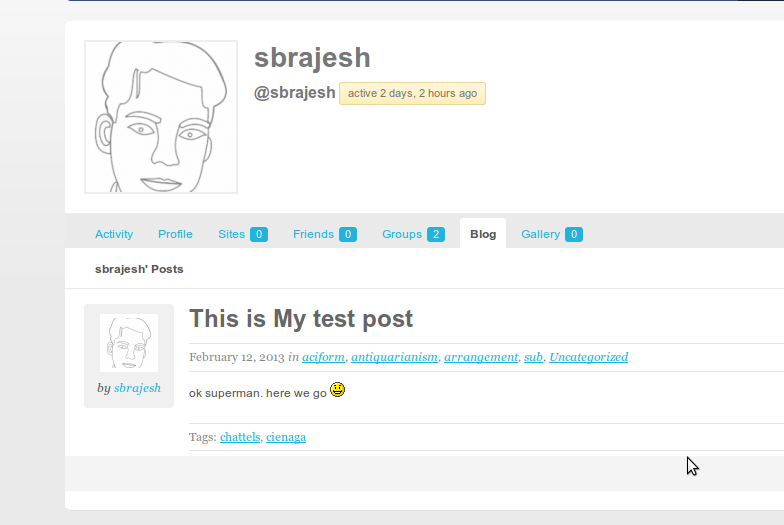
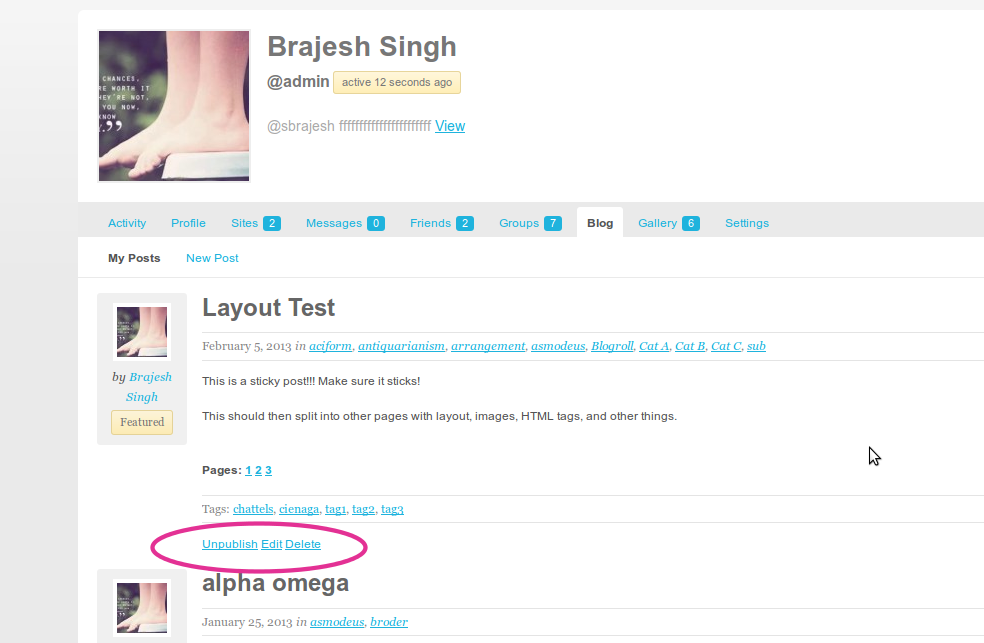
when the user is logged in:-
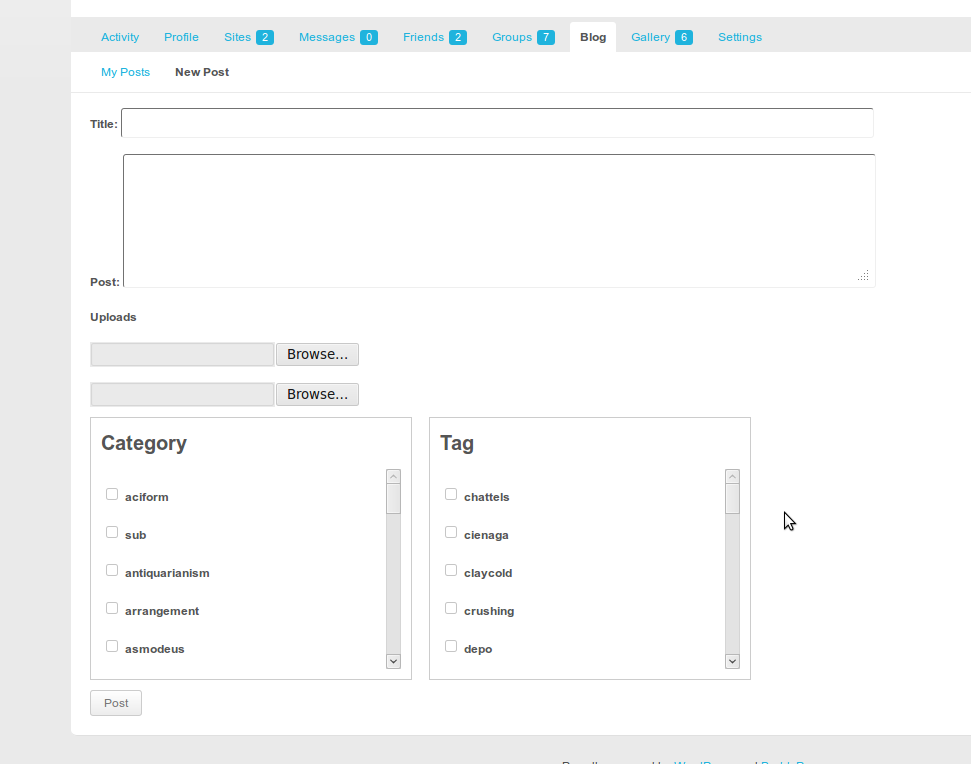
Creating New Post:-
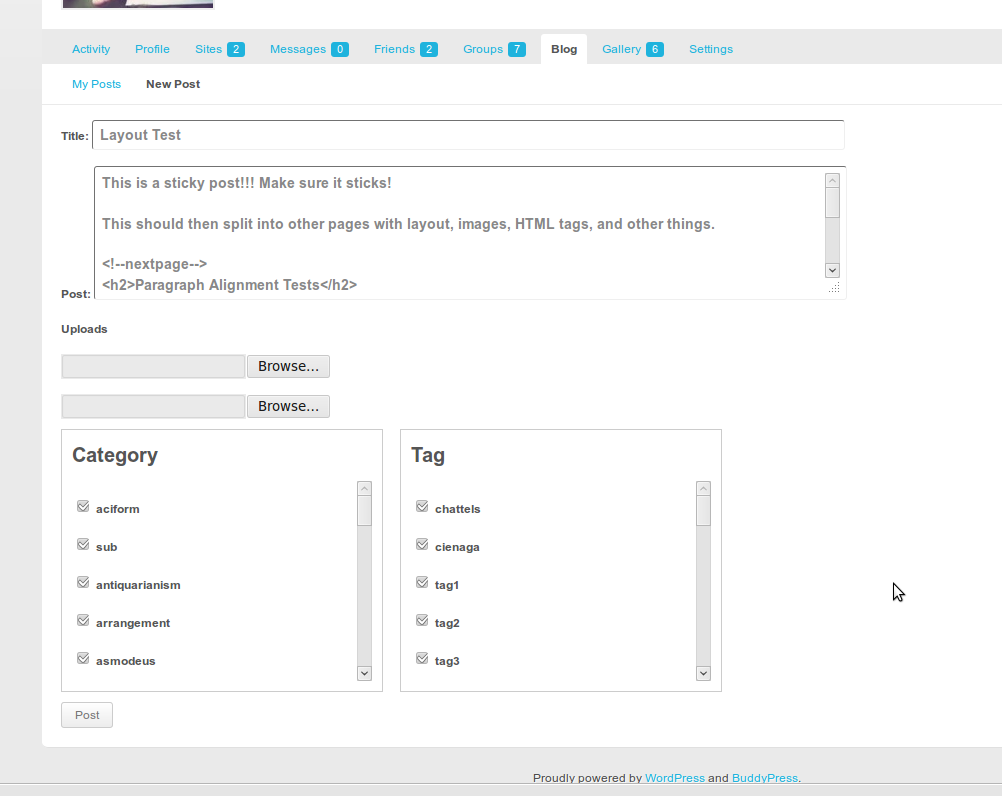
Editing Post:-
Currently, the best way to use it is having a community blog where everyone can post/edit their own post. The posts are listed as normal post on your blog.
You can use this plugin for custom post type too.
If you want to use it for custom post type, you will need to tell the plugin about this using following code.
Using with Custom Post type:-
1 2 3 4 5 6 7 8 | function buddyblog_my_post_type( $post_type ) { // it can be say 'events' or 'movies' or anything, // just make sure you have already registered the post type. return 'custom_post_type'; } add_filter( 'buddyblog_get_post_type', 'buddyblog_my_post_type' ); |
Also, if you are using custom taxonomy associated with the post type, you can tell buddyblog about it to output the custom taxonomy list(checkboxes/dropdown) on the new/edit page using the following
1 2 3 4 5 6 7 8 9 10 11 12 13 14 15 16 17 18 19 20 21 22 23 24 25 26 27 28 29 30 31 32 33 34 35 36 37 38 39 40 41 42 43 44 45 46 47 48 49 50 51 52 53 54 55 56 57 58 59 60 61 62 63 64 65 66 67 68 69 | add_filter('buddyblog_post_form_settings','buddyblog_my_postform_settings'); /** * Filter on the Post form settings which is used by BP Simple Post Form settings * The settings array is structured like this * array( * 'post_type'=>buddyblog_get_posttype(),//do not change it, use the filter buddyblog_get_posttype to change it * 'post_status'=>'draft'//allowed values are draft|publish|inherit(any valid post status value) * 'tax'=>array( * 'taxonomy_name'=>array('taxonomy'=>'taxonomy_name',//taxonomy_name is the name of taxonomy e.g category, post_tag or your custom taxonomy * 'view_type'=>'checkbox',//valid values are checkbox|dd, it tell whether to list the taxonomy terms as checkbox or drop down * 'selected'=>array(termid1,termid2),//optional, if you want some terms to be selected by default * 'include'=>array(termid1, termid2,termid3)//if you want only these terms to be available to the user, user can select from these terms, if he does not select any terms, all of these terms will be associated to the post * ), * * 'another_taxonomy_name' => array( * 'taxonomy'=>'another_taxonomy_name', //another_taxonomy_name is the name of taxonomy e.g category, post_tag or your custom taxonomy * 'view_type'=>'dd'//valid values are checkbox|dd * )// you can add as many taxonomies as you want. Just make sure, the post type is allowed to have these taxonomies * * * ),// end of taxonomies * // use custom fields to allow as many custom fields as you want * 'custom_fields'=>array( * 'custom_field_key_name'=>array( * 'label'=>'What ever you want to display as the label for this custom field * 'type'=>'type of the custom field',//allowed values are hidden|select|radio|checkbox|textbox|textarea * ) 'options'=>array();//array of value=>Label use only for checkbox/radio/select * 'default'=>'some default value which is valid for current type' * //examples * 'privacy'=>array( * 'label'=>'Privacy', * 'required'=>true, * 'type'=>'select', * 'options'=>array( * array('label'=>'Anyone','value'=>'public'), * array('label'=>'Friends Only','value'=>'friendsonly'), * array('label'=>'Logged In Users Only','value'=>'loggedin'), * )//end of options dat * )//end of privacy custom field * ),//end of custom fields * 'upload_count'=>2;//how many attachments you want to allow with each post, It is a little bit misleading really * )//end of settings array * </code> * * @param array $settings is a multidimensional array explained above */ function buddyblog_my_postform_settings( $settings ) { $settings = array( 'post_type' => buddyblog_get_posttype(), 'post_status' => 'draft', // 'publish'|'draft' etc 'tax' => array( // all the associated taxonomies, the below settings are for post category and post tag. 'category' => array( 'taxonomy' => 'category', 'view_type' => 'checkbox', ), 'post_tag' => array( 'taxonomy' => 'post_tag', 'view_type' => 'checkbox', ), ), 'upload_count' => 2, // how may uploads. ); return $settings; } |
Please don't get frightened by the above code. These are the settings for BuddyPress Simple Front End Post plugin version 1.1+. I will be posting a complete tutorial and more details about the new features of simple front end post plugin tomorrow.
If you don't need custom post type/taxonomy, you don't need to worry about these settings
Bonus:-
Since you have read my boringly written post, I seriously believe you deserve a dessert 🙂
Here is a sweet bonus, you can limit the no. of posts a user an publish:-
Limit no. of posts a User can publish:-
1 2 3 4 5 6 7 8 9 10 11 12 13 14 15 | // yes, limit the no. of posts a user can publish. add_filter( 'buddyblog_limit_no_of_posts', '__return_true' ); // if you activate limiting of the no. of published posts, the default limit is 100, good enough ? // not happy, ok, let us read a little more. // let us set a limit on how many posts a user can publish. function buddyblog_custom_limit_no_of_published_posts( $allowed_no_of_posts, $user_id ) { // You can limit the no. of posts by filtering on the user id, // say you can allow subscribers 10, contributors 100 and so on. // limit to 20 posts for everyone. return 20; } add_filter( 'buddyblog_allowed_posts_count', 'buddyblog_custom_limit_no_of_published_posts', 10, 2 ); |
Bonus 2:-
Do you want to show the single post view for posts created by user on user profile with comments and not as the normal post on site? Ok, no problem, here you go 🙂
1 | add_filter( 'buddyblog_show_posts_on_profile', '__return_true' ); |
Do you want another bonus? why not visit us again tomorrow 🙂
Update:- You do not need these bonus/custom codes anymore. It is available as settings in BuddyBlog now.
And the final thing:-
The future Plans:-
- Please let me know your suggestions
- The Interface design/update for managing posts on user profile, I am really not a fan of what I have done at the moment
- Better media uploader integration(Front End post editor, don't know how to restrict the no. of uploads in that case)
- Featured image integration(Front end post editor)
- Ability to filter posts by status/categories on the my posts screen
- Admin settings panel for the plugin(Have yet to decide what feature we may want to turn on/off, please do let me know your preferences)
- anything you say 🙂
Download and Installation:-
Links: https://buddydev.com/plugins/buddyblog/
PS: Special thank to Selu, Mercime for the name of this plugin. The name was suggested by Selu and Mercime supported the idea. Thank you both for a great suggestion 🙂
Ok, That's all we have got for today, why not visit us again tomorrow for some more tricks/tips/plugins . Don't forget to let me know if you are using this plugin, whether you liked it, should we improve and anything you say 🙂
Very cool! Thank you. Will be testing this tonight on trunk versions of WP/BP 🙂
Hi Mercime,
Thank you for the comment.
I am looking forward to your tests 🙂
Will post any issue at github.
Might I add, thank you for helping out at the BuddyPress.org forums 🙂
Thank you mercime. About BuddyPress.org, just trying to contribute back again 🙂 I shouldn't have left the forum earlier in the first place. Hoping to be regular again 🙂
Awesome!!! Thank u very much Brajesh 🙂
Thank you for the comment Kiran. I am looking forward to your further feedback 🙂
Hi Brajseh, looks really good. Can you add validation to the Title and Post fields that checks for a minimum character count please?. For example, members must create a title which is at least 30 characters long and their post must be at least 1000 characters.
I think this would help with SEO and stop people posting one word titles and one sentence posts which happens a lot on my BuddyPress site. 🙁
It would be great if these fields could be set by Admin at whatever character limit you like. Can you work your magic please 🙂
Hi Rob,
Thank you for the comment. I am putting an update to Front end post plugin again to make it working.
That is a great suggestion Rob! Will definitely eliminate a lot of "non-serious" posting. Can't wait till it's implemented.
Hi Brajesh, any ideas when the minimum character count will be implemented? I really want to use this plugin as a replacement for 'UCAN Post', and this feature would be excellent for SEO.
Also, what about checking the post title for duplicate posts with the same name? I recently discovered that I had flagged in 'Webmasters Tools' 40+ member generated posts on my site with the same title. Not good for SEO. For example http://domain.com/post http://www.domain.com/post-1 http://www.domain.com.post-3 etc etc. It would be great if BuddyBlog could check this before posting.
As always, thanks
Rob.
Hi Rob,
I have just updated Bp simple front end post plugin. Please download version 1.1.2.
Once you have activated this plugin(version 1.1.2), you can use the following code snippet in your bp-custom.php to limit the length of content/title
[sourcecode language="php"]
add_filter('bsfep_validate_post','buddyblog_custom_validate_title_content',10,2);
function buddyblog_custom_validate_title_content($is_error,$post_data){
//if there is already an error, let us return
if($is_error)
return $is_error;
//otherwise, let us check for the length of the title/contet
$min_title_length=50;//assuming 50 characters
$min_content_length=200;//assuming 200 charactes, will include space
$title = trim($post_data['bp_simple_post_title']);
$content = trim($post_data['bp_simple_post_text']);
//get the form
$form_id = $post_data['bp_simple_post_form_id'];
$form = bp_get_simple_blog_post_form_by_id($form_id);
if(strlen($title)<$min_title_length){
$form->message=sprintf('Sorry, The title is too short. The title must be atleast %d characters long.',$min_title_length);
$is_error=true;
return $is_error;
}
if(strlen($content)<$min_content_length){
$form->message=sprintf('Sorry, The content is too short. The post content must be atleast %d characters long.',$min_content_length);
$is_error=true;
return $is_error;
}
return $is_error;
}
[/sourcecode]
Hope that helps.
Thank you…this is a perfect solution to a definite problem. Great job and thanks again to Rob for the idea.
Hi, it´s possible to use the rich editor (like tinymce) or only the html editor?
Hi Alicia,
It is not possible at the time but in future I am planning to integrate media manager and rich text editor both.
Excellent!!
OK, I'm not thinking straightforward. In the form.php file, replace the contents between
and
has_tax()):?>
with:
<input type="text" name="bp_simple_post_title" value=""/>
'bp_simple_post_text', 'editor_class' => 'requiredField', 'teeny' => false, 'textarea_rows' => 8) ); ?>
Alicia,
Replace the code in the BP Simple Front End Post's form.php with the code below and you will have your TinyMCE editor. You'll have to play with your theme's CSS to make the form the proper width.
current_user_can_post ):
?>
<input type="hidden" name="bp_simple_post_form_id" value="id;?>" />
id ); ?>
<input type="hidden" name="action" value="bp_simple_post_new_post_id;?>" />
<input type="hidden" name="post_id" value="" />
<input type="text" name="bp_simple_post_title" value=""/>
'bp_simple_post_text', 'editor_class' => 'requiredField', 'teeny' => false, 'textarea_rows' => 8) ); ?>
has_tax()):?>
render_taxonomies();?>
has_custom_fields()):?>
<?php echo "";?>
Extra Info
render_custom_fields();?>
<?php echo "";?>
show_comment_option):?>
Allow Comments
comment_status;
if($post_id){
$post= get_post($post_id);
$current_status=$post->comment_status;
}
?>
<input id="bp-simple-post-comment-status" name="bp_simple_post_comment_status" type="checkbox" value="open" /> Yes
<input type="hidden" value="" name="post_form_url" />
<input id="submit" name='bp_simple_post_form_subimitted' type="submit" value="" />
OK, the code snippet got truncated on posting. argh. If you have a place I can upload it to or if you want to pull it from my FTP, let me know. 😉
Note to self, ask how to paste code without losing most of it 🙁
I know I am getting in here late, but could you also provide me with the full code and instructions. I am trying to use Ultimate Tiny as my blog editor for users.
I'd like this code too!
Hi Brajseh, thanks so much for this. The Title and Post character restriction work well.
However, I'm having an issue adding a photo to the blog post. When I submit my post with a photo uploaded the post is visible but the image is not. Am I missing something here?
Also, after the notification message appears informing you that the post has been successful, the input fields of the form still remain populated with the Title and Post content. Can these fields be cleared on a successful post please? Otherwise, I think my users will get confused and create duplicate entries…
All the best
Rob.
Did you find the solution to add media into post?
Thanks
Mari
Hi Rob,
sorry for the delayed reply.
Many people have asked the same question.
The problem is I haven't included the code in the template files to show image on post listing. I am hoping to put an update with the the template to list attachments today.
Hello, I need also help with uploads, it takes the images but it doesn't upload them into post!
Thank you
Hi Mari,
I am sorry for all the confusions. The images are uploaded but not listed. We need to put the code in the template to list the attachments. will do something about it(I am trying even better to allow media uploader directly) in day or tow.
hi brajesh firstly heartly thanks for ur all contributions; n wanna ask that why is there 2 browse section for uploads n none of them seem working in buddypress 1.6.2
Hi Amir,
Thank you for the comment.
The media files are uploaded. The problem is attachments are not listed on the single post page. Can you please edit your single post and add the code to list attachments. That should make the media visible.
I did it by throwing this into single.php after the content.
'ASC',
'post_type' => 'attachment',
'post_parent' => $post->ID,
'post_mime_type' => 'image',
'post_status' => null,
'numberposts' => -1,
);
$attachments = get_posts($args);
if ($attachments) {
foreach ($attachments as $attachment) {
echo wp_get_attachment_link($attachment->ID, 'full', false, false);
}
}
?>
bad paste 🙁
Google a chunk of the above and you'll find your fix, i did.
Thank you Tom for the help here 🙂
many many thanks for your comment tom and brajseh. i did same as you briefed but hadnt luck. its still the same .well when i try to upload a image nothing happens only post is shown
Hi Brajesh, Nice plugin, will try this
I would like to put up some suggestions,
If you can create a dashboard where users can see their post views count and Analytics
Hi Saurabh,
Thank you for the comment and the suggestion.
You can use any post view counting plugin to count the post views and show it on the users profile. It should be pretty simple. Please do let me know if you find any issues. Will be glad to help 🙂
im using bp nicey theme and i edited the code in C:\wamp\www\wordpress\wp-content\plugins\buddyblog\template\buddyblog in single.php after
'ASC',
'orderby' => 'menu_order',
'post_type' => 'attachment',
'post_parent' => $post->ID,
'post_mime_type' => 'image',
'post_status' => null,
'numberposts' => -1,
);
$attachments = get_posts($args);
if ($attachments) {
$no_show=true;
foreach ($attachments as $attachment) {
if($no_show) {$no_show=false; continue; }
echo wp_get_attachment_link($attachment->ID, 'thumbnail', false, false);
}
} ?>
Why do not you try to allow users to write a post for their group i mean registered users should be able to post their article in their joined groups. Everything is fine but if you will add this type of functionality so it will become very useful..
One more thing posted article must be shown in that particular group activity stream.
Hi Kapil,
Thank you for the comment.
this plugin is intended for blogging from profile and not from group. I believe you may use either use BuddyPress group Blog or my Blog categories for Groups to achieve the same.
This would be really helpful
if the member ( as in multisite) can post to her individual blog ( like elgg or oxwall org allows)
if anyone can comment on a blog post BOTH from activity stream as well as the post itself like Buddypress Media
Hi Ron,
That's a very good idea.
Here is the problem. How do we manage posts screen(I mean post listing screen) for the multiblog setup. If you can provide some idea on that, I will be glad to have this feature quickly. It is possible, the problem lies in managing the post screens.
Hi Ron,
I was able to do it for the scenario when a user has only one blog, still not sure about users having multiple blog though.
Hello,
I am experiencing issues with allowing users to upload media to their blog posts. I see their are two areas to upload but nothing shows up with the post. Has this been resolved? Thanks
This plugin just saved my 1700+ and growing userbase from extremely painful front-end blogging. We keep our users entirely out of the backend, so this plugin is just the thing for it. Awesome work. Looking forward to seeing it in the trunk.
Question though: Is an "allow comments" toggle possible, too?
In fact after some testing with lots of members using it, buddyblog sometimes disables comments on a blog after an edit. Hard to replicate, though.
We'd love a hint towards making a little hack for an “allow comments” tickbox on buddyblog>edit.
On the other hand, blog deletion doesn't work if members are completely denied access to the WP backend via other plugins, but I do have a completely unique lump of code that can do it. I'll happily swap it for a comment toggle. 🙂
Hi Tom.
Please update to BuddyBlog 1.0.1 and BP Simple Front End Post version 1.1.3 and you can control the comment status from the post new/edit screen.
hope that helps.
Amazing. You made my 1900 users who all share a single-blog buddypress happy bloggers. 🙂
I'd happily post my above no-backend-access delete hack here but it's full of php. Care to take the conversation to email?
Tom, would you care to share the delete workaround? Really interested in it.
hi Tom, i'm also interested in your solution – its saves so much admin work… thanks! 🙂
Hello,
Thank you very much, this works great!!!
Is there a way to redirect after login to the blog tab?
Like, http://www.mysite.com/user/buddyblog/edit
Thanks!
Xander
Hi,
You can use the code from this page and edit the link to point to blog instead of profile.
https://github.com/sbrajesh/bp-redirect-to-profile/blob/master/bp-redirect-to-profile.php
Hope that helps.
Would you care to share the delete workaround? Really interested in it.
Hi Brajesh,
Can You give us a code hint, what code should be implemented to list the attachments in posts? I have also a trouble with images not showing up in posts.
What code should go and where?
Thanks
@all,
for now, if you want to show the attachment with post, please use the code from this page
http://codex.wordpress.org/Template_Tags/get_posts
You will see the code to list that at the bottom of this page. You can put that in your single.php
Hi brajesh
2 issues
1. admin is unable to unpublish or edit or delete users post from frontend.
2. can the post be restricted for admins approval? user submitted post as pending status?
Hi Saurabh,
1. I had done that intentionally. Mostly, admins will be writing all sort of posts/pages and did not want it to be messed with Front end post. So, I did that intentionally. There is a filter, so if you really need it, please do let me know.
2. Yes, can be done easily. Just filter on 'buddyblog_post_form_settings' and set post_status='draft'. Also, you will need to filter on 'buddyblog_user_can_publish' and return false if user is not super admin. That will prevent users from publishing the post.
Please do let me know if you need more help.
Can you tell me what the filter is to allow admins to unpublish, edit and delete all user posts? I am running into the same issue. I need all admins to have the assumed super admin access. Thanks!
Hi Beth,
My apologies for delayed reply.
here is the code that you can put in your bp-custom.php. It will allow all admins to publish/unpublish posts
 add_filter( 'buddyblog_user_can_publish', 'buddyblog_custom_admin_allow_publishing', 10, 2 );
 function buddyblog_custom_admin_allow_publishing( $can_publish, $user_id ) {
if(user_can( $user_id, 'list_users' ) )
$can_publish = true;
return $can_publish;
}
Hope that helps.
Brajesh, could you also post the code for the filter to prevent users to publish if not super admin?
I’m new to buddy and wordpress and decided to try your plugin and I have to say awesome job!
I did notice saurabh question about allowing the admin to approve all blogs and I would like to that but don't know how? I'm guessing in the plugin files for buddyblog. Help someone!!!
Brajesh, please help me, I still did not managed to show images in posts? I don't know what shall I do, what code to insert where. I saw that you send me some comment link for fix, but I don't know where to put the code, in which file.
Thank you
Marinela
Hi!
Thanks so much for making this plugin. It's exactly what we've been looking for in terms of giving members of our site the ability to post and create blogs from within their own profile.
Not sure if this is a feature you are currently working on, but I was wondering if it was possible to have the blog post viewable within their own profiles in the same area where blog is listed? At the momment, when you click on a blog post, it brings you to a sperate blog post page outside the member's profile. I would like to keep the experience within the same space as their profile if possible. So if member "Tanukid" were to link to one of their full blog post titled "Testing", it would would direct them to the blog page in their profile located in:
http://www.example.com/members/tanukid/buddyblog/testing/1234
It would kind of be in the same style as say what they do at Giant Bomb for example :
http://www.giantbomb.com/profile/pk_koopa/blog/the-speed-gamers-halloween-marathon-for-charity/71550/
I know this is a pretty new and recent plugin, but that kind of functionality would make it perfect for what I'm looking for and would really help streamline the members page further. Greatly appreciate what you're doing and look forward to the next updates, especially the integration of media manager and rich text editor. 🙂
Hi Sam,
Thank you for the comment.
If you read the blog post above, I have already provided code snippet to enable that future 🙂
Hope that helps.
Thanks for the helpful tip! We're getting closer to what we're trying to achieve on our site. 🙂
At the moment, the mod restricts all post to be viewed in the creator's profile. Even ones created by admins in the backend of wordpress. Our site has news post that will need to be presented as a normal post on the site. Is their a way to separate users blog post tied to their profile from the normal post that will be presented on a regular post page? Perhaps tying user blog post to the "Blog" category where only post in the blog category will be shown in user's profile. While any post under a a different category such as "news, movies, sports, etc. will be shown as a normal post page. I don't need the users to choose the category of their post, so tying them to the "Blog" category wouldn't be a problem.
We also need some adjustments on the permalink structure. For example, a blog post titled "New Site" created by member "Otter" has a permalink structure like this:
http://www.example.com/members/otter/buddyblog/my-posts/204/
For site structure and SEO purposes, I would rather have the blog post title in the permalinks instead of "my-posts": Also I'm looking to change the "buddyblog" slug to just "blog" in order to integrate in the member's blog section. The end results would look like this:
http://www.example.com/members/otter/blog/new-site/204/
Getting these problems licked would be a major win in getting this buddypress site up and running. I appreciate any help and tips.
Many thanks in advance. 🙂
Hi Brajesh!
I hadn't heard anything back regarding my last question in a while, I assume you're just busy at the moment, but I thought I'd check back in to see if there has been any working solution regarding my issue. I greatly appreciate any help I can get on these issues.
Thanks again!
Hi Sam,
I am about to put an update with all your requests(I had got the mail, just been little busy) in 4-5 days. Have updated the trunk on github for one of your request(to allow admin for backend editing)
Sorry for the delayed reply.
Thanks for the response Brajesh!
I know you've been busy with getting the site in order, so I appreciate all of your efforts!
Looking forward to the updates! 🙂
Hi Brajesh!
I didn't want to bother you, but I wanted to check in and see how the updates to the blog plugin were going. I'm really looking forward implementing these features into my site. 😀
Hope you are doing well Brajesh!
How are the updates to the plugin going so far? I hope they're not too much of a problem to implement. Would love to see them in action with this plugin. 😀
Good job.
Makes more sense than WP User Frontend plugin's requirement for multiple separate pages on which these frontend editing actions are stored.
However, some feature requests/reports…
Redirect action after posting/editing should go to post, not back to edit.
Whilst editing existing post, submit button text should be ie. "Edit", not "Post".
Add post count to "Blog" and/or "Blogs > My Posts" tab/s.
–
Use WYSIWYG editing. Rival plugin WP User Frontend re-uses WP-Admin's form and buttons. In fact, it also re-uses the native Add Media dialogue.
Add Status, Visibility and Publish Time options.
Add new-Category functionality.
Add new-Tag creation.
Support Excerpt and Custom Fields.
Are you aware of these plugins stopping new blog posts from appearing in Activity feeds?
I've activated and deactivated these plugins but today I'm not seeing new posts appear in the Activity feed 🙁
http://buddypress.org/support/topic/main-blog-posts-not-appearing-in-activity-feed/#post-157291
Has anyone managed to show the attachments in a post? I see that a lot of people can't do it, I myself tried to put the code in single.php but it doesn't show any images (attachments).
Would appreciate Your help, thank You.
Hello Brajesh,
Wonderful plugin and I can't wait for my future members to post their blogs on my site. Just a quick question. Excellent work! The bonus codes listed above, where exactly would you recommend pasting them? Please advise. Again, thank you so much for making plugins that will enhance the experience of online user communication.
Thank you!
Virtual Souq
My apologies for the delayed reply. I am replying for future reference. The code should normally be put into bp-custom.php
Great plugin. A few questions
1. Can I restrict the categories users can post to from the frontend?
2. Is there a way to make the delete button work without access to the Wp-admin area, because I have another plugin blocking that access
Help much appreciated!!
Hi,
how can I use some particular category to select from front end, I am using this plugin and It shows all the category and tags, I just want 2-3 category to choose from frontend.
http://wordpress.org/extend/plugins/restrict-categories/
Any way to show a limited number of categories that the user can post to, i.e. if I have 4 categories, I want to show 3 but not the 4th?
Hi Brajesh,
I found a Bug in BuddyBlog.
When an user with role "Author" tried to edit a post from the backend the page refreshed instead of going to post edit page. So the user was not able to edit IS OWN posts from the backend but only the post written by other authors.
I saw that in filters.php there is a function called buddyblog_fix_edit_post_link and also the relative filter option.
So to fix this issue I had to modify the filter like this
if (!current_user_can('edit_posts')) {
add_filter( 'get_edit_post_link','buddyblog_fix_edit_post_link',10,3);
}
So the EDIT LINK is edited only if the user doesn't have the ability to edit posts.
Doing like that the author now can edit own posts from the backend.
I suggest to fix this in the future release!
Thank you Luca
Hi, I want to eliminate the capability of my buddypres users to attach image and archives in post, can you please help me saying me how?, thanks!!,
Hello, I asked for how to eliminate the capability of my buddypres users to attach image and archives in post, and I found the solution, in: bp-simple-front-end-post/form.php
I eliminate this code after:
<!— generating the file upload box –>
<?php if($this->upload_count):?>
<label> <?php _e('Uploads','bsfep');?></label>
<div class="bp_simple_post_uploads_input">
<?php for($i=0;$i<$this->upload_count;$i++):?>
<label><input type="file" name="bp_simple_post_upload_<?php echo $i;?>" /></label>
<?php endfor;?>
</div>
<?php endif;?>
Thanks for all, best plugin because simplicity!!!.
good find Victor, though same could be achieved via the filters in buddyblog plugin.
hi all, small Q: where/which php-file do i have to paste the code to activate the Custom Post Type for buddyblog/simple front end post? Thanks!!
add_filter('buddyblog_get_post_type','buddyblog_my_post_type');
function buddyblog_my_post_type($post_type){
return 'custom_post_type';// it can be say 'events' or 'movies' or anything, just make sure you have already registered the post type
}
Hi Brajesh,
Great work! forget my previous question – already fixed! 🙂
I've got another though – is it possible in any way to include custom post fields (text/radio/select) in the front end form? By means of easy coding or an integration of an existing form-customize plugin (Types for instance)? Would help out a lot!
Thanx & best,
Hendrik
Hi All,
My apologies for not responding on this post about the problems earlier. I was busy with some work and was not able to support you. I am writing a post and will publish tomorrow that explains all the issues/solutions that you all have asked here.
Thanks
Brajesh
thanks! looking forward to them 🙂
Welcome back Brajesh!
Look forward to seeing to the post. Hopefully you will be able to help with the last few issues I've ran into. We're getting so close to what we’re trying to achieve on our site.:D
Hi Brajesh,
I really like the Buddyblog plugin. Is there any way to change the way it reads? For example: instead of http://www.MySite.com/buddyblog/username – to http://www.Mysite.com/myblog/username?
Sorry for the delayed reply,putting this in bp-custom.php will do the trick
[sourcecode language="php"]
define('BP_BUDDYBLOG_SLUG','myblog');
[/sourcecode]
Hope that helps.
Hi Brajesh, very nice work, I have 1 questions/2suggestions:
1. Can I use it for both or three custom post types and if yes how can I add another one to the code provided above ? I have 2 types of people there, one creates posts, another one CPT "portfolios", and all of them "third types"
2.One suggestion is to wrap the categories and tags into some div with vertical scroller because I have 1500 categories and it is very long list of items.
3. Tonight I will try to use buddypress class="generic-button" buttons to use with links as for example : Unpublish Edit Delete in your plugin , then if you will like it you can offer that in your future releases.
I forgot very important suggestion: tab post count would be very nice , if there's some trick I should also add it by myself
Hi Daniel,
Welcome back and thanks for the suggestion. Must have in next update 🙂
Hi, is there anyway to have the post display in a gallery form? my site shows portfolios and I would like it if the thumbnails could show in a gallery formation?
can that be done?
thanks
Hi William,
The posts are listed using normal post loop. You can modify the html/css and show them as you want. Please look inside the buddyblog directory of your theme for listing posts. That will allow you to customize it as you want.
Very neat plugin! This bridges the gap in my eyes. Now members can post blog updates without ever having to visit the admin area.
May I ask if the plugin is compatible with JJJ's Liveblog?
http://wordpress.org/plugins/liveblog/
Hi Henry,
No I haven't tested and I am not sure. If you test it, please do let me know the results.
Thanks
Brajesh
Hi Brajesh,
I tested this yesterday and yes, it is fully compatible.
I seem to have found an issue:
When a member posts using the form – the post goes in to 'drafts' – but not into that member's drafts. It goes into the 'drafts' for the main site. I would have expected:
1. The post not to go into drafts
2. The post to be associated with that author's site and not the main site.
Am I doing anything wrong or is this default behaviour?
Hi Henry,
Thank you for the comment. That is not a bug but the plugin is made to work that way. It only allows to post to the main site at the moment and the main site (or the site on which BuddyPress is active) acts as the community blog. I have got a mod of this plugin working for mulitiste which allows users to post to their site, My problem is still related to the UI. I am not sure, how to list the posts under user account for various sites.
The only strange point is, It should allow the post to be published by default which it is not allowing in you case. Can you please provide more details?
Hi Brajesh
Thanks for your feedback. Yes, the mod which will allow users to post blog posts to their own site instead of the main site would be a great improvement. Certainly looking forward to that one.
I'll have a think about the UI problem too and get back to you with my thoughts.
With reference to the post going into drafts, i'll do some testing and post an update on the detailed steps so you can replicate the issue.
Thanks again
Great plugin…I'm actually doing something similar using a really out of date plugin called posts-on-profile.
I'm tempted to switch to this but what I also need to do is show the most recent post for a user on the members list on the members home page – would that be possible?
Thanks,
Ian
HI Ian,
Yes, you can easily do that. You can use WP_Query and pass the author parameter as bp_displayed_user_id() and then use the post loop to list recent posts easily.
Hi All,
My apologies If I haven't been able to answer your queries. Please ping me again if you are still stuck with it and I will do my level best to reply quickly. I am reigniting the discussion sections and activities on BuddyDev after a hiatus, so hoping to be more prompt in replies in future.
Thank you for your patience.
Thanks
Brajesh
Hello Brajesh, excellent plugn! I just installed buddypress 1.0.1. Everything works great except that each blog post is being duplicated. Have any suggestions on how I can resolve that? Thanks. I would list my url here, but it's an adult website, so I wouldn't want to offend anyone.
I meant buddyblog 1.0.1
Hi rell,
Is it appearing twice in the WordPress dashboard->Posts or just User profile?
Hi Brajesh,
Just in the User profile
hi Brajesh & all! I found that in the Frontend post plugin, when the author wants to delete the post, there is an 'error' and the post doesn't get deleted… The post can now only get deleted by the admin in the edit post page… anyone else experienced this? :-\
Hi Hendrik,
We will be testing it in the day and will let you know. It may be an error as I did not test it using subscribers role for deleting.
Hi Brajesh,
Just in the User profile
ok thanks brajesh!
@rell,
Thank you for the quick reply.
Can you please link me to the site(I see you have a thread in forum, if you want to link there, that is fine too). Most probably the post loop to display posts is having some issue.
Here you go Brajesh,
http://blacksonblondeshq.com/members/rell/buddyblog/
http://blacksonblondeshq.com/members/test/buddyblog/
Thank you.
I see it Now. The theme template compat is messing up the things.
As far as i see, I think you theme does not support BuddyPress natively and template compat is kicking in. Still, Can you please check and see if your theme has a file in members/single/plugins.php?
Yes, I have a plugins.php file in that location.
plugins/buddypress/bp-themes/members/single/plugins.php
HI, I meant the Builder theme or the Builder child theme. If is it present in any of these two themes, then we have got some easy way to fix it. Can you please check again in these two themes. Sorry for the trouble.
Sure no problem, my mistake 🙂
No I don't have a plugins.php file in my Builders theme or Builders child theme
Can you post detailed instructions on how to hold all user-generated blog posts for admin approval before publishing? Even if someone is the default subscriber role, they are still able to publish posts without any kind of approval process. I assume the quickest way would be to have all posts via the plugin post as drafts and not published posts.
Hi Tony,
Please put this code in your bp-custom.php
[sourcecode language="php"]
add_filter('buddyblog_user_can_post','bpdev_only_allow_draft',10,2);
function bpdev_only_allow_draft($can_post,$user_id){
if(!is_super_admin())
return false;
return true;//only site admins can publish
}
[/sourcecode]
That will only allow admins to publish the post. Please do let me know if that works or not?
Works perfect, thanks for the quick response!
Hi Tony,
I am glad it is working. Thank you for joining BuddyDev premium. I really appreciate that. Welcome to the club 🙂
Im not so sure that this is working completely. Initially it doesnt publish. but if i go back into my profile and click on my blog again, i can then click publish. …?
Testing this function also, but as alex posted… when going back to my posts I can hit publish also as normal user… what to change?
Hi Thomas,
Have you checked clicking on publish? This should not allow users to publish at all and It is still valid.
Hi Brajesh Singh,
Thank for the great plugin. but i have facing little problem in pagination. when i click next next button then my permalink show something like this (admin/posts/my-posts/my-posts/page/3/) . how can i fix this.
Hi Brajesh Singh, this is a great plugin, but I'm having a little problem with the pagination function, it displays X number of post on the profile depending on the reading option I gave to WordPress and then the pagination links, but when I click the next page it goes to a page not found.
http://localhost:8888/mysite/members/member/buddyblog/page/2/
I'm stuck with this and cant find how to fix it.
Appreciate any help on this.
Thanks.
Hi Alejandro,
That pagination link won't work. It seems some issue on my end. I am checking it. Please check back tomorrow for an update.
Thanks for your help, I'm looking forward to the solution, It's driving me crazy, I'd Tried to implement an AJAX load more on the profiles but not even that.
Hope we can find a solution soon, Cheers 🙂
Hi, Brajesh Singh. how are you doing man?
Sorry for insisting, haven't you been able to fix the pagination issue? I need this for a project plzzz
How can i remove my-posts slug e.g. default url (www.example.com/admin/posts/my-posts/page/2/) i need to create my permalink like this (www.example.com/admin/posts/page/2/)
Hi Maan,
I am sorry but currently you can not remove 'my-posts' from the url. Will it be good, If we could make it like http://www.example.com/admin/blog/posts/page/2 ?
it will be great if you can do this.
For any member post, I now have permalink http://example.com/my-custom-post-type-slug/post-name-slug/
However, because of specialty of my site, members post blog posts with the exact same titles (as the title is the name of specific events that my website is all about). So I get hundreds of same slugs, just with the 1, 2, 3, … added, as per standard WP behavior.
What I would like is at least to include member's name into slug. Ideal would be also, if possible, to add a taxonomy slug (as my custom post type I use for BuddyBlog has taxonomies too).
Can you help me here, or at least point to the correct direction?
Also, I have my custom fields set up for the custom post type, that BuddyBlog uses. How to show fields for users in frontend?
I have my custom fields created with the help of Advanced Custom Fields plugin. But if that's the problem, I can create them in other way.
Hi Brajesh,
For some reason, I can't locate your plugin! I feel like I'm losing my mind…LOL. What is it listed under in the plugins? I was looking for "BuddyBlog"…is that correct? And, would it be in the BBPress Codex or the WordPress Codex?
Sorry for the "stupidity" of this question…but I seriously couldn't find it! Thanks for any help you can give me!
Ldjautobody (Denise) 🙁
Pingback:BuddyBlog Update and Bug Fixes | Buddy Dev
Hi All,
I have put an update to BuddyBlog today.
Please have a look at this post for more details. This release should fix all the issues and adds many enhancements suggested in the comments on this post.
https://buddydev.com/buddypress/buddyblog-update-and-bug-fixes/
Hi,
thanks for update!
I managed to solve all my issues, except one last – hope you can help with it.
I am still struggling to add ACF(http://www.advancedcustomfields.com) fields to buddyblog "New Post" screen. I think I have to edit function register_form() in buddyblog-actions.php, but really don't know how – my PHP knowledge is still limited. I need somehow include tag into this function (this tag renders ACF fields in the frontend). Do you have any ideas for this?
Hi all,
can anybody help me to integrate tinymce in this great plugin?
Hi MacBill,
Thank you for the comment.
Do you want to enable all the rich text editing functionality of TinyMCE or just a subset of it.
It will need 2 things. Initializing tinymce for the text area and filtering the wp_kses allowed tags for subscriber users. Please let me know and I will like to see if I can help better .
I would like to insert media. Once a picture and post once a featured image. at the moment I can specify the title, write a text and save. When I try to upload a picture, it is indeed in the media folder, but is not seen in the post. Then I thought, that the images may possibly be involved with the Tynimce?
Hi MacBill,
Thanks.
I am including g this functionality in next weeks release. You will be able to include images directly inside the text editor.
Adding featured image is easy, I am not sure where I place the UI element for the featured image, that's why It is still not there.
hi Brajesh, kudos on the latest update of Buddyblog, it answered to a lot of wishes! One thing i found: when setting the view_type to 'dd' (instead of 'checkbox'), the list doesn't order alphabetical anymore, rather chronological… is there an addition in the code to set this alphabetical? Thanks!
Hi Brajesh, big fan of the plugin. Was wondering if the update for inserting media/feature image is still in the works.
Thanks!
Any word on when this release will be out? Working on a project and I'd like the user to have the TinyMCE editor if that's a possibility!
Sorry I meant to reply to the one above this one regarding TinyMCE…been a long day…
You've been saying for months you will include image functionality.
Is this plugin still supported?
Any new updates on a featured image addition?
Hi Brajesh, does BuddyBlog need to be used with multisite? Can I use the plugin on a standard buddypress install without multisite enabled? What would the member profile page and blog post page URLs look like on a multisite install? What would they look like on a non-multisite install?
Thanks in advance
Henry
Hi Henry,
This plugin is best suited for standard WordPress/BuddyPress install. Please check part two of this plugin update post which allows you to customize the url properly.
Hi Brajesh
Any chance you can post the link to part 2? I can't seem to find it. Thanks again
Henry
No Problem. Please have a look here
https://buddydev.com/buddypress/buddyblog-update-and-bug-fixes/
Hey Brajesh Great plugin, love your website and the support :D, i will join the community, just to let you know my prob is the plugin is doing double post on user profile :/
any advice is appreciated
Hi Oshi,
Thank you.
Are you using a theme which does not support BuddyPress natively? I mean, are you using a theme which uses buddypress theme compatibility layer?
Hi
Brajesh,
The Plugin is Awesome.. Great Job. I have one problem. How do I make only few categories to show up in the profile blog post area? Right now it is showing all the categories for users to select, I want only selected two categories to show up while posting.. How do I do it?
Nope the theme dasn't support buddypress, though i install the latest buddypress I had no probable just few css styling i add to the theme and i was good to go. just that i thought they was a prob with the plugin display double posts 🙂
It mast be the theme, thanks for the hint Brajesh you rock!
Hi Brajesh,
Why cant i change the taxonomy name when using custom taxonomy?
Hello Brajesh,
Thanks for the great plugin. I am using it only to show member posts in their profile, and do not want them to be able to post from their profile. I have looked through the plugin code but can't figure out how to hide the New Post sub-navigation button.
I think the ability to turn off the New Post feature would be good once you get your plugin plugin admin settings up and running. Just a suggestion.
There used to be a plugin called BP Posts on Profile that does not work any more and there are many unresolved threads on Buddypress.org about a solution. With the ability to turn off New Posts your plugin would be it!
Thanks for the plugin and your thoughts!
The question submitted regarding hiding the New Post button is resolved. A bit of CSS did the trick:
#edit-personal-li {
display: none;
}
Hello again,
I have comments turned on in my blog. The commenting function on my Buddyblog is showing "Comments Off" for posts that have no comments yet. It should be displaying "No Comments".
I've tried to trouble-shoot this and don't understand where "Comments Off" is coming from. It is not in the postmetadata at the end of your posts.php file.
Thanks again for this great plugin!
Hello and thank you for the wonderful plugin. I'm having one some problem when it comes to pagination links. When a logged out user clicks pagination links under buddy blog in the buddypress menu they are given links like:
"http://buddyblog/my-posts/page/5/"
Logged in users are only seeing THEIR blog posts paginated instead of the users whose profile they are on. The issue can be seen on my website under community and members. Please help. Thank you!
Hi Brajesh,
Firstly, great plugin, thanks.
Similarly to Rell and Oshi above, I also have duplications of uploaded posts in the My Posts tab. I have a theme that supports Buddypress and does have plugins.php within the buddypress/members/single/ of the theme folder. You mentioned in an earlier comment that if this were the case there may be a quick easy fix – any help would be greatly appreciated.
Following this, the posts are displaying full content – is there a way to display excerpt please?
The double post issue is fixed in 1.0.3.
to show excerpt, please modify the buddyblog/templates/buddyblog/posts.php
Hi All,
I am sorry That I was not able to reply to the comments above. I got stuck in my personal life and some other issues.
If you are still trying to find an issue, Please reply to your comment or just leave a comment. I will be replying quickly from now on.
My sincere apologies for all the inconvenience you might have felt.
Thank you.
Brajesh
Hi again Brajesh! Glad to hear from you again. Hope things in your life are starting to get better! I asked a few question while you were away, but weren't answered during the duration of my membership. Even if it's over, I hope I can still get some answers to them.
–
I wanted to see if there was any updates to the Buddyblog plugin yet. Any status on the better media uploader integration and Front End post editor additions for future releases?
–
Also If you had any advice on fixing the counter int he blog tab of profiles? I managed to implement your suggestion to change the WP_Query in buddyblog/templates/buddyblog/posts.php and pass cat=>the id of blog category. Though now in the blog tab is still counting non-Blog categories in the total. What file and where in it do I need to edit so that the blog tab only counts blog categories?
–
Another question! At the moment I’m using the “buddyblog_show_posts_on_profile” filter on my Buddyblog. Problem is, the post in the blog section of profiles all have comments off, even when comments on are toggled on in the front end poster editor. Are comments just disable from the profile by default or is there a way to turn them on?
–
Thanks again in advance Brajesh! 🙂
Checking back to see if this plugin is still being worked on. I would love to support this with renewing my premium membership again, but it seems like I can never get any answers or help anymore. 🙁
Brajesh,
Great plugin! Is it possible to have the categories show up in a drop down as opposed to have them be checkboxes?
Thanks,
R
Hi Rafael,
Thanks you.
That is possible but for that we will need to write a Form generator for BP Simple Front End Post form. I will give it a try at the end of this week and will let you know.
Thanks
Brajesh
Hi Brajesh,
Any update?
Thanks
Hi Rafael,
here is the code that you can put in your bp-custom.php to do that.
 //buddyblog category as dd
 add_filter( 'buddyblog_post_form_settings', 'buddyblog_custom_category_as_dropdoown');
 function buddyblog_custom_category_as_dropdoown( $settings ) {
if( !empty( $settings['tax']['category']))
$settings['tax']['category']['view_type'] ='dd'; //view is drop down for categories
return $settings;
}
hope that helps if you are still looking for it.
great work!!!
i build my customize theme using bp-template-pack but after installing your plugin
my design is mismatched in blog section. plz tell me how can i change the header foooter
and internal structure of blog pages??
Hi,
If you are still using this plugin, the contents are shown by using plugins.php file that is inside members/single. If you are using template pack, just copy it from bp-templates/buddypress/members/single to your theme (having same hierarchy) and change it as you want.
Hi Brajesh,
thank you so much for this plugin. It's already been incredibly helpful and will only get better with more development. I wanted to ask a question, but also suggest that you open the plugin up to donations to help get this to a point where it could become incredibly useful! I would gladly donate 🙂
My question is with post editing. Right now, something is going on where the content of a post is deleted when a user hits the edit button. Would you be able to point me in a good first direction to troubleshoot this?
Thank you!
Hi VS2,
I am sorry i could not reply earlier. thank you for the kind words and the suggestions 🙂
I have updated the plugin and now the edit should not delete any content. If you are still using this plugin, please do upgrade and let me know if that works for you or not?
Brajesh,
I love this plugin, would you consider adding support for another front end posting plugin as a possible dependency for BuddyBlog? I'm referring to User Submitted Posts plugin, which is a pretty mature plugin that solves some of the issues you are already working on for Front End Posting (such as featured images) and has a variety of additional features. I posted in the WordPress support forums about this particular request, which you can find here: http://wordpress.org/support/topic/adding-support-for-buddypress?replies=1
I'm hoping to connect you with Jeff Starr, the developer of that plugin in the hopes of inspiring some collaboration. The mix of BuddyBlog, with his plugin would be fantastic.
I would love to hear your thoughts on this.
Thank you.
I will certainly look into that plugin. I am not sure about the integration at the moment but the architecture of BuddyBlog allows it to be independent of any front end posting plugin. Will let you know once I find some time to look int it 🙂
Thanks, Brajesh. I've got a corporate intranet project coming up that already uses the plugin I mentioned, but I would like to take it up a notch by using BuddyBlog to enhance it. I'll be doing my own research when the project starts, but since you are already so familiar with BuddyBlog as the developer I look forward to hearing what you discover.
Brajesh, did you ever get a chance to look into this? I'm also considering using this with Gravity Forms – is that a possibility?
Hi Brajesh,
I have installed your plugin. Thats great. I wanted to know few things.
1. I want to list all the blogs created by all users in a single page.
2. Is it possible for a nice editor to be integrated with the plugin.
Your help is really appreciated.
Thanks,
Hi Pavan,
I am sorry i could not look at your comment earlier.
1. That is the default functionality of this plugin. You can use WP_Query to list all the posts on a single page.
2. Yes, but I don't have time at the moment for that purpose. That is on my list for future.
Good plugin. I Installed this plugin but in blog page posts appears twice. I don't know why this is happens. How to fix this
Please upgrade to 1.0.3 that fixes it.
Hi Rajesh, AMAZING plugin, but I found that there were double posts occurring! I use the iBuddy theme!
Hi B,
Thank you for the comment. I am putting an update today which has many fixes and will solve this issue too 🙂
Nice! Hopefully it will have some of the fixes mentioned before. Look forward to the new update. Thanks Brajesh! 😀
Thank you Sam,
I have just updated the plugin to version 1.0.3.
it fixes the comment issue, double post bug.
I haven't been able to update the simple front end post plugin dues to lack of time. Once I get some time to update that plugin, we will have media uploader, visual editor working.
Hi All,
Just wanted to let you know that I have updated this plugin and version 1.0.3 fixes the double post bug as well as the comment being turned off issue.
Hope that helps.
Thank you
Brajesh
I would also like the features Sam has asked for as well.
Hi,
Awesome plugin. Exactly what i needed. Thank you.
Just one Question: is there a language file or something to change the language?
Hi Brajesh,
I have installed both plugins, and they're working great. I just would like to set all new posts to draft so that I may approve them first before being published on the site. How can I do this? Thanks
I was wondering if I can prevent my users' personal blog posts from posting on the main site's homepage as a latest post?
Hi Brajesh,
Superb Plugin!
I just have a couple of questions, please?
1) Do you have support for multiple custom post types yet? (I need two of them)
2) When one adds a custom post type via the form (php code) that you supplied, the member remains on the same page and the form does not look as though it has gone through / the post does not look as though it has been posted. When you click on "post" again, it submits a duplicate post – for approval by admin – I have it set to pending as client wants to approve posts first.
With thanks!
Nicole
Hi,
Great plugin, Is there a way I can disable the ability for users to Edit, Delete and Unpublish Posts?
Hi Brajesh!
Thanks in advance for developing this great plugin. I have managed to integrate my custom post type with buddyblog, but I only need one thing and I hope you can provide help regarding this: I can't make my custom taxonomy options display as drop down. Instead, they are displaying as checkbox. I already tried changing the view-type value for dd or select.
Any suggestions?
Thanks a lot!
Hi Brajesh!
Thanks for a great plugin.
I was wondering if there was a way to make some custom validation on the forms. I have two forms.
In one of them I don't need the post-field, because i'm using custom fields with a custom post type. Can I delete it or somehow say that it's not required?
I tried adding a filter to 'bsfep_validate_post', but it seems to be overwritten by the default message and validation. Any ideas?
just signing op for e-mail notification 🙂
Hi, is posible insert header for blog? The user can upload a image (banner) fullwidth and this image has the header of blog.
Sorry my englis is bad.
Hi Carlos,
The images which are uploaded with BuddyBlog are stored as post attachment for that post. So, all you need is to modify your header file and get the attachment to show there. Hope that helps.
First of all, thank you for this great plugin.
I need help, please. We have a custom post type 'recipe' on our website.
I used the post filter you provided so it shows recipes instead of default posts:
add_filter('buddyblog_get_post_type','buddyblog_my_post_type');
function buddyblog_my_post_type($recipe){
return 'recipe';
}
and it works, except images are all stretched and distorted.
Preview: http://www.recepti-kuvar.rs/kuvari/recepti-kuvar/buddyblog/
Is it possible to only display post title (or title and a small thumbnail) instead of full post article
Keep up the good work, cheers!
I am having difficulty with the plugin. All sorts of errors relating to the category field.
Warning: Missing argument 2 for FEE_Field_Category::wrap() in /home/poetrysc/public_html/my/wp-content/plugins/front-end-editor/php/fields/post.php on line 290
Warning: Missing argument 3 for FEE_Field_Category::wrap() in /home/poetrysc/public_html/my/wp-content/plugins/front-end-editor/php/fields/post.php on line 290
Featured
Warning: Missing argument 2 for FEE_Field_Category::wrap() in /home/poetrysc/public_html/my/wp-content/plugins/front-end-editor/php/fields/post.php on line 290
Warning: Missing argument 3 for FEE_Field_Category::wrap() in /home/poetrysc/public_html/my/wp-content/plugins/front-end-editor/php/fields/post.php on line 290
Warning: Missing argument 2 for FEE_Field_Category::wrap() in /home/poetrysc/public_html/my/wp-content/plugins/front-end-editor/php/fields/post.php on line 290
Warning: Missing argument 3 for FEE_Field_Category::wrap() in /home/poetrysc/public_html/my/wp-content/plugins/front-end-editor/php/fields/post.php on line 290
Warning: Missing argument 2 for FEE_Field_Category::wrap() in /home/poetrysc/public_html/my/wp-content/plugins/front-end-editor/php/fields/post.php on line 290
Warning: Missing argument 3 for FEE_Field_Category::wrap() in /home/poetrysc/public_html/my/wp-content/plugins/front-end-editor/php/fields/post.php on line 290
In addition, it seems I would also need to restrict the categories in which the BP members can post and also limit it to one category.
Thanks
Turns out that it was another plugin that was causing the problem
Thank you John.
Glad that you found the issue and fixed it 🙂
Brajesh you legend!
I have set this plugin up and it works beautifully…
So much so that I have created a few extra post types and am trying to tackle the process of getting them to also be in the buddypress admin menu with a sub menu to view posts and add new. I'm so stuck and confused lol….
Are you able to give me a quick boost of inspiration by pointing me in the right direction to go about this?
Very Best,
Chris
Also just signed up – this place is going to be great to boost my buddy skills!
Thank you 🙂 I hope It goes well for you 🙂
Hi Chris,
Thank you.
can you please tell me a little detail about what you are trying to accomplish? I will be happy to help 🙂
Hey Brajesh,
Thanks, In a nutshell I have a Buddypress where the member is able to post to forums, blogs and also some extra custom post types i have created like 'live reports' 'reader's digest' and 'book reviews' … Creating the custom post type is not problem I'm pretty savvy with that process however implementing this delicious plugin for those custom post types as well as still retaining the original function of Buddyblog? Would I have to duplicate the whole plugin a few times and in the code set it to each specific post type?… I guess I would then have to duplicate 'Simple front end post' several times too pointing to each form? Is there a better way? I guess I am touching on Nicole Holgate's post above.
Anyways, if the above is not possible this is a great plugin!
Best,
Chris
Hi Brajesh,
Very big thanks for this useful plugin
Is that possible to disable the tags field, since I have many tags on my site and don't want to confuse my user?
Hi Sai,
Thank you for the comment.
Please put this code in bp-custom.php
[sourcecode language="php"]
add_filter( 'buddyblog_post_form_settings', 'buddyblog_remove_tags');
function buddyblog_remove_tags( $settings ){
unset( $settings['tax']['post_tag']);
return $settings;
}
[/sourcecode]
It should remove the tags field. Please do let me know if that works for you or not?
superb, works like a charm
I'm a wordpress newb. Where do I find bp-custom.php? THANKS!!!
Hi David,
Apologies for the delayed reply.
It should be in wp-content/plugins directory. If it is not present, Please create one.
I tried the snippet Limit no. of posts a User can publish, but it doesn't work. Even I edit the plugin core, all new post from user not admin still getting publish
Hi! Thank you for this amazing plugin. But there is one one problem connected with pagination. Justin wrote about this in october 20013, but there was no reply. He said: "When a logged out user clicks pagination links under buddy blog in the buddypress menu they are given links like:
“//buddyblog/my-posts/page/5/”
Logged in users are only seeing THEIR blog posts paginated instead of the users whose profile they are on. The issue can be seen on my website under community and members. Please help. Thank you!"
This problem is still exist. Can somebody help to solve it?
Thank you Arty,
An updating coming in the morning will fix it.
needs to have scheduled posting ability like in blogs. admin needs to be able to force blog posts to one category. great plugin.
Hi Kristoff,
though there is no way at the moment to have scheduled post(by time), but with slight code, It can be forced to allow users to post to single category. Please let me know if you need that code.
that would be great Brajesh.
nice work on this plugin. there are some misspellings in the UI descriptions. Associated and Categories are misspelled. How can we fix things like this?
the errors were actually in the blog-categories-for-groups plugin and fixed by editing the blog-categories-for-groups.php file.
Thank you Kristoff,
I will update the Blog Categories plugin in coming days 🙂
I wonder if we might allow Group admins to create a category that only the group sees and then only allow the group to post to that category?
when users make a post, how do i feature it to show on the homepage of my website?
Hi Dickson,
You can use WP_Query to fetch the post and use the meta_key='_is_buddyblog_post' to identify BuddyBlog posts.
you can read more details about WP_Query here
https://codex.wordpress.org/Class_Reference/WP_Query
Hope that helps.
Is there a way I can just have users post to one category? I just want them to post to 'personal' category. Also if you send me a code where would i put it?
HI Sureissean,
I am sorry that I could not reply. I had recieved your message but could not reply back.
I hope it is not too late.
you can use the following code to add default category to a BuddyBlog post when they are created by the user.
You can put the above code in your bp-custom.php
Thank you @sbrajesh . I changed the $term to the category I want them to use but it still shows all the categories when they make a new post. Sorry for the headache ha.
Hi Sean,
Do you mean that all the categories that you check from the category list are still assigned or you mean that the category list is being shown on the edit/create page.
I have not hidden the list in the above post but they should not b e assigned, we can use css to hide the list for now. Please let me know the issue and I will be happy to help 🙂
Hello @sbrajesh . You are correct I want to hide the rest of the category choices when a user wants to make a new post or edit. So instead of the categories section showing concert, news, personal, etc etc. I just want it to show one category; personal. I dont want them to be able to post in any other category. I want them to be able to see my posts in those categories but just not be able to post in it themselves. I hope I explained that well lol
It would be great to only let admins publish posts and normal users to only submit drafts… any idea how to?
I agree,
I was about to post the code here, then I realized that the code is already in the comment above(you have replied there). That will work for you and that code is still valid.
I am certainly considering another update of BuddyBlog next month(It has been a long time) to add admin options for the form.
Hi All,
I just updated the BuddyBlog plugin that adds a new settings page, allows you to use custom post type/taxonomy with BuddyBlog and many other options. For more details, Please visit https://buddydev.com/buddypress/reintroducing-buddyblog-supporting-custom-post-typestaxonomies-for-buddypress-user-blogs/
Thank you
Brajesh