BuddyPress Ajax Registration Plugin: Allow users to quickly register on any page of your website and increase participation
BuddyPress Ajax Registration plugin allows your users to register quickly on your website. User can register from any page of your website. The plugin not only registers them but also logs them to the website automatically.
Features:
- Easy Registration using Ajax
- Users can register from any page of the site
- Automatically logs the new user to website
- Will increase the participation of users(As they can register and login on a specific page without any redirects)
- Allows you to control which xprofile fields/groups are shown(programatically)
- Developers/Designers have full control over layout(Yes, you can theme the popup as you want and also control the template if you want)
- Compatible with BuddyPress on WordPress(standard) as well as WordPress Multisite(Including blog registration)
I will like to thank @Greg for the Idea. He mentioned it a couple of time for our global forum plugin and increasing participation in the forum topics a few months ago. I got some time recently and created the plugin.
Credit: This plugin uses the jQuery modal plugin by Richard Scarrott
It is a flexible and will allow you to control the layout/look and feel.
Screenshots:
Let us see some screenshots first
Here is the registration screen
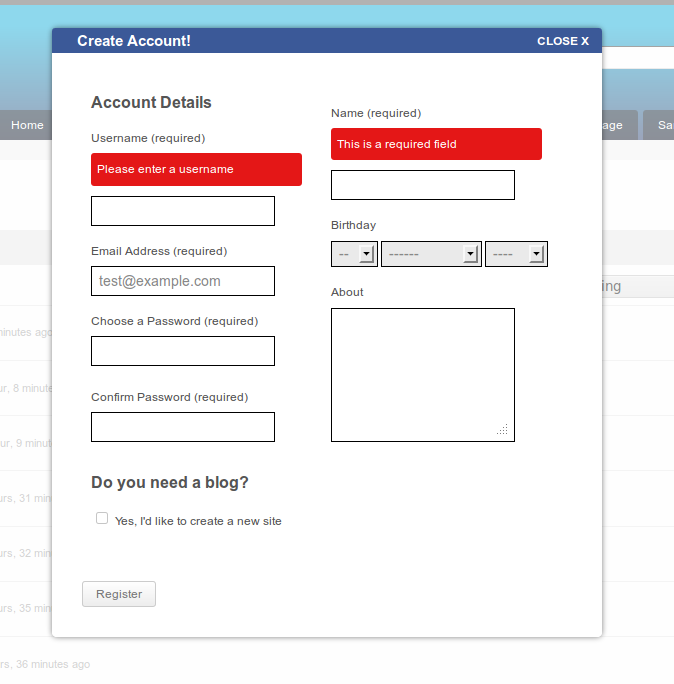
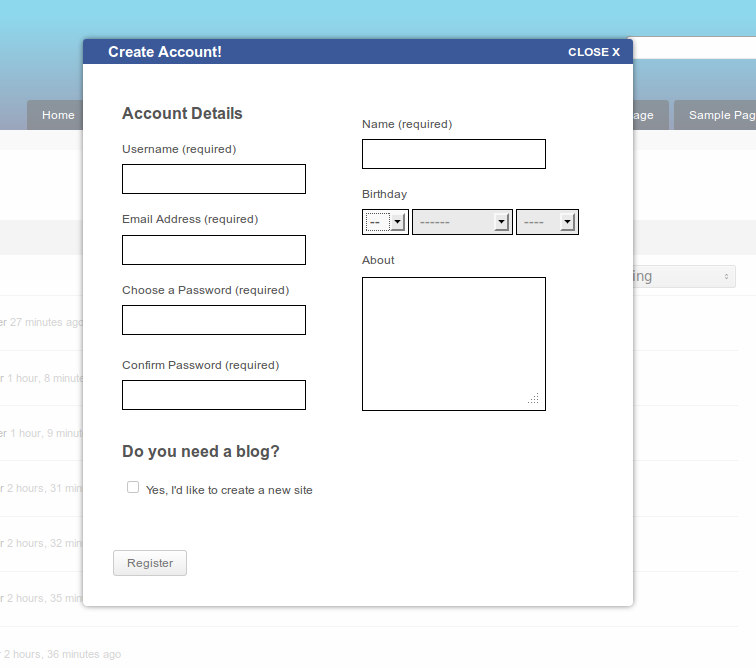 If there is an error, the user will be notified immidiately as shown below
And if the registration is successfull, user sees the welcome message and is then logged in to the current page
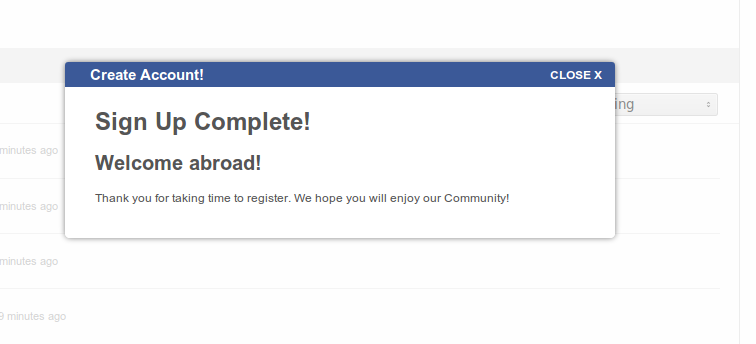 The message will appear for 1 second(You can control it from the javascript file) and then the page will be refreshed to make the user login.
The plugin automatically filters BuddyPress standard signup links(In the admin bar, sidebar) and activates the modal . So, once you have installed it, you are ready to go.
If you want to show the registration popup box on any other link, just give it a class 'bp-ajaxr' and the the modal box will automatically work for that.
Customizing the Layout template:-
I have included a registration page(register.php) in the plugin. If you want to use your own registration page, you can create a register.php in your theme and It will load automatically.
Controling which Xprofile fields/groups are shown:-
Use the filter 'bpajaxr_xprofile_args' to filter on Xprofile loop arguements. Let us say if you want to show all the fields from xprofile field group 2, you can use it in your functions.php /bp-custom.php as below
1 2 3 4 5 | function my_custom_registration_fields( $args = '' ) { return 'profile_group_id=2&hide_empty_fields=0&hide_empty_groups=0'; } add_filter( 'bpajaxr_xprofile_args', 'my_custom_registration_fields' ); |
Download: https://buddydev.com/plugins/bp-ajax-registration/
I hope this plugin will help you all. Looking forward to hear your feedback from you 🙂
Note: this is a premium plugin. Also, if you are using BP Autoactivate Autologin plugin, please download the version 1.2.6 which is compatible with it.
Another awesome BuddyPress plugin – I love it!
Will this still work okay with suck plugins as "Allow Capital Letters In Username"? and other plugins that hook into the registration page?
PS: How's the progress on the chat plugin? 🙂
Hi Mike,
Thank you for the comment 🙂
Yes, this plugin should work with all those plugins, though I haven't tested it.
I had stopped working on chat a few week ago because some other work. will let you know soon in another update on the site. sorry for keeping you waiting for the new chat.
Is it multisite compatible? Say a non-member is browsing the subsites and they get excited about things and click the Register link in the BuddyBar/WP Admin Bar (I still use a modified buddybar) – can they do a registration in a modal on the subsites? That would be cool! Especially if it pulled the register.php from the main site to do it.
This way, they can register anywhere on the mainsite, but also anywhere within the network! Talk about a killer feature….
Hi Saunt,
It indeed allows users to register from any blog on the multisite. I just tested it on a random blog on my test install and It allows registering from there.
If the link for signup is generated by BuddyPress, It will automatically show model box on clicking, otherwise just give the link a class 'bp-ajaxr' and It will work(Just clarifying as you are using modified top bar, It works with BuddyPress's included admin bar).
Will you submit this plugin to Wordpres plugins website? It will get to more people! And auto updates! 😛
Another cool plugin 🙂 Thanks Brajesh!
Thank you mercime 🙂
Hi Brajesh, Im trying to do something similar though not as complex with the ajax..
I have a onclink drop down in my admin bar with the registeration form though the form will only display if I am on the registration page.
Could you maybe provide some insight as to who I could show the form on any page?
Would be greatly appriciated.
Charl,
sorry for my late reply.
1. Copy the registration loop from registration/register.php
Now change
bp_has_profile( 'profile_group_id=1' )
to
bp_has_profile('profile_group_id=1&hide_empty_fields=0&hide_empty_groups=0')
That should show the fields on other pages. Hope that helps.
Hi,
Great idea ! 🙂
You said :
"Localization:-
Use a translator tool(I recomment poedit) and translate the po file in the /languages directory of this plugin. Once you are done translating, save the mo file as yourLocale.mo(e.g en_US.mo if your locale is en_US) and it will load that automatically."
But I can't find any languages directory or po file.
Another point :
This is a bit too slow to pop up, if you could improve it in another release.
Hi Laurent,
sorry It seems I missed to include the languages file.
Will include today.
2. The form is loaded via ajax, so the speed will depend on the server you are using. I will see if I can implement somethign better. Just don't want to load the form as hidden on all the page.
I'm still waiting… 😉
Thanks a lot !
No news from you… I'm still waiting and a bit disappointed… 🙁
Could you do this now ? A lot of my french users really don't speak english so it's a major issue for me.
Thanks !
Hi Laurent,
sorry I got busy with some work and forgot about this. I am updating it in half an hour and will post back again here.
regards
Brajesh
Hi Laurent,
Please download v 1.0.1
It includes the languages directory. sorry for all the delays on my part.
Hi Brajesh,
Local install – default bp theme and child themes – bp-ajax-registraion works perfectly
Queries
The message will appear for 1 second (You can control it from the javascript file). Please hand hold. Which file ? which line ? say to allow message to stay there for 10 seconds
Problem
Local install – Non – default bp theme (elbee elgee) I'm having difficulty.
modal comes up but when register button is clicked original modal stays up but password fields etc empty
Any ideas ???
Thanks
Hi Brajesh,
sorted the elbee/elgee problem – don't know how maybe there never was one !!
now just
re activation modal —— Please hand hold. for javascript file Which file ? which line ? say to allow message to stay there for 10 seconds
thanks
Hi Brajesh,
I have sorted that out.
just noticed that "Welcome abroad" in register.php might better be "Welcome aboard"
cheers
Hi Barjesh,
I've installed the ajax registration plugin and it works fine except that when someone registers they get the email but not the key, it sends the registration link without the actual key, just up to the point where it shows "/activation/?key-"
I've removed all plugins and tested each one to see which one was causing this error and found it was this ajax registration plugin alone. Any idea what may be?
Thanks
Thank you for reporting.
It was a bug on WordPress single user. Just fixed it and uploaded v 1.0.3
I installed the plugin but it doesn't seem to work for some reason. What am I doing wrong?
My site:
http://miengle.com
Multisite
I'm not sure if i need to change the class? If so, how do i go about doing that? Thanks!
I'm also using BP
Hi,
you are using mingle theme and the login link does not have any of the required classes. Please make sure your login link have the class bp-signup and it will work.
Hi,
Great plugin, but I agree with Laurent MATIGNON that it is really slow. Isn't it possible to load the screen, fields and buttons (visuals) and then keep loading the other stuff? Or is the layout ajax loaded? (i'm not an expert on this for sure)
Thanks for your answer.
Hi John,
Thank you for the comment. Currently, I am loading it via ajax. I am going to put an update in a week to allow you either directly load it in dom and then show the popup or using ajax. that will give you the full control and make it faster for the shared hosted websites 🙂
That's great, I have a fast VPS server but loading is delayed with 1 to 1,5 seconds.
Does this plugin work with bp 1.6 beta ??
Hi,
No The version 1.0.3 will not work with Bp 1.6 beta. I have it (and many other plugins updated for BP 1.6). I will put them today and let you know.
Brajesh any updates around the "super fast" update?
Please download version 1.0.5.
You can enable/Disable the ajax loading of form from BuddyPress->settings screen.
Hi Brajesh. I was wondering if you have a planned date on when you're going to update your plugins for BuddyPress 1.6 support as well as PHP 5.4.x. I purchased club membership yesterday and I'm really eager to play with some of these brilliant plugins, particularly this one. Really good value and amazing work! Thanks.
Hi Barjesh,
I was wondering if your plugin would solve my issue, I have two different users on my site teachers and students and I would like to have two different registration forms.
So can i show xprofile field group 2 in one registration form and just the base in another?
Thank you, Tomas
Hi Tomas,
Thank you for the comment.
I don't think you need this plugin for that purpose. You can use simple javascript to show hide the field groups on the registration page.
Hi Barjesh thank you for the quick answer. I am kind of a beginner at all this that's why I was hoping your plugin would be the solution;)
The ultimate solution would be to have a radio button or dropdown menu and when the user chooses their selection relevant to them (for example student) xprofile field group specefic for them would show up below.
What would be your advise for me to accomplish this?
Thank you for your time I appreciate it.
This doesn't work with my theme 🙁
Is there a way to call the AJAX registration page manually, perhaps through a hyperlink?
HI Skyrie,
I am sorry top hear about that. Is it a javascript conflict?
Btw, if you specify the class 'bp-ajaxr' to any anchor element, it will be used as the trigger point for showing the form.
Hope that helps.
Regards
Brajsh
Hi Brajesh,
I'm not to sure, it just does not work at all. No errors in FireBug, it just takes me to the normal registration page.
I tried adding that class, it didn't do anything 🙁
hi . i want to divide register form in steps ie. step 1 next step2 and complete sign up . how can i make like this in buddypress. ?
HI Kevin,
I will advise looking at one of these jquery plugins for the solution.
http://www.jquery4u.com/forms/6-jquery-form-wizard-plugins/
hope that helps.
Regards
Brajesh
Hi
Will yur ajax registratin for Buddypress work with WPMU Dev's Mailchimp newsletter integratioj plugin which automatically adds new users to the mailchimp database please/
Hi gail,
Thank you for asking.
I don't see a reason why it should not work. If they are using proper hooks(which I believe they are), this will work.
Hi, Great plugin. How do I enable the ajax login part of the plugin?
Thanks.
Hi Amir,
currently this plugin does not support ajax login. I am putting one next week to have this functionality 🙂
Hi Brajesh,
I'm using a custom theme and the plugin doesn't work. After adding class "bp-ajaxr" to the register link, the modal opens but totally empty, so it's not a javascript conflict issue.
Is there any step more that I'm forgetting to do or "do_action" that my theme should use?
Thanks for your help.
Hi,
Please check if you have
[sourcecode language="php"]
<?php wp_footer();?>
[/sourcecode]
in the footer of your theme. The forms are loaded via this action. If it is not in the footer, please put it in the footer.
Hello Birjesh, Just purchased this plugin (membership), but was disappointed not to find ajax login,Any progress?
Hi Hamzah,
Thank you for buying the membership.
I see that many people have demanded this feature. I will put it in 2 weeks.
Thanks
Brajesh
Sorry I wasnt logged in, is is possible to make the pop up appear when a logged out visits the website?
Cheers
Rob
This plugin will not work, can anybody please give me an example of how to add the class "bp-ajaxr: to a menu item in wordpress? Or any other way to get this Registration box to show up on my live site?
Hi John,
Are you using WordPress custom menu? If yes, Please visit appearance->Menus screen. At the top of the screen, you will see screen options(right side top). Check the CSS Classes under advance property.
Now, you can click on any menu item and just input the class name. Hope that helps.
I did exactly that before posting my first request for an example. Do you have any step by step instructions with examples? I have done this every way possible and nothing is working. How exactly should the class look that I place in the CSS Class box, examples please…just so I know I am not doing something wrong, to compare.
Just replied to your mail and fixed the issue on your site. since the class was getting applied to list item, had to change the class name to bp-signup instead of bp-ajaxr for the list items.
Thanks
Brajesh
Hi there, great plugin…I'm a brand new member because of it!
Just had a question: Is there a way to add the class to my custom admin bar links as I've tried: 'class' => 'bp-ajaxr', but to no avail.
Never mind, I decided to just go back to the standard register link and it works great 🙂
Hi JD,
I am sorry I could not help. If you ever plan to go back to that custom registration link again, please do let me know 🙂
Happy new year @sbrajesh,
please how can i use BuddyPress Ajax Registration Plugin on my site, I downloaded the plugin when my membership was still active.
I have the following in my header to call registration button:
<input type="button" name="register" id="register" value="" onclick="location.href=''" />and I have tried to add bp-ajaxr as a class to that link but still not work.
How can i fixed this please?
looking forward to renewing my membership.
Regards
Naijaping
Not works on my site can you help me?
Hi Gustav,
What is the problem? Is it not triggering the modal box? Can you please post on the forum?
Thank you
Brajesh
Hi, is this plugin compatible to BuddyPress 1.9.2 ? i would love to buy it if it is 😀
regards
joschi
Thank you for asking.
yes the plugin is compatible with BP 1.9.2. Please note that the current version is not responsive( I have got a lot of people asking for that, so clarifying in advance) but I am working on one and should have ready in 1-2 days.
Hey Brajesh,
Has anyone experienced any Chrome CSS issues? The black BG behind the register modal is not showing in chrome. If you click the register link twice (first click brings up the register box, second click brings up the black background) it works.
Any fix for this or more info?
Also I would of posted in the forum however it is a 404 currently if you try and go to it.
Thanks.
-X
Hi,
Please upgrade to the most recent version. It is fixed now and also modal is responsive now.
PS: Yes there was a problem in forum, It is fixed too 🙂
Thanks
Brajesh
Hi, is there any way to put register link in a custom place & get it working with ajax registration. For example: i want to make it working like this – <a href="/register">Register instead of register link in wp toolbar or buddypress login widget
Hi Atif,
Thank you for asking.
yes, you can trigger ajax registration plugin from any anchor element. just put 'bp-ajaxr' in the list of class for that anchor element.
Please do let me know if that helps or not?
Thanks, its working perfectly.
Hi Atif,
Thank you. Glad that it helped 🙂
I am using BuddyPress reCAPTCHA plugin & captcha is not generating in popup. Any idea how to solve this?
T^hank you for noticing. I too tested and saw the problem. For now, Please try using SI captcha or any other alternative. It seems that BuddyPress recaptcha is using js to create the desired captcha element which is somehow not working. I am looking into it and will have more details tomorrow.
Thanks for your suggestion about the alternative plugin. Its working fine.
Did you get anywhere with the above issue?
I want to embed the register form on a page (not in a modal just the straight form embedded). I am fine with any hack type of way but would love to be able to do this.
Any comments/help would be great. I tried using the static html code from the modal and included all the js and css from the original modal but still did not work. I think it has to do with the :
Any advice would be great.
Thanks.
-Dave
Hi Dave,
All you need to do is modify the javascript part and use the functions that shows form to show a form in your own template file? Do you want me to put an example, please do let me know, I will put the code in the day then 🙂
Yes please show me an example that would be great!!
Thanks so much!
Hi Dave,
Here is the shortcode plugin I wrote for you. It needs BP Ajax registration plugin to be active. After activating the shortcodes plugin, you can use this [bp-ajax-registeration-form] to insert the form anywhere.
https://buddydev.com/downloads/bp-ajax-registration-shortcode/versions/bp-ajax-registration-shortcode-v1-0.zip
Hope, It will give you an idea 🙂
I'm looking for this as well. However, I downloaded this plugin and put the shortcode in [bp-ajax-registeration-form] and nothing shows up. Is there somethign else I need to be doing?
Hi Rian,
Please make sure that you have activated the shortcode plugin and also you are logged out when checking the registration form.
I have activated the plugin and am logged out. The shortcode seems to be registered because the shortcode is replaced with nothing on the page (as opposed to just printing out the shortcode on the page).
Hi Rian,
The version 1.0 of the shortcodes plugin has issues with the current version. I am uploading a new version of shortcode plugin in 5 -10 minutes.
Please download and user vfersion 1.0.1 of the shortcodes plugin
https://buddydev.com/downloads/bp-ajax-registration-shortcode/versions/bp-ajax-registration-shortcode-1-0-1.zip
It will work with the current version of Ajax registration plugin
i have install the plugin and the shortcode plugin but on the new page with the shortcode, nothing is shown…
i can see the regform only for 1-2 seconds
you can see it here http://immobilien-lobby.de/reg-neu/
Hi Carsten,
My apologies for the inconvenience.
Can you please open a topic in forum. That will make it much easier to help you. Please do note that if you use shortcode plugin, you need to disable the ajax loading of form from "Settings->BuddyPress->settings " page. Then, It will work. Please open a topic and let us help you in forums.
Thank you
Brajesh
The Display Form Container bpajax-register-form-container is Display=none? Why?
Because you don't want the modal form to be visible by default. It is copied in the modal and set to display block when the modal dialog is triggered.
That link is not rendering any page. Can you please check if you have both the plugins active? Also, can we please move discussion to support forums?
ok i have set the display to block. now it will be shown on page but how can i shown more then one Group
Here is how to show multiple profile field groups.
https://buddydev.com/support/forums/topic/bp-ajax-registration-page-showing-multiple-xprofile-groups/
Hope that helps.
sorry but it not working with the code in my own functions.php
not shown my 3 groups…?
and one more thing… i nee a headline over all my own groups… the code will not be shown any headline over the group section.
What can i do in the ajax-register-form.php that i have a headline over the Group sections?
now it works all for me. i have customize the ajax-register-form.php.
thanks for your support
Greetings @sbrajesh
FYI This doesn't seem to want to work on 2.0.1
I click on *Register* and you can see it's thinking about it,
But fails to open, But there are a lot of the plugins that have now stopped functioning in 2.0.1, All seemed fine until I did a fresh install to test most again.
Regards,
Ben.
Sorry Ben, I know it is a very old comment. Just confirming that it was fixed long ago but I missed to reply.
The plugin doesn't work with WPLMS theme, where I can change classes in top menu??
Hi Juan,
I am not familiar with WPLMS theme code, so I am not able to help much here.
Please take a look at this document on how to change the class name.
https://buddydev.com/plugins/bp-ajax-registration/documentation/
Please do let me know if that helps or not?
Thanks
Brajesh
I'm not a developer, in documentation you say:
Assigning class ‘bp-ajaxr’ on the anchor(link) element (where I find anchor(link) element?) and how I assign class bp-ajaxr?
if you have a link like this:
register (Where I find this link?)
Change it to:
Register
Hi Juan,
I have updated the plugin to automatically support the WPLMS theme.
Please upgrade to v 1.1.4 and It will work automatically with the wplms theme.
Hope that helps.
Thanks
Brajesh
Thanks a lot !
How to set it up? I have installed and activate it also marked it in BP settings but do not see any change in the behavior of the site. There is no any modal login windows pop up in WPLMS.
I installed and activated the plugin then checked settings in the BP section (I didn't find anything else related to it anywhere else). But that install didn't influence the work of registration at my WPLMS site anyhow. I also tried to copy php file from plugin folder to the theme's folder but no change again. I have the same login/registration procedure as I had before the installation no pops of the forms or anything else. It not really clear from the documentation how it is intended to work.
MHi Ivan,
My apologies.
Could not see your message earlier.
If you are using WPLMS theme, It should have automatically work. Can you please point me to the site if you still have the issue? There is no need to copy any file in the theme.
Thanks
Brajesh
Is the issue with WPLMS Theme resolved? I'm facing the same problem, after installation of the Ajax Plugin nothing changed.
Hi Christian,
Yes, It was fixed. Can you please activate the plugin on your site and point me top your site?
Does this work on the current version of BuddyPress (2.1.1, which was released on October 7th, 2014)? There haven't been any comments for two months here, and 6 months ago, a user that this plugin didn't work with 2.1.0, but there was no reply.
Thank you!
Hi Melynda,
It is tested to work with BuddyPress 2.1.1
I am sorry if I missed to reply here in a comment.
Thanks
Brajesh
I've added BP login and register links to my wp-menu. I installed Ajax login plugin but it doesn't affect these links I've created. I can't assign CSS classes to the WP menu since BP puts its own classes to the menu items and they can't be edited. Please advise.
Hi Ahmad,
I am sorry i could not reply earlier.
To edit a BP item class is easy, just open it the appearance->menu page in admin and click on the link. select the grayed class area and click inspect element. you will see the html. add the class value there and save. I know it is bad, but that is one solution.
another solution will be to not use BuddyPress generated signup link instead add a custom link with the signup page url.
Regards
Brajesh
Hi again Brajesh,
Thank you, the class change did the trick however I still don't get a popup window when I click login or register in my website. It's shoplikeits1999.com
Hi Ahmed,
thank you for the reply.
I took a look at the site and I see the issue. The issue is there are two copies of magnific popup js file is loaded and that is causing conflict. One is loaded by your theme and one is loaded by this plugin.
Are you comfortable with PHP code? If yes, Please try putting this in your bp-custom.php
Please do let me know if that fixes it or not?
Thanks a lot Brajesh, I deregistered that script from my theme file using the child theme functions.php and it works. Is it possible to have two different popups one for the login and one for the registration. I couldn't see anything regarding that in the documentation? Or do you have another plugin for that? thanks.
Hi ,
1. i have override the function to hide the fields in Buddypress register form, how can i hide the fields in the Ajax registration box.??
2. And the registration form is not submitting. After submitting the forms it just show only the overlay. how can i solve this??
Hi Charlie,
I am sorry i could not look at the comment earlier.
The simple solution is to copy 'ajax-register-form.php' from plugin to your theme and modify it as you like.
For the second issue, Please point me to the site. The plugin expects data from server to be a valid json response and any plugin throwing notice can cause that data to be invalid.
Hi Brajesh Singh,
Thanks, It worked well, I have few more issues.
1. I want to allow user to activate users by confirmation e-mail. I don't want auto login after registration.
2. And i am not receiving the confirmation mail by using the standard registration form. BP Ajax registration stops the activation mail receiving to users. once i deactivate the plugin it works fine.
Please explain how can i resolve this??
Will this work with the WPMU dev membership plugin Membership 2 Pro??
Hi Lukas,
We have no access to that plugin and can not confirm the same. If you want to test it for compatibility, please drop us a mail and we will send you a copy that you can check.
Thank you
Brajesh
Hi,
I'm having issues with the popup working on may site here: pods.plantpurenation.com/ the login button in the header has the class set but it's not working.
Hi Monica,
My apologies for the inconvenience.
I just looked at your site and I see the the class 'bp-signup' is not added to the list item.
Can you please visit Dashboard->Appearance->Menu and edit your top menu and add class 'bp-signup' to your menu item and check.
PS: I see that your theme also includes the Magnific popup plugin and that may cause some other error. does your theme provides a way to not load it? If no, Can you please open a new topic on our forum and I can provide the way to only load one copy of the popup plugin
Hi Brajesh,
I commented out the Magnific plugin included in my theme and also added the bp-signup to the login for menu option and it's still not loading.
Hi Monica,
1. I don't see the class added to "Join" link in the top menu. I tried checking using firebug. can you please confirm.
Also, Now, I don't see the magnific popup script loaded at all.
After making the changes, Can you please open a topic on https://buddydev.com/support/forums/ to let us help you quickly.
Hey Brajesh,
it's the actually the Login link using the class not the Join Us.. I also commented out the popup javascript from the theme itself.
I opened a new topic
Thank you. have replied there.
There is a conflict between the klein theme and the plugin that is not loading magnific popup. Let us get it solved on the forum now.
Thank you
Brajesh
Hi I was wondering if there a way to make this plugin redirect to a page of choice after registration… Because I'm trying to get the Auto Activate Login/Registration plugin to do so.. but I have no idea how to change the coding from going to the profile page.
Hi,
We have got that feature in the plugin and here is a forums post weher we have handled the same.
https://buddydev.com/support/forums/topic/ajax-registration-with-social-login/page/2/#post-738
Hope that helps.
Hi. One question. Must the Registration Page run in modal popup or can i use a normal page to shown all my custom xprofile Fields and Groups?
Hi,
With shortcode plugin installed with ajax registration, there is no need for modal. Also, you can customize the modal content as you want in your theme by copying the ajax-register-form.php in your theme.
You can make it show your own groups/fields or anything else. If you need further help, please open a topic in forums and we will assist.
Thank you
Brajesh
This is a great plugin which solves a major issue with multisite by letting users register on a subsite. Love it.
I am having issues getting the plugin to work on mobile devices. My site is http://pd.eduquest.ca and the plugin works great on a computer; however, on my phone or iPad, the overlay does not show up. Any suggestions? Is there something special I need to do to make this mobile compatible?
Hi Erica,
Thank you for using this plugin. My apologies for the delayed reply due to the weekend here.
I did check your site and see the issue with mobile. To confirm, I have setup a custom installation tested with mobile. The ajax registration link works fine on mobile. So, I am assuming it is something related to the way this theme handles link clicking on mobile.
Can you please open a topic on forum and provide details about the theme? I will look into that and provide a quick solution.
Thank you
Brajesh
A little tip to all but eliminate bogus robot sign ups. If you use Ajax Register then redirect your register.php page back to your main page or wherever you want (obviously to a page that has your Ajax Register link on it) using a plugin like "Quick Redirects" you will never get a bogus sign up again 🙂
Ever since I installed this plugin my original login with facebook (which was a pop-up) on register.php template on the KLEO theme does not work, I uninstalled it via wordpress (as it didn't do what I thought it was going to do which was show all the xprofile groups in steps at register) but the facebook pop up link still doesn't work at all. I tried deactivating all the other plugins just to double check it was another conflicting but it did nothing.. please help!!
Hi Gemma,
My apologies for the inconvenience.
I am not sure how it can cause issue even after uninstall. Can you please get in touch via contact form or the forum and I will look at it quickly.
Thank you
Brajesh
Hi I'm having issues where the plugin was working for a bit but it's no longer working as I try to test it out on my staging site.
Hi Monica,
I am sorry for the inconvenience. Please open a topic on our forum with more details(like version or WordPress, BuddyPress and the theme you are using) and we will assist you quickly.
Thank you
Brajesh
Hi Brijesh , here is my website – https://www.shisha-fit-royale.de and after clicking on regestrien 2 link in header menu pop up comes fine, but after submission it says you are registered but i cant see registered user in users, also mail activation is not working.Also close buttton of pop-up is not visible. Can you please help me out ?
Hi Premanshu,
I believe the problem lies with the way you have BuddyPress Xprofile fields setup. The first name field is not shown. BuddyPress will not allow the registration to go without it.
Can you please post on our forums with more details? We will be happy to assist.
Thank you
Brajesh
Hi Brajesh, thank you for all of your amazing plug-ins. I just have one question that you might be able to help me with. Registration for buddypress can be a little confusing with the two username fields. How can I just display one and dynamically populate the second? Any ideas? Thank you.
Hi Joy,
Thank you for posting.
It is easily doable. we have helped a few of our members with the same.
Please post in the forum and one of our team member will post the code.
Thank you
Brajesh
I am going to be using this form for registering people to a multisite with different levels of users using the WPMUDev Pro Site plugin. Does this plugin allow for users to select a level (Free or Paid) when they register their site?
Hi KF,
Thank you for the comment.
Does the level selector appear on the registration page? If yes, They will work with it. We haven't used the WPMUDev Pro but if there is any issue, will be glad to assist.
Thank you
Brajesh
It does show up on the registration page. I think this will solve my problem. Thanks for the reply
Thank you. That's good to know.
In case of any issue, Please do post in our forums and we will assist.
Regards
Brajesh
Can we set(upload) user avatar in this buddypress registration process.
Thank you for asking.
No, It does not allow uploading avatar at signup step. BuddyPress does not support avatar upload at signup anymore.
Regards
Brajesh