Branded Login Plugin for your BuddyPress Powered site
Welcome to the era of damn cool social networking with Buddypress. So you have got everything from Buddypress, all the components which builds a social network.
What matters the most in a social network is reflecting the uniqueness of your network, so you do custom theme, a lot of plugins and everything to make your social network unique. But what happens, when someone forgets his/her password, damn!,[s] he has to see the not so themable wordpress login/password reset page. It is something which every webmaster will hate to confess, but the truth remains, you don't want your user to see the login screen/password reset screen provided by WordPress, or do you ?
Well, here I present you the Branded Login for Buddypress plugin to solve your problems. It allows you to theme your login page, password reset page as you do in your buddypress theme. Is'n that cool! Each unique theme have their own login/reset and everything screen. And the best of it, the user will never see wp-login.php even if [s]he tries too. [s]he will be always redirected to the themed login page on the front end of site . cool, heh!
Well, let me show you what it does for you
- Templatable Login page(yes, you can put the login.php in your theme/blogin and it will pick that)
- Templatable Password reset page(same, put resetpass.php in your theme/blogin and it will pick that one).
- Redirect user to front end login, i.e yoursite.com/login when they try to access wp-login.php
- Redirect User to yoursite.com/resetpass if they try to access the reset password option.
- Customize your Login slug/reset password slug
- Customize the password reset messages to send the user to onsite page
- Frond end logout, i.e complete replacement of wp-login.php, if you use this plugin, you even don't need to use wp-login.php
And more, I have added a function to remove the buddypress login menu with the custom menu to point to your on site login page, not the wp-login.php.
I heard someone saying a picture says a thousand words, so why not we should see some pictures then 🙂
Here It is enabled on one of my test site wpknight, and I have captured a few screenshots to show it in action.
Themed Login Page
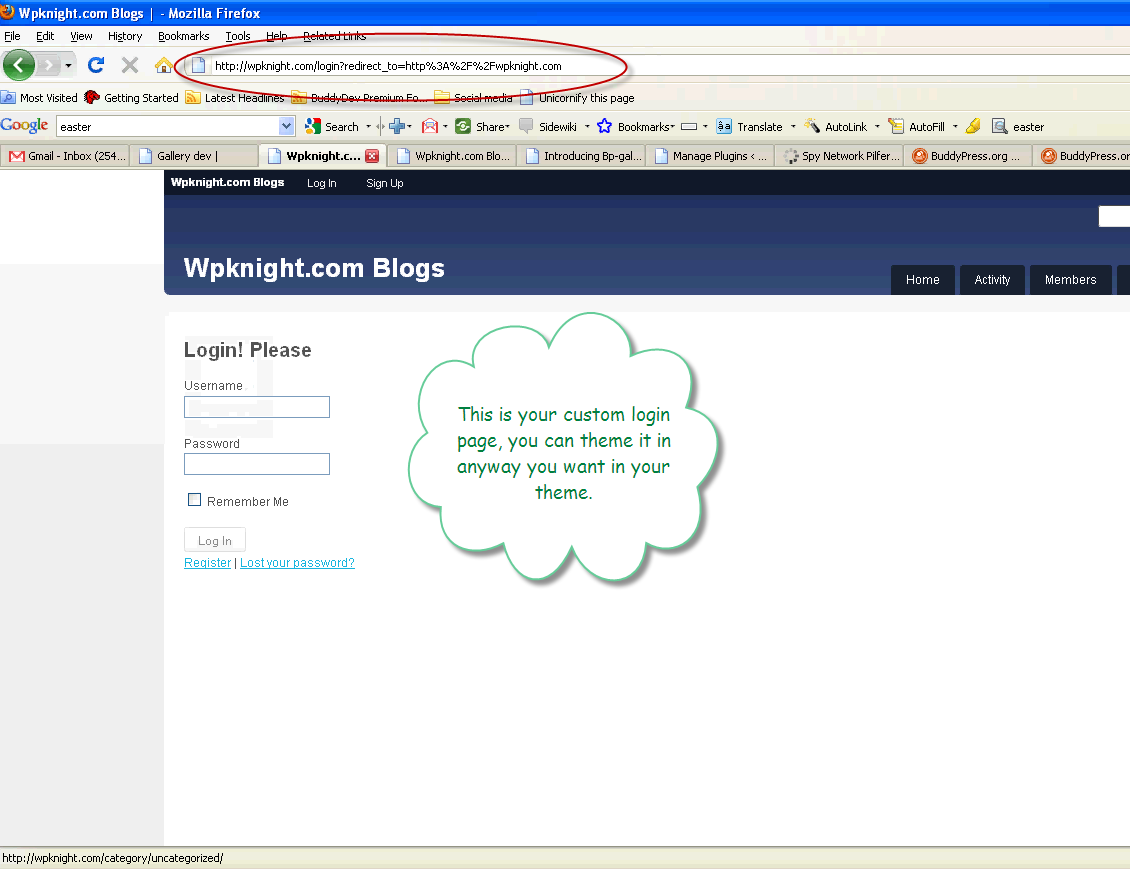 This page is completely themable, I have added the template files for default BuddyPress theme. Note the url in the location bar. It is mysite.com/login, not the backend.
Well, If you enter some wrong user name and password, what do you expect, you should be redirected to wp-login.php, hey come on, you won't. Here are a few combination of wrong username and password and the screenshots for them.
On Invalid password
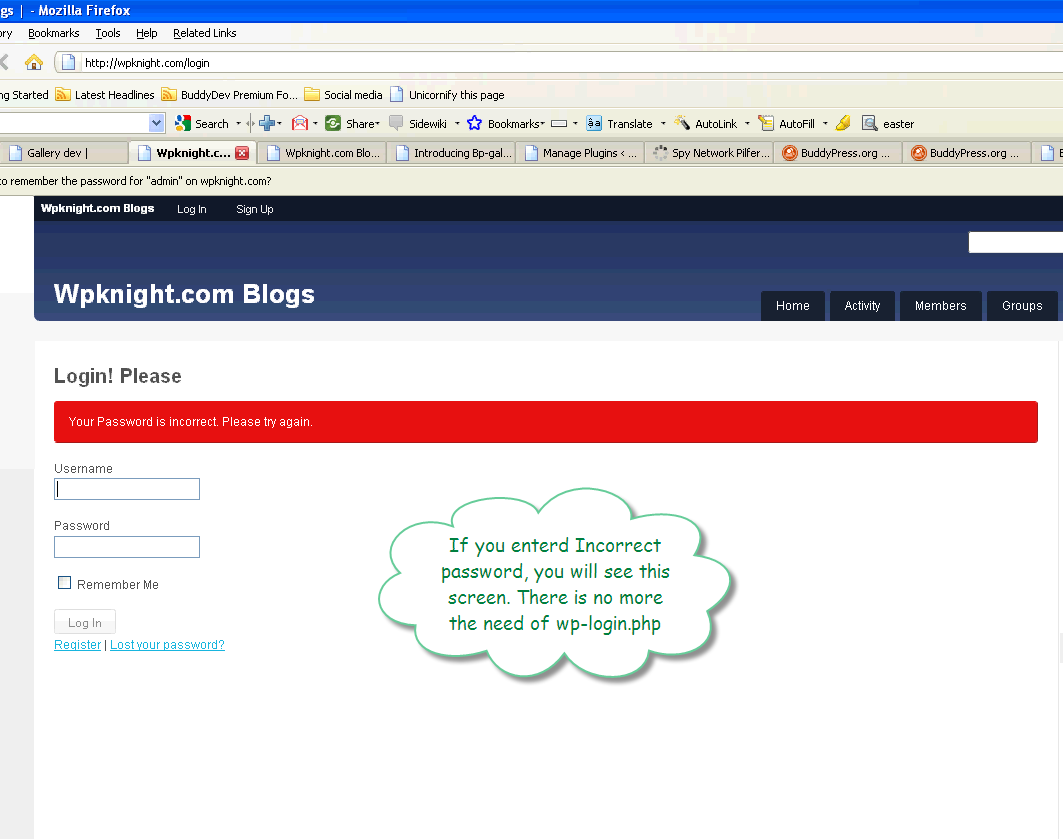 And If you leave user name empty and put some password. You will get something like this
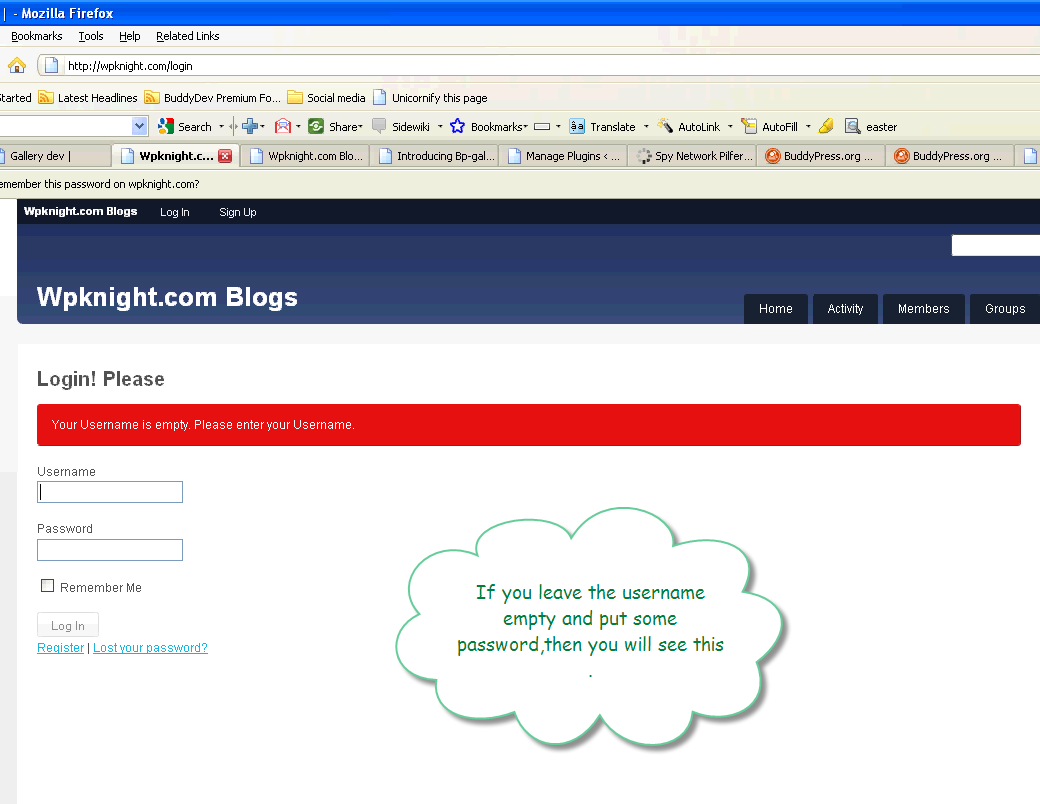 And if you entered both correctly, then man! you will go to the home page of the site.
Reset Password
Now let us see some reset password thing, you see there are links at the bottom, well, you can use them to point to reset password page.
Here is the mystery unfolded and the whole process illustrated:)
Reset password screen
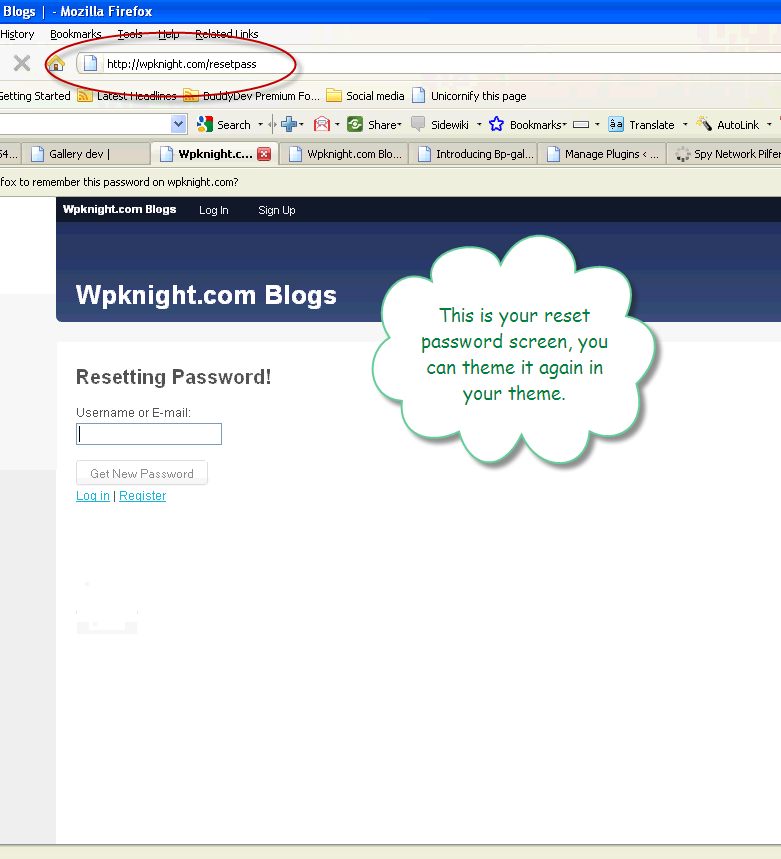 So, if you enter invalid username/email, you will be presented with our damn cool red marked screen as below
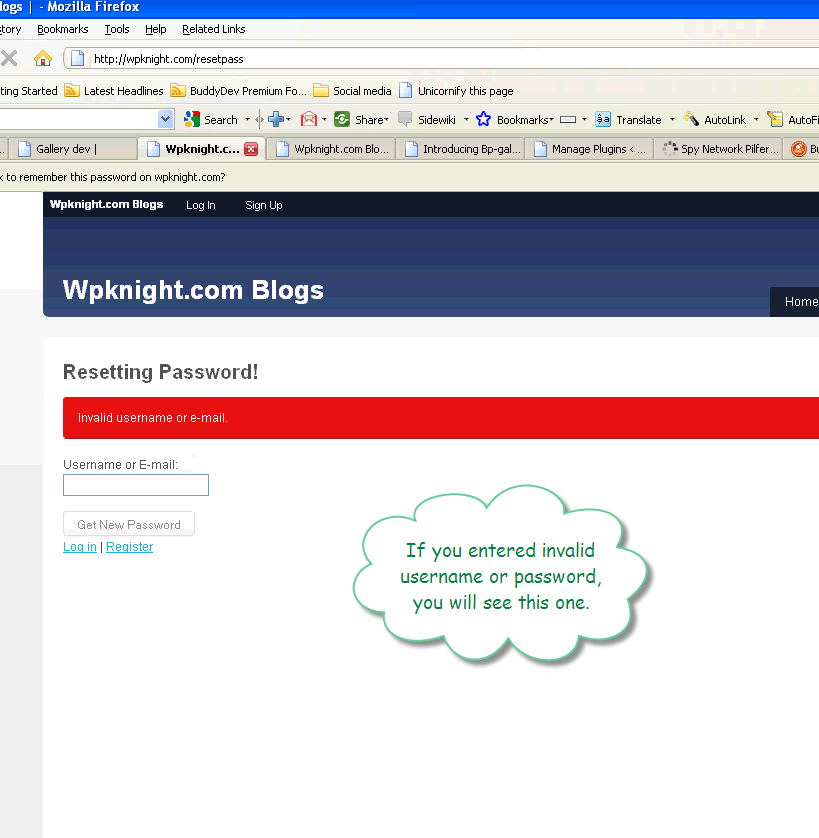
Cool, ahh yes, I know 😀
And in case you decided to enter correct username/email, you will see our green signal here
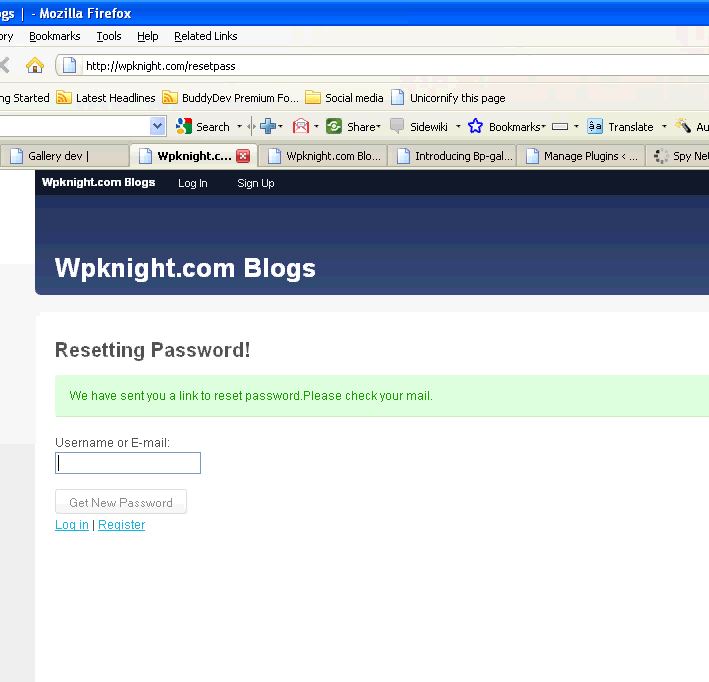 Hopefully your server decides to send the mail then you will be greeted by a mail in your inbox which shows the divine way to reset the password. Here is what I got.
 About the black line, someone told me, brajesh, you should never show the keys they are secret to the door, so I have hidden it for now.
Make sure to notice the url, It points to yoursite.com/resetpass/validate/?key=some secret key&login=the damn cool user name
When you click on this link, you will get a greeting again like I got here
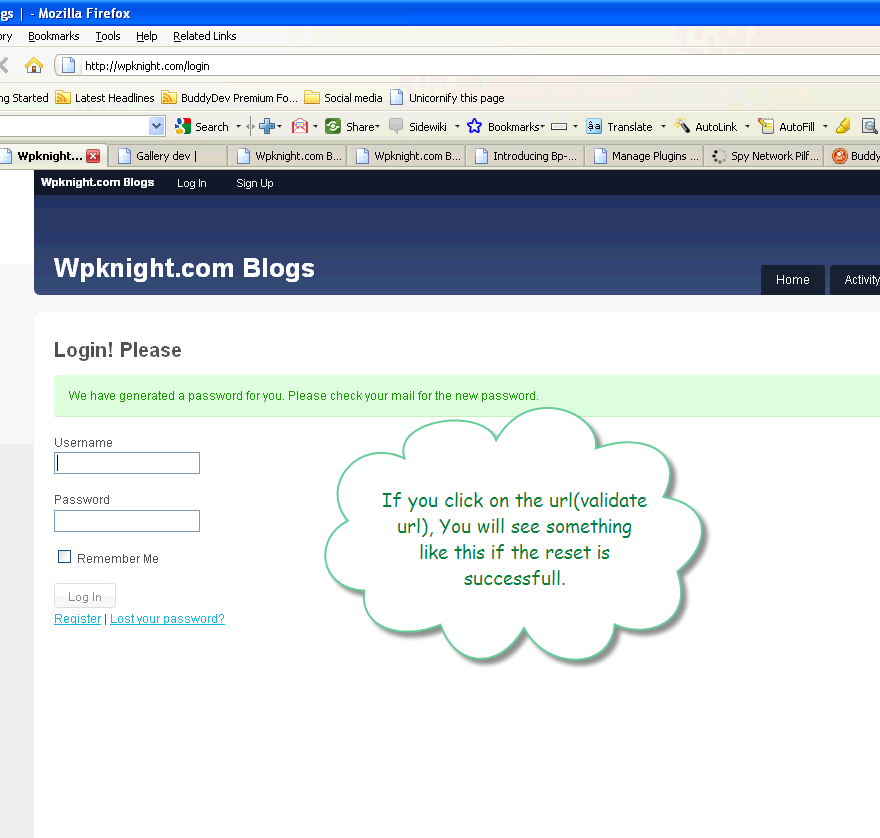 And that's not all. You will need to check your mail again in order to get the not to be memorable password for you. I too got some cool password, but again blacked(Now I hope you know the reason why :))
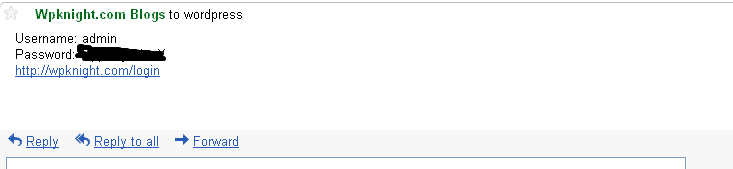 Make sure to see the url for login. It links to our front end login page.
So, I hope, you have got some clue about what this plugin does, and If not, you can continue reading this post until my server says please pardon me 😀
Ok, enough fun, now coming back to the topic.
This plugin is built of two things. One is plugin core file and another is template. The plugin handles all the actions and processes them accordingly and the template files which you can theme in anyway you want, is used to present the user with the various screens.
There are two template files
- blogin/login.php:- to show the login screen
- blogin/resetpass.php: to show the Password reset screen. If you need another screen too, then do let me know in the comments.
And what is more cool that I decided to replace the BuddyPress top nav login link, which points to wp-login.php with the link which points to on site login page. So, once this plugin is activated, the link will automatically point to out custom login page. Further, all the relevant urls which point to wp-login.php will be redirected to our login/passwordreset/retrive password pages, logout link will be corrected automatically using filter to point to yoursite.com/logout.
Now That's all for me, It is time for you to grab this plugin and make sure your site is now have a branded login.
Download
Get the plugin from here https://buddydev.com/plugins/bp-branded-login/
Installation
- Unzip bp-branded-login.zip
- Move blogin folder to your current theme
- Upload bp-branded-login folder to wp-content/plugins directory
- Login to WordPress backend
- Go to Dashboard->Plugins->Installed and look for "Branded Login for Buddypress"
- Click Activate and you are done.
If you are not using bp-default theme, then take a look at the blogin/login.php and blogin/resetpass.php, these two files contains two simple forms, just copy the form to your template and replace login.php/resetpass.php with your template having the same name.
And keep yourself tuned for my upcoming next plugin today/tomorrow which will allow to perform global search on single page in BuddyPress. You know what I mean, yes, on a single page, you will have all the results for the search term from groups, members, forums, blogs and all, that's cool, isn't it. And that plugin is free, so make sure to visit and grab the global search plugin for buddypress 🙂
lol, ok that's a cool pleasant surprise Brajesh. Will be playing with the plugin tonight. Thank you.
haha 🙂
so cool thanks Brajesh!!! 🙂 exactly the two things i needed, custom login and a global search ..
wow Thanks alot Brajesh!!!!
Any news on the global search plugin. I'm more than interested in it – will you also submit it as Trac-Ticket for BP 1.3 or future releases?
hi 21cdb
Thanks for the comment.
I have been busy with some other things so could not update the site. hopefully tonight I will post it.
It's just simple, will see if it needs a ticket as It can be achived using just theme. Nothing too much.
Thanks
Brajesh
Oh really just via theming? Cool … i'm looking forward for your update tonight!
Well this plugged a big vacancy and was much needed. Thank you so much for all your hard work.
-tom
Can we integrate this with the s2member plugin?
Thanks
Hi,
Great plugin!
There is one problem though. When users read single posts and want to comment, they click the "Login to comment" link, and once they login through single post pages, they are directed to the home page and not back to the post they were about to comment! This is disturbing for users.
Is there a hack to solve this?
Hi Kirhan,
Thanks for the comment. There was a bug in blogin/login.php.
Please change line number 29, from
<input type="hidden" name="redirect_to" value="" />
to
<input type="hidden" name="redirect_to" value="" />
I will be uploading the fixed version here today too.
I am unable to post the fix here. Going to update the plugin in a minute. You will just need to override blogin/login.php
Thanks
Brajesh
Ok, I have just updated the plugin with version 1.1.1.
please override the blogin/login.php if you are running on branded login 1.1
Here is a download link.
https://buddydev.com/http//buddydev.com/download/bp-branded-login1.1.1.zip
Thanks!
Brajesh
All works fine except when I tested the the password recovery, all worked fine until I got the email that was supposed to show me the new reset password. The email only contained the following:
Password Lost and Changed for user: rolandogomeztest
As you can see, no new password, only the above text. Also, I tried it on Firefox with my test account and I have cookies turned on that browser, but I get the following on some of the pages for the login/password recovery:
Cookies are blocked or not supported by your browser. You must enable cookies to use this site.
I now I'm not blocking cookies. Again, the rest works just fine, just those two items. Any ideas? Thanks, rg.
Ok, moved "Blogin" folder to the theme folder instead of the child folder, all works now…thanks!
Thanks Rolando for posting. I am glad It worked.
when I try to log out – I get a message page not found?
Please move the "blogin" directory from plugin to your current active theme.
yes after activating the plugin- I moved /blogin/ to wp-content/themes/bp-columns
still getting page:
Page Not Found
The page you were looking for was not found.
ok – got it, I was editing the wrong files 🙁
thx for your help – love buddydev
Hi Brajesh,
I am using the plugin and I love it…However, on my site, the hyperlink Register and Lost your password? seems to inherit the color of my nav menu from my theme..How can I remove the green background? I want it to remain white..
my site is http://www.accessguyana.com/login
thanks
-S
Hi S,
Since the links wrapper have id #nav and your top nav has the same , so it is causing trouble.
Please add following css code at the end of your css file
 p#nav{background-color:none;
 background:none;
 }
That should solve the issue. Please do let me know if you still see the problem.
Brajesh,
It worls perfect…you are the best. I am also using your gallery plugin and loving it. However, i think i am having a css clash there also. The gallery menu is taking the same width property of the subnav section of my css. I dont mind taking the menu css property, but how do i change the width?
You can see what i am talking about on this link..
http://www.accessguyana.com/members/sat/gallery/my-galleries/my-pics
Thanks
-S
Hi,
Since gallery subnav and your top sub navigation is having same id, that's what is creating issues.
here is the css to fix it
 #item-body  #subnav{
 background:none;
 background-color:none;
 color:#000066;
 font-family:Arial,Tahoma,Verdana;
 font-size:10px;
 font-weight:normal;
 overflow:hidden;
 text-shadow:none;
 width:auto;
 }
 #item-body #subnav a,#item-body #subnav a:hover{color:#000066;background:none;}
That should fix it.
Brajesh,
Another issue I found with the custom login, I noticed that there are two "sign up" links in the buddypress nav bar at the top of my page…You can see it at
http://www.accessguyana.com
This happen when I activated your plugin. Can you pls assist..
Thanks much!
-S
Brajesh,
Any update on the above two questions..?
Thanks much!
-S
Hi S,
For double appearing the login menu, It seems to me you have a customized theme which adds the loign menus differently and does not allows this plugin to remove original menus.
I am posting a solution on your post in the forum in a minute.
for gallery, will be posting again on that post.
Thanks
Brajesh
Brajesh,
I copy the following you recommended..
#item-body #subnav{
background:none;
background-color:none;
color:#000066;
font-family:Arial,Tahoma,Verdana;
font-size:10px;
font-weight:normal;
overflow:hidden;
text-shadow:none;
width:auto;
}
#item-body #subnav a,#item-body #subnav a:hover{color:#000066;background:none;}
it works great. U change the bacground color to add some nice customization..:) However, what i need to do to change the background color when I hover the mouse on the link..?
I try adding background color to:
#item-body #subnav a,#item-body #subnav a:hover{color:#000066;background:none;} but it did not work. Any suggestions. Thanks much!..
-S
Any way to force the custom login template to show as the home page for non-logged in users. I have the activity stream as my home currently on a BP/MU site and I'm thinking creating a custom page template and pasting the code login.php from blogin into it. Then setting the custom login template as home in >>reading options. I'm hoping to rautomatically redirect logged in or already logged users to the activity stream (regular home page)
paddleathlete.com
Thanks for your help
Hello,
I download and install the this plugin but since I activate it I can't logout anymore. So I testet this with wordpress 3.04 and BP 1.27. Will there be an update on this issue for this versions?
Greetings thx for this plugin .. if it would work for me hehe.
Had you moved the "blogin" directory from bp-branded-login to your current theme ?
Hi Brajesh:
I am hoping to use branded longin with Suffusion theme and it seems to throw the sidebars to the bottom of the page.
I have had the same problem with bp-gallery also and believe they have similar fixes, in that I must change some code lines in these plugins. I will be using many more of your plugins with Suffusion theme and hope I can find the right solution to all of them.
Can you please help? Thanks soooo much;
Vida
Hi Brajesh, I hope you are well.
I'm having two problems with Branded Login. Can you help?
1. When a wrong username or password is tried, there is no error message. 'div.error' is output, but empty.
2. When an user does step 1 above, and then navigates to resetpass page or navigates to login page, previous 'div.error' is output into page again (ie. into the new page).
I should mention this is with BP and WP latest versions, single site (not network / multi).
I haven't signed up for premium membership yet. Though I am currently considering it. If you are looking for something to develop as a part of your promised plugins per 3 month period, I thought of a plugin similar to this one that would be very sell-able. The plugin would also be hooking into BP-Registration and login so that a user would sign-up for an e-mail account on the website and a user account at the same time. Then when they login into Buddypress, it would also log them into their webmail. They could choose webmail from the community menu and access their e-mail, giving them another reason to continue returning to the website. Roundcube is my webmail of choice but hooking in to any of the top 4 webmail used would be great. Any others interested?
Hi Sinama,
sorry for my late reply.
Very good suggestion about the plugin. I am not sure if it will be useful for many peole but will ceratinly be a good thing for large scale sites. I have seen some documents on it. I won't be promising to complete it very soon, but we will have it certainly before bp 1.3.
Thanks
Brajesh
Brajesh,
Tried to install this plugin for BPmag and received the following error.
Fatal error: Call to undefined function: strripos() in /home/content/h/a/p/er99/html/cer/wp-content/plugins/bp-branded-login/bp-branded-login.php on line 469
Thanks as usual
Hi Rakesh,
I hope we got it solved in forums. It was a PHP4 issue.
why after I install / activate the plugin can not? after I install the plugin and click login
exampale:
http://domain.com/login?redirect_to=http%3A%2F%2Fdomain.com
not to domain.com/login
but to domain.com front page
please help me
Please move the directory "blogin" from the plugin to your current theme.
Branded Login is not compatible with Buddypress Version 1.2.10. Any idea when this will be working?
Hi Joe,
Are you using bp-default theme. If yes, then please move "blogin" from branded login plugin to your bp-default theme. That will make it work.
hi this doesnt seem to be working on bp1.5 will there be an update soon?
Hi Alex,
There is already an update available.
https://buddydev.com/buddypress-1-5-compatibility/
Please note, the new plugin will require you to create 3 pages and associate with teh Login/Reset/Logout page(You will be notified on wp dashboard on how to do it).
Hi brajesh,
the logout is not working. I have created the three pages and places the blogin folder in the theme.
thanks.
PLUGIN-COMPATABILITY
registered-users-only-2
Does anybody know if this plug-in plays well with PRIVACY
plug-ins? namely registered-users-only-2
I also get the message
Cookies are blocked or not supported by your browser. You must enable cookies to use this site.
but only on SOME logins. I can login just fine to my admin account, and to several other accounts but there are a handful of accounts that they can not login they simply get the above message. I already have the /blogin/ folder in my theme folder
Hi Matt,
sorry for the trouble.
Can you please tell me if it is happening for a specific browser? or any other specific things about the issue ?
I have tried on Safari, Chrome, Firefox, and IE. All the same. I have a specific username and password I can send you which simply will not login at all. If you email me I can give you the website and login matt [at] emoxie dot com
Hi Brajesh
This plugin used to work very well on my BP install. But currently i installed Social Connect plugin for allowing users to do a social login and your branded login plugin causes an error and doesnt allow social connect users to login.
http://wordpress.org/extend/plugins/social-connect/
What happens is that after the social connect login form comes in and user puts his FB or google login its not redirected properly. It gets redirected to /login/ and the user is not registred via social connect.
Where as when i disable branded login the user gets properly registred and is redirected to the home page.
Can you kindly check this out and let me know what/where to fix this? I require your plugin as well as social connect to work fine on my BP install.
Thanks
W R Kazi
great plugin, worked with no bugs or errors, didnt conflict with wp-fb connect login either. Important to move blogin folder to theme to function correctly.
Hi Renee,
Thank you for the encouraging feedback. Appreciate your comment 🙂
Im getting a blank login page, no conflicting plugins activated.
Hi Aliyah,
Please move "blogin" folder to your current active theme and it will work.
Hi Brajesh, you said we can theme the login page. Does that mean we can add an image and include a welcome note or something to the login page?
Sorry for the newbie question…..I'm a newbie 🙂
Hi Martin,
I believe I replied your post on forum last month. Just putting here for everyone.
The pages can be themed in any way. You just need to modify the login.php inside blogin folder.
Brajesh,
Could you help me out with this? Please help ASAP. It's really appreciated.
https://buddydev.com/support/forums/topic/only-reset-password-form-branded-login-plugin/
Replied there.
https://buddydev.com/support/forums/topic/only-reset-password-form-branded-login-plugin/
You said, "Please allow me 1-2 days to check that out". It's been over a week (okay since it's a favor), but just checking on the status of this.
Please respond ASAP. Thanks in advance.
Hi Brajesh
I noticed the reset password email contains a link which can be clicked. Once clicked a new password is generated and emailed out to the user.
Instead, after the link is clicked, could the user be taken to a page on the website where they can choose their own new password? This will avoid them having to check their email twice.
just installed this on the latest buddypress release and I have a "register now" link in my theme that uses the following slug
http://www.site.com/wp-login.php?action=register
after installing your plugin, that link doesnt work properly, how can I fix this or do you have any ideas for a work around. I'm still somewhat new to the buddypress world and wouldnt knwo the first place to look to change that url.
this is the css code for that message, its when a visitor that isnt logged in wants to access and they are not logged in… they get a message saying login | Register now
#buddypress div#message a, #sitewide-notice a {
font-weight: 600;
color: #222
Hi Craig,
1. for BuddyPress to work properly, please visit your Settings->Permalink in the dashboard and change the permalink from default to something else and save.
Once you have done that, the register pages should go to yoursite.com/register and branded login will work with that. We have tested it with BuddyPress 2.1.
Great, thanks so much Brajesh! One last thing, I noticed it has a Logout page but when a user logs out it doesnt redirect to that page. I have a page setup for permissions, so if a user doesnt have permission to access to that area, it redirects to a "permissions error – sorry you have to login to view this page"…. so when a user logs out while in his buddypress dashboard, it redirects to the "permissions page". rather than your logout page. Could you please provide the code and location to put the code, on how to redirect logouts on buddypress? Much appreciated. I love this plugin by the way! GREAT JOB!
ps I have already tried using your logout redirect plugin, but its clashing with something, cause my theme's logout button redirects to homepage but doesnt log the user out. your "BpDev Logout Redirect to Mainsite for Mu/BP" plugin worked fine before installing "branded login".
I just bought the plugin but doesn't work with BuddyPress 2.2!!! Will be updated?
Hi Spark,
My apologies for the inconvenience.
I tested the plugin and it is broken on BuddyPress 2.2/2.2.1 but works on BuddyPress 2.1/2.1.1
I am working on a fix as the same change is affecting 2 other plugins(only the plugins that uses top level directory component are affected). Please allow me to fix the issues by Monday(it is taking some time as I was able to fix the component page not saving issue but the screen is not caching the component properly).
Thanks for your reply! Please, keep me updated.
Regards
Hi,
Thank you for the patience.
Please upgrade to 1.2.5 and It will work with BuddyPress 2.2+(tested with BuddyPress 2.2.1)
https://buddydev.com/plugins/bp-branded-login/
Thank you
Brajesh
Beautiful! Thanks…
Hi Brajesh,
I bought this plugin 2 months ago, but since the recent BuddyPress updates it no longer functions properly, and has been locking me out of my Admin Dashboard completely. I had to individually delete plugins till I found this causing the error, and I've seen above that you've updated it to work with the latest BuddyPress release.
I've tried to download this latest version, but it's not letting me – can you please help? My site is about to go live, and this is an important function for me!
Many thanks,
Dennis.
Hi Dennis,
sent you a copy on your mail. Hope that helps 🙂
Thank you
Brajesh
Hi Brajesh,
Sorry about the late reply, and thank you yes that's fixed the issue – appreciate your help as always!
Regards,
Dennis.
Just a heads up Brajesh,
I got the please enable cookies error after using this login. Both chrome and firefox throw that error out.Not to mention i got a couple times trying to log into your buddydev.com site.
My cookies are enabled as recommended. I tried deactivating all plugins and reactivating. I'm using the latest version of chrome. I'm going to disable a few plugins to see if its conflicting with anything. I will let you know what I come up with.
-Best,
Craig
Now it worked. I have no clue what I did, it just logged me in. I'll let you know if I run into the error again. Sorry for bothering you.
it might have just been a caching issue. I use apc object cache but I didn't even clear the cache on the backend and it started working out of know where.
Hey Brajesh,
Couple things I noticed with this plugin over the past few months of working with it.
1. I use a plugin called limit login attempts. I notice that it isn't showing any notifications when someone gets locked out. I was wondering if you know of a plugin that is similar but supports your branded login plugin. I dont know if it is a theme compatibility issue or if the plugin doesnt support it.
2. I notice when members fail to enter the correct password, it shows "please enable cookies notification" rather than an incorrect username or password.
I hate to bother you about these things cause I know that you have a lot on your plate already. But i dont know if these are just personal theme compatibility issues, or if they are plugin bugs.
If you end up updating the plugin to support these 2 issues, I'll purchase another membership to download the latest update. In the meantime, I'll just do some simple workarounds like… hide the "cookies notification" with CSS. and just manually put a notice on the login screen that "members will be locked out after 4 login attempts".
Thanks for everything, you have a wonderful weekend!
Best,
Craig
Hello, there is a problem with lost password.
This will leave the key to only letters and digits but buddypress generates keys with all chars.