Updating Bp Chat beta 5
Hi All,
The wait is over and here I am presenting you the beta 5 of BP Chat plugin. It took much longer than anticipated but I am sure It will help most of you. This release fixes a couple of very important issues. There is no change in UI except an additional go button for sending the message(other than pressing enter). Most changes are in the core and fixes a couple of bugs reported on the previous posts.
Further, I have tried to cut down the sql queries and streamline a few more thing. Most of the changes won't be visible until you have an active community and you try to chat with other users.
Some changes:-
- Fix the get_id error in javascript
- Fix issue with gPress
- Chat Box opening/closing issue fixed
- add a go button to be used when pressing enter does not work
- Changed icons(thanks to Joel)
- and many changes in query
What I could not fix and will not be able to fix is the compatibility with BuddyStream plugin. So, pressing enter will not work with buddystream plugin. It is caused, because buddystrem calls the PrettyPhoto numerous times(to be precise it depends on how many elements have .activity class) for each ajax request and multiple times calling the PrettyPhoto causes all the issue. Don't believe me, test bp chat on your site's forum directory page(since this page has mostly no .activity class, bp-chat will work on that page very well). I hope that the upcoming release of BuddyStream fixes it.
I hope the beta 5 has fixed all other issues(from the previous comments) and if you find any issue, please do let me know. I will be happy to fix it soon.
A Few screenshots:-
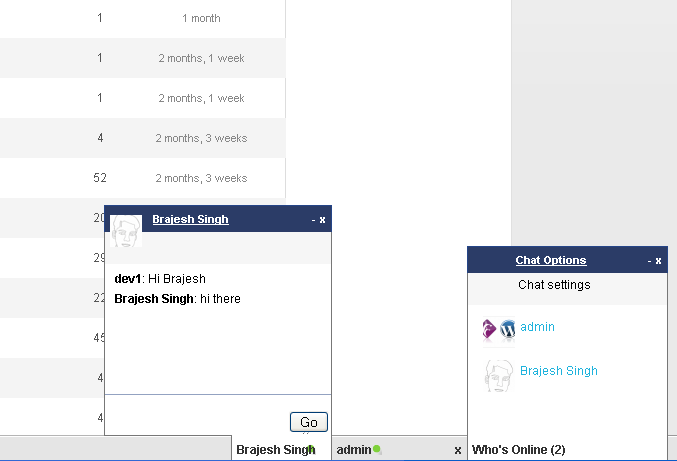
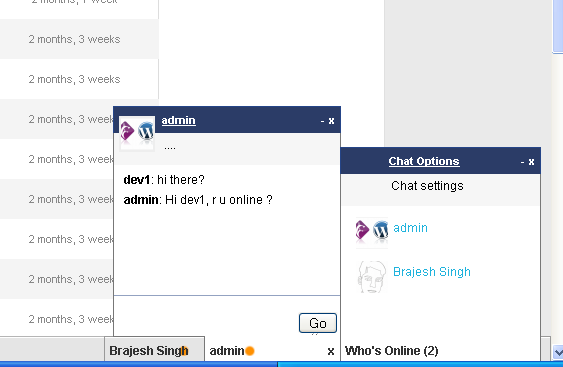
A note on fixing the issue with gPress:-
gPress by default load an extra version of jQuery which not only causes issue with Bp Chat but will cause issue with most of your other plugins/themes too. You don't need that extra loading of the jQuery library. I have yet to find a reason why gPress includes it by default.
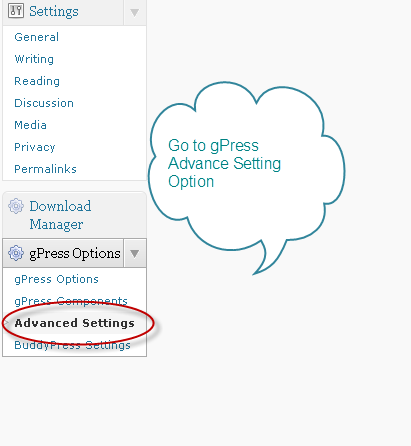
To disable it, go to dashboard->gPress Options->Advance setting as shown below
 Once you click on the Advance settings, you will see the settings panel. Look for the MISC settings and check no for loading jquery as shown below
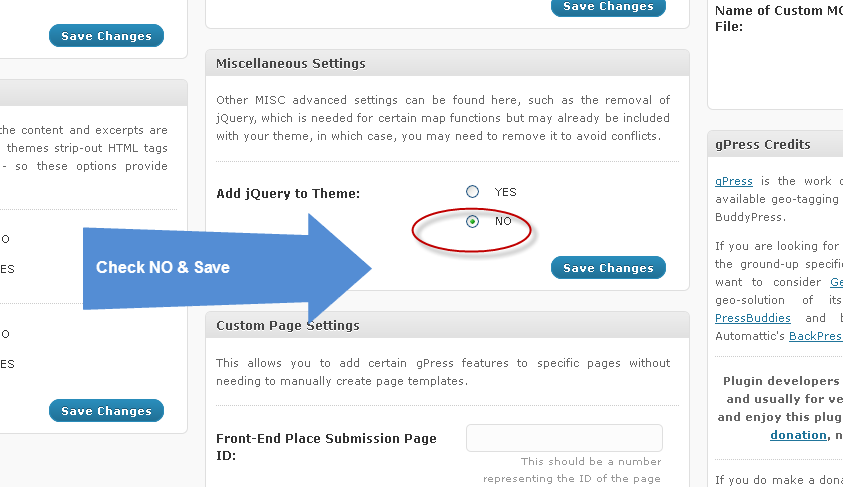 Once you are done, the conflict will go away and BP Chat will work fine for your site.
Download & Installation:-
https://buddydev.com/plugins/bp-chat/
Hope that helps. Please do let me know in the comments if you find any issues or want a feature to be added.
PS: My apologies to all of you who commented in last couple of weeks, I could not reply promptly. I am going to reply from now on promptly again. and yes, there will be a lot of activity in upcoming weeks, so please keep checking for the new updates lined up.
Pingback:BP Chat Beta 3: Fixing all bugs and a few new features | Buddy Dev
Its working Brajesh, its fixed basicly everything!!! Still slow responding
but very cool indeed
Hi Brajesh, thanks for the update, but i dont know whats wrong when i change the chat settings to Sitewide, it will show as if some people are online when no one is online. it even show one without any name. how can i fix this problem
Hi Abbey,
It will take upto 3-5 minutes to show the correct statics when you log in. After that It will show the correct details.
Hi Brajesh
Thanks for releasing a new version, working great apart from one thing, it says that lots of people are online when really there is only one person. Do you have any ideas how to fix this?
Thanks again
Thanks for the comment Orca.
The problem with showing online is, it calculates based on the earlier data, so for the first time login, It may show users online(in the list) upto 3-5 minutes but the status indicator should show within 45 seconds if a user is online or not.
I tried leaving it running for a while but it seems when a new person comes online they just get added to the list of people who are online then when they go offline they are still in the list.
Any ideas? Thanks
I have the same problem. Shows 5 users in chat, when I know there is only me online. Last time anyone else was logged in was days ago
@jamz,
Please check javascript console and let me know if you see anything there. I am unable to helop until I reproduce it. Please check and let me know if you find this behavior when using it with some specific plugin. Please provide some more details.
Hi Brajesh, thanks for your reply, there is no problem when i choose friends only as chatting mode, but if i choose sitewide mode, it shows incorrect details it even show one annonymous without any name just avatar.
regards
Thanks Abbey. Will need to check it on some site where there are many users. Hope for next update to fix it.
Hi, I have just tested the plugin and it is great! The only thing is, when I have a chat window minimized and I go to a different page, it pops out again automatically. Any way to get it to remember if it's open or closed as I'm browsing around?
Hi Jon,
That is a strange behavior. Is it happening when you have a single chat window or when multiple chat windows are there?
sorry for the delayed reply.
I have tested it with single and multiple chat sessions. When I go to a different page, regardless of how many sessions I have going on, the session I last had open pops back up.
I second that… i too have noticed the same behavior. If i "minimize" the window and then click on any other link… it "maximizes" itself again… do you think there is a quick-fix for this problem?
I'd love to get this added to my in-development site but it doesn't sem to be working. I'm using WP 3.1.2 with BuddyPress 1.2.8 and, when I activate the plugin, I get the footer bar at the bottom of my page but all it shows is:
Who's Online (
And clicking it does nothing. I've deactivated all other plugins… any ideas?
Hi Chris,
sorry I haven't been able to reply earlier. That means the tables were not created. Please check the plugins documentation page to see the sql file you can import to create the tables if you are still looking for a solution.
I've come to understand that the issue is becuase we have the "Friends" feature turned off on our site (it's an internal-only site, so we don't need the functionality). Any chance that the chat tool can be updated with an option to simply work with all members, regardless of whether or not they're "friends?"
Have you made any progress on support for Internet Explorer?
Hi Brock,
Not yet actually. Hope to look into that matter in upcoming weeks.
Hi there,
These plugins look great. Do they work with wordpress? I use wordpress 3.1.2
Hope so, as I installed the bp chat and it comes up with an error on line 81?
Not sure if it is compatible or I am doing something wrong
Thanks
Hi Richie,
No, It does not work with WordPress. It needs BuddyPress to work at the moment, but In future, I may add the compatibility for WordPress. btw, that won't be soon, as we first need to get it ready with BuddyPress.
Brajesh, just an idea — instead of having to send repeated AJAX requests every few seconds to see if new chats have been sent, could you trigger the recipient's side to get a new message when the sender presses "enter"? Perhaps by making the sender and receiver's user IDs into jQuery variables that are then passed onto a PHP script using jQuery/AJAX, triggered by the "enter"? A similar idea could be used for triggering a "typing…" notification to the recipient using onkeyup.
Hi Jon,
Nice idea but that is only possible with comet services. In pure javascript/php we can not do that. there is a new thing web socket which is able to hopefully simulate it. I am looking into that and hoping to use it in future. let us see what happens.
Google and HTML5 to the rescue.
http://sites.google.com/site/webrtc/home
Thanks TJ.
That seems promising but is not available for developers yet. Another solution is using nodejs+socketio. I am looking at that at this moment.
Bonjour,
I would like to download the 5th beta version and test it tonight but I can only find 4th… Could you please enlight me ??
Thanks for your help
OK. found. sorry
Hi Brajesh,
I have beta-tested the chat beta5 this evening.
The major issue for us is that it seems not compatible with the "stealth mode".
An Admin with stealth mode On, appear on the chat list. Could you help ?
BTW, A user told me he would prefer a taller window.
Thanks
Hi Frenchie,
you are right, It is not compatible with stealth mode plugin. Will try to include that in next revision.
The window sizes are controlled via css, so please feel free to play with css 🙂
Hi Brajesh.
I have tried to play with CSS but didn't win…!
First I tried in my child theme.It didn't worked.
so I tried directly in chat css, it is ok for the colours but not for the win_body height to 220px. It remains 130.
Well, I am a beginner so may be I will improve my css later on?
Thanks a lot,
Sophie
Hi,
I have been testing BP Chat 5 for some time now and I am wondering if in a future update you can include the ability to limit the chat just to friends. I do not wish to allow my users to chat with anyone that is on the site, only their friends.
If this is already an option can you tell me where to configure it?
Thanks
It is built in. I will put a filter to allow site admins to be able to do that.
Thanks.
Brajesh,
This was working great for me, but I noticed my site getting slower. Talking with my host, this plugin was straining the server, with the CPU usage up near 100%.
We disabled, and usage fell. Enabled, and it was up there again.
I'm excited to use this plugin and am happy to continue testing it, but it definitely seems to cause some performance problems.
-Greg
Hi Greg,
Yup, you are right about the load. The polling on client side may cause this type of load if you have a large number of users online.
This is one of the problem with PHP/js when we try to implement the presence like xmpp protocol(or something like comet).
I am looking at other solutions at the moment(specially node.js for future)
Hey, great work! Been on this site off and on checking out what you have been upto!
I have a suggestion for chat, it would be great to have on/offline feature in chat prefs. Also, i found a bug, after someone is a confirmed friend and chatting, you can remove them as a friend and continue talking through the chat box. Figured its something i should mention.
Keep up the fantastic work my friend!
-Patrick
Brajesh:
Any thoughts on the ability to utilize chat w/o having the "Friends" feature enabled on one's BP installation (see my May 24 post above)?
Hi Chris,
Please check back by this Friday. I will have some good news for you 🙂
Still anxiously looking forward to the update. Just sayin'
The plugin dosnt work i am using firefox 5 and wp 3.1 or 3.2 and bp 1.2.8 and bp chat beta 5 it works but man alignment is bullshit
Maybe this is a problem only with admin accounts when i chat with admin account all my messages are messed up man it really looks crappy
I'm curious if there is any way to implement this with web technologies?
http://www.realtimetext.org/index.php?pagina=nieuws&nieuws=23
Hi TJ,
XMPP is the most suitable protocol for the purpose and used by Facebook chat/gtalk and many more. The problem is, If you want to use xmpp, you need a jabber(ejabbered) server or a compatible server installed.
Then building a chat app becomes simple. But I believe, In most of the cases, people won't have a dedicated server and they won't be able to install jabber server.
Even node.js provides excellent communication functionality with the help of socket.io but the problem is most of the people won't have node.js installed on their server. We are not limited by the technology but the target users.
For those of us with dedicated servers, is Jabber easy to install? That might be a worth premium option…
It always shows 0 people online. im unable to see myself in the chat either. its just blank when i click on it. Please help! thanks!
I had a problem before when it showed everyone online all the time, even if they weren't. I had an older version that I had upgraded, so I assumed that might be the problem. I deactivated and then deleted the plugin. I then dropped the bp_chat tables. I installed a fresh copy of beta 5, but this time it didn't create the bp_chat tables. I manually created the tables (pulling the create table statements from the plugin) and I always show 0 people online.
Hi TJ,
Please make sure the new tables you have created are "yourdbprefix"_bp_chat*(as per your forum post).
Hey I am also Having a problem with the chat never showing anyone online
Hi Brian,
the bp-chat is having some trouble currently with creating tables. Please get the swl from the plugin documentation page and import it into your database. That should fix it.
@all,
Since the current version has been causing some trouble and could not be worked out perfectly(the database issue+server load balancing), I have decided to drop the current version of this plugin. Once BuddyPress 1.3 is out, we will have a more modular plugin using javascript mvc and server side option for (PHp based/nodejs based).
So, Please bear with me till then. If you want a feature to be included, please post a feature request on this plugin's git page. I will highly appreciate that.
https://github.com/sbrajesh/bp-chat/
BP 1.3 (now renamed to 1.5) is out now. How long will the new version of the plugin be out?
Hi Mike,
Please wait till RC. I will start upgrading it once Rc of BuddyPress is out. I tried updating a couple of plugins for beta and It broke again with the trunk because there are still some changes going on in the core API. I will rather wait for the code freeze to work on these updates.
Okay, yeah, better to wait until out of beta, I guess! I'll be anxiously waiting! 🙂
For great inspiration, take a look at ArrowChat: http://www.arrowchat.com/demo.buddypress/members/demo
Hi Brajesh,
This plugin is just great! I installed Beta-5 //no problems what so ever.
I have one question – is there easy way to add something like public channel(shoutbox) to your chat??
I copied the function in bp-chat-templatetags.php and slightly modified it:
 function create_public_chat_window($channel,$toggle_class=''){
 ?>
<div id="chat_channel" class="chat_tab " style="width: 200px;allign:left;">
Public
0
x
-
Public
function updatePublic(){
channel_id);
foreach($messages as $message)
echo "id)."'>".bp_core_get_user_displayname ($message->sender_id).": ".stripslashes ($message->sent_at)."".stripslashes ($message->message)."";?>
}
setInterval( "updatePublic()", 1000 );
Go
<input type="hidden" class="chatting_with_user" id="chatting_with_user_user_id;?>" value="user_id;?>" />
<?php
}
also added create_public_chat_window(0); on line 75 of the same file – so it added "public" tab
when i write in that window mesages get channel 0 – everybody can see them.
problem is that I cant figure out how to make messages from other users to appear in window instantly – not after refresh.
 function create_public_chat_window($channel,$toggle_class=''){
 ?>
<div id="chat_channel" class="chat_tab " style="width: 200px;allign:left;">
Public
0
x
-
Public
function updatePublic(){
channel_id);
foreach($messages as $message)
echo "id)."'>".bp_core_get_user_displayname ($message->sender_id).": ".stripslashes ($message->sent_at)."".stripslashes ($message->message)."";?>
}
setInterval( "updatePublic()", 1000 );
Go
<input type="hidden" class="chatting_with_user" id="chatting_with_user_user_id;?>" value="user_id;?>" />
<?php
}
im posting it wrong-sorry
Thanks Brajesh for this great free chat I am using it on my site but I have an issue logged in users disappear after few seconds or after one minute from chat room but massages works properly kindly help me to resolve this issue
Any news on when the next release will be?
Hi,
BP-Chat it's the best chat plugin that I know to buddypress, but it works with the multisite version?
I have a multisite installation and I noticed that the plugin only works in subdomains where the theme is a bp-default child theme, the windows simply doesn´t open when I click it while using twenty eleven, for example.
Hi Lenardo,
Thank you for the comment.
The current version has trouble in working the sites other bthan the root site of a multisite install. I am updatint this by 10th-12th of this month and will fix the issues.
Thanks
Brajesh
Hi,
thanks for your awesome plugin!
I have just one problem: At the moment, people can write javascript code in the chat. Would this be prevented in future versions?
regards
-Re-
Hi Re,
sorry for the trouble. Just got the time and checked it. Have fixed it on the github trunk. Please update from the github trunk.
Hi Brajesh.
Thanks for a great plugin. I find it most useful 🙂
However it took me some work making it work. First of all BP Chat didn't create any database tables, but I figured out how to fix that problem following the instructions in the BP Chat documentation.
Now where the database was up and running I translated bp-chat-templatetags.php making BP Chat speak Danish 😀
Now it was just working fine. But I did however have the same problem as Leandro. I'm using BP Chat on a multisite and it isn't working on blogs with a non-Buddypress compatible theme on it. And it isn't possible just to activate BP Chat on my front blog only.
Is there anything I can do to solve this problem?
P.S When is the BP Chat update being released? I hope those bugs I mentioned above will be solved with the release.
Sincerely,
Per Bovbjerg
Hi Brajesh
First of all I would like to thank you for developing such a good plugin – great work so far!
I am using it and the only problem I have is with the latest internet explorer, when you click on the chat user it opens another window but on the left side and only half of it, definitely some alignment issues.
I am sure you probably working on a fix for this, I just wanted to know how progress is going, and or if meanwhile there's a temporary fix until the next version, or any line of code I can change for the effect.
Regards
Pedro
Is there any news as to when a new version of the chat will be released?
I'm wondering when we're going to see an update as well.
The online users list never seems to update for me. The tables don't seem to install on a clean install.
I would be interested in seeing two versions of this as discussed above, one for dedicated servers with Jabber or nodejs, and one for shared servers.
Thank you for your job, it is a great chat plugin.
I want to add the time near on each conversations. Do you know how to do that ?
Thanks
hats off to ur plugin First
but sorry to say that i am getting this error. pls help me to over come this
— SoundManager 2 failed to load (security/load error) —
soundManager.disable(): Shutting down
soundManager: Failed to initialise.
soundManager: Verify that ./soundmanager2_debug.swf is a valid path.
soundManager: No Flash response within expected time. Likely causes: Loading soundmanager2_debug.swf may have failed (and/or Flash 8+ not present?), Flash blocked or JS-Flash security error.
soundManager: Getting impatient, still waiting for Flash…
soundManager::initMovie(): Waiting for ExternalInterface call from Flash..
soundManager::initMovie(): Got EMBED element (created via JS)
soundManager::createMovie(): Trying to load ./soundmanager2_debug.swf
— SoundManager 2 V2.97a.20110123 (AS2/Flash 8), normal polling —
Hi ,
sorry for delayed reply.
Please make sure the uploaded plugin files have correct permission, or try setting them to 755 and test.
Hi, I have tried BPChat but its not working. even users are online it wont show Visit my site "ecoface.in" get logged in and requested to check urself.
Hi Brajesh
Will this plugin work with BP 1.5?
I have a suggestion for you for a new plugin drop me an email
but when it comes out the next update?!?!
This plugin was released almost a year ago if I remember correctly ..
Hi
There is an update ready which is at least 10 times faster and cause very low load on server. I haven't released as the UI is not updated and I fear a backlash on bad UI. If you want to check the updated version, please drop a line here and I will push that to github.
I want to use BRajesh! I would love to try
Hi Selu,
Please download 1.1 beta 1 from here
https://github.com/sbrajesh/bp-chat/zipball/v1.1beta-1
I haven't updated the ui and neither have out the admin panel. Though It contains the idle timer plugin to detect when a user is idle and prevent excessive ajax request. another thing is I have done a complete code refractoring(except business functions), so hopefully, we can keep updating it continually.
Well we tried already, the plugin is killing the multinetwork admin backend, but on frontend its going quite cool. Actually I was trying a couple of conversations and works well, guessing how is going to behave on multiple chats simultaneously. But i looks tons more fast and light. Keep going, we surely try to fix some staff to get on live as soon as posible! If you want to see our advance just ask! Thanks.
Hi Selu,
sorry for not following up on your comment.
I believe the issue is fixed in my last update(please make sure to use it on wpms 3.3+). Will love to see your updates 🙂
This is the plugin that drew me to the site initially. It is the reason I signed up for a membership. I would absolutely love to see this working properly. I am interested in a premium version of this that requires Jabber (or something like it) on the server.
Any chance of seeing an update?
HI TJ,
Thank you for the comment and your support.
I am sorry I could not put the other version because of lack of time. A jabber version will come for sure in future. Btw, please do not forget to give a try to the most recent update which fixes server load issue.
— SoundManager 2 failed to load (security/load error) —
First thanks for a nice plugin..
But I encounter the following errors. Could you explain how to solve it.
soundManager.disable(): Shutting down
soundManager: Failed to initialise.
soundManager: Verify that ./soundmanager2_debug.swf is a valid path.
soundManager: No Flash response within expected time. Likely causes: Loading soundmanager2_debug.swf may have failed (and/or Flash 8+ not present?), Flash blocked or JS-Flash security error.
soundManager: Getting impatient, still waiting for Flash…
soundManager::initMovie(): Waiting for ExternalInterface call from Flash..
soundManager::initMovie(): Got EMBED element (created via JS)
soundManager::createMovie(): Trying to load ./soundmanager2_debug.swf
Please upgrade from the git hub repo.
The issue is fixed.
Hi Brajesh @sbrajesh ,
I notice that even if the user has buddypress an open session (and also the broweer is open) but he is working on something else (eg: he's browsing on another tab of the browers or any other action with its pc) after a certain time user disappears from the chat like if he was logged off.
How can I solve the issue?
Thanks in advance
Giuseppe
Any update on when the new version might be finished?
Hey,
can u intergrate a chat, where everyone joins in when he's logging in? Like a chatroom for all next to the "who is online", would that be possible?
Hi TheShow,
I am sorry but I am unable to do anything like that at the moment.
When BuddyPress 1.6 releases, I will be looking at this plugin again and will try to include it as an option.
Regards
Brajesh
I have a bit of a non-standard question. I'm trying this out again on a new development site. I have Bulletproof security installed, which added some .htaccess rules. Sadly, one of those rules is stopping the following files from loading.
/wp-content/plugins/bp-chat//includes/css/chat.css?ver=1053
/wp-content/plugins/bp-chat/assets/soundmanager/swf/soundmanager2.swf
Here are my rules with 403 redirects:
RedirectMatch 403 /\..*$
RedirectMatch 403 /(\$|\*)/?$
RedirectMatch 403 (?i)(|:|;|\'|\s)
RedirectMatch 403 (?i)([a-zA-Z0-9]{50})
RedirectMatch 403 (?i)(https?|ftp|php)\:/
RedirectMatch 403 (?i)(\"|\.|\_|\&|\&)$
RedirectMatch 403 (?i)(\=\\\'|\=\\%27|/\\\'/?)\.
RedirectMatch 403 (?i)(\,|//|\)\+|/\,/|\{0\}|\(/\(|\.\.|\+\+\+|\||\\\"\\\")
RedirectMatch 403 (?i)/uploads/([0-9]+)/([0-9]+)/(cache|cached|wp-opt|wp-supercache)\.php
RedirectMatch 403 (?i)\.(asp|bash|cfg|cgi|dll|exe|git|hg|ini|jsp|log|mdb|out|sql|svn|swp|tar|rar|rdf|well)
RedirectMatch 403 (?i)/(^$|1|addlink|btn_hover|contact?|dkscsearch|dompdf|easyboard|ezooms|formvars|fotter|fpw|i|imagemanager|index1|install|iprober|legacy\-comments|join|js\-scraper|mapcms|mobiquo|phpinfo|phpspy|pingserver|playing|postgres|product|register|scraper|shell|signup|single\-default|t|sqlpatch|test|textboxes.css|thumb|timthumb|topper|tz|ucp_profile|visit|webring.docs|webshell|wp\-lenks|wp\-links|wp\-plugin|wp\-signup|wpcima|zboard|zzr)\.php
RedirectMatch 403 (?i)(\$\(this\)\.attr|\&pws\=0|\&t\=|\&title\=|\%7BshopURL\%7Dimages|\_vti\_|\(null\)|$itemURL|ask/data/ask|com\_crop|document\)\.ready\(fu|echo.*kae|eval\(|fckeditor\.htm|function.parse|function\(\)|gifamp|hilton.ch|index.php\&\;quot|jfbswww|monstermmorpg|msnbot\.htm|netdefender/hui|phpMyAdmin/config|proc/self|skin/zero_vote|/spaw2?|text/javascript|this.options)
RedirectMatch 403 /\..*$
RedirectMatch 403 /(\$|\*)/?$
RedirectMatch 403 (?i)(|:|;|\'|\s)
RedirectMatch 403 (?i)([a-zA-Z0-9]{50})
RedirectMatch 403 (?i)(https?|ftp|php)\:/
RedirectMatch 403 (?i)(\"|\.|\_|\&|\&)$
RedirectMatch 403 (?i)(\=\\\'|\=\\%27|/\\\'/?)\.
RedirectMatch 403 (?i)(\,|//|\)\+|/\,/|\{0\}|\(/\(|\.\.|\+\+\+|\||\\\"\\\")
RedirectMatch 403 (?i)/uploads/([0-9]+)/([0-9]+)/(cache|cached|wp-opt|wp-supercache)\.php
RedirectMatch 403 (?i)\.(asp|bash|cfg|cgi|dll|exe|git|hg|ini|jsp|log|mdb|out|sql|svn|swp|tar|rar|rdf|well)
RedirectMatch 403 (?i)/(^$|1|addlink|btn_hover|contact?|dkscsearch|dompdf|easyboard|ezooms|formvars|fotter|fpw|i|imagemanager|index1|install|iprober|legacy\-comments|join|js\-scraper|mapcms|mobiquo|phpinfo|phpspy|pingserver|playing|postgres|product|register|scraper|shell|signup|single\-default|t|sqlpatch|test|textboxes.css|thumb|timthumb|topper|tz|ucp_profile|visit|webring.docs|webshell|wp\-lenks|wp\-links|wp\-plugin|wp\-signup|wpcima|zboard|zzr)\.php
RedirectMatch 403 (?i)(\$\(this\)\.attr|\&pws\=0|\&t\=|\&title\=|\%7BshopURL\%7Dimages|\_vti\_|\(null\)|$itemURL|ask/data/ask|com\_crop|document\)\.ready\(fu|echo.*kae|eval\(|fckeditor\.htm|function.parse|function\(\)|gifamp|hilton.ch|index.php\&\;quot|jfbswww|monstermmorpg|msnbot\.htm|netdefender/hui|phpMyAdmin/config|proc/self|skin/zero_vote|/spaw2?|text/javascript|this.options)
Hi TJ,
I am sorry but I don't have much experience with these .htaccess rules and I may not be able to help you much on this. Can you please ask the Buletproof security developer about this, they may help you better.
Regards
Brajesh
Sorry, I wanted to know what code I need to edit to remove chat from the list of all users and allow only one of his friends.
Thanks and sorry for the language but do not know speak English well.
Of course I tried it with the description given in the tea forum: https://buddydev.com/forums/topic/disable-sitewide-chat-option#post-
but does not function as the user in question, the code does not work for me either ..
ok solved ..
awesome 🙂
Awesome plugin! I've customized my UI so it matches more to the look of my theme.
My question: in the box where it says "Chat Settings", does that refer to the "Chat Options" above it or is "Chat Settings" supposed to be clickable and give you new options?
For me, it doesn't do anything. I'm wondering if I should just remove it as it's only taking up space.
Hi there,
just found your plugin, loved what I saw, got the latest version from your github repo, installed it without any issue. But the "Who's Online" is staying desperately empty (0)! Did I miss something ? Are there some setting (I want side-wide chat, not just friends, but the option is missing from the top bar)
I'm running BP 1.5.5 btw.
Thanks!
Tom
HI, Brajesh, I have tried to install your chat plugin with the newest version of buddypress 1.6.0. It is not working properly. there are few bugs that you should know…may be you wanna to fix it.
sometimes it is not working with buddypress admin bar. admin bar gots blank…and the chat plugin is also not working..
and the second is your plugin is not showing chat messages in a real time…every time i need to reload my webpage for getting view able..
please try to fix these problems if you can….
hi brajesh, please where can i download bp-chat beta -5. i have tried everywhere, the link am seeing is beta-3 which seems to show people online while not.
I have beta -5 in one of my site bp 1.6 and it seems to work well.
please i need beta -5 download link.
Regards
Hi Brajesh,
Thanks for the great effort. The latest version of the download page is beta-3. I could not find a download link for beta-5 of this plugin?
Hi Salm,
Thank you for the comment.
Please download the most recent version from here
https://github.com/sbrajesh/bp-chat
It's only with me or sometimes bp-chat just add an 'n' in the message?
Hi, great job @sbrajesh
Can you give me any coding suggestion or idea to get an online/offline chat option?
I'll appreciate your help. Thanks.
Hey Brajesh, nice plugin to use, using it now with bp 1.6.3 and wp 3.5, working great except 1 problem which some users already stated above, is when after you closed the chat tab, reload a page or click something, it pop up again. tested with firefox, chrome, internet explorer all same, it kinda annoying if the user do not want to chat for that moment, some just like to leave the tab close till they want to reply or something… can you fix this please, thank you so much!
Also to report 2 bugs, using the latest version from here https://github.com/sbrajesh/bp-chat.
1. when you do not have any friend online the chat bar shows Friend's online () <– zero is missing. Well, not a serious bug but just reporting.
2. when you in the chat window chatting with friend, you can keep pressing enter without any text on the text box and the message still go through with just yourname: , this can be potential spamming, hope this can be fixed also.
Thank you again
Hi Simon,
Thank you for the comments.
I am sorry i had left this plugin in lurch because of the heavy maintenance of some of my other work.
I am trying to rework on it and hopeful to have some small fixes this week and then a major haul sometime next month(The UI does not look good and I have been planning to change it for a long time ).
Hi Brajesh,
nice to hear that this plugin will still be updating 🙂 thanks for this nice chat. only need some more fixes and it will be perfect.
I really hope you add it a close chat function for each use, close the chat until the user open it, same like fb.
Looking forward for more update to this plugin, cheers.
Hi Simon,
Thank you for the encouraging comment.
Will be putting these minor updates by weekend:)
Hey Brajesh,
Any updates for this chat yet? Thanks for the time 🙂
Hi Simon,
I have updated chat to fix a couple of issues. Specially the 'n' appearing in the message.
Please download it from here
https://github.com/sbrajesh/bp-chat
Hope that helps.
Thanks
Brajesh
Thanks for this great plugin. May I know where can I download Bp chat beta 5
Hello Brajesh, great plugin you have here.
Is there a way to set this plugin to only show friends online by default?
And I am still waiting for your response on Twitter,
Best Regards,
Elisha
Hi Elisha,
Thank you for the comment.
You can put this line in your bp-custom.php
[sourcecode language="php"]
add_filter('bpchat_has_friend_only_enabled','__return_true');
[/sourcecode]
Please make sure you are using the updated code from github and not from this site.
Sorry about twitter, will get back to you in the day tomorrow.
Thanks
Brajesh
Thanks Brajesh, I will see how that works and will await your reply 🙂
Hey Brajesh,
Does is it possible to use this plugin network wide with BP Multi Network or will it only work on the main site?
Thanks!
It should work with Multinetwork but the chatbox is not usable on subsites as far as I remember.
I really like the idea of this plugin–especially for single chats. I run the latest buddypress,bbpress and wordpress. There are a few things I would like to report on, the chat window doesn't scroll up when a message comes in. You have to click on the box to have the messages sent to you from the other person your chatting with and then they all come in at one time. Everything seems to work okay besides for the issues but in ie10 it seems the chat window doesn't want to close. Just trying to help because I am sold on this plugin and think it is awesome.
William
Please, i've a message with bp chat 3, an error to the 50th line.
Please wait, I will have an update by 20th Nov to fix all the issues.
Hey Brajesh, I can't wait to see and test the update!
Hello Brajesh, can we expect the update today?
Any progress yet? 🙂
Will upload an update tomorrow(Monday). Sorry for keeping you waiting so long.
Thanks Brajesh, I know you've had a lot on recently.
I will be online today and looking out for an update.
Any update yet? 🙂
Hello Brajesh,
Where are you going to upload the update?
Any more news? 🙂
Hello Brajesh, if you don't have time to spare to work on and release the plugin on your website here, can I pay you some money to work on the plugin and release it this week if it is not finished yet?
Are you still uploading the update?
Brajesh, thank you very much, your chat has been a great help for me. I'm using only among friends and it works great!
🙂
Thank you Juan,
Glad that it helped.
Thanks
Braesh
Hi Brajesh,
Just discover this plugin. Seems to answer main part of what I need !
I need to restrict chat to paid members (managed with Paid Membership Pro).
Is there an easy way to do this?
Regards
Pat
Hi Brajesh,
Could you please consider the 2 issues I found by using your last version of chat :
– some unwanted messages are displayed. It is like the messages are sent twice, one with the correct member name and a second with an “undefined” name? The fact to reload the page make the display comes to normal (without unwanted)
– I’m using the “BP | You are blocked” plugin to allow members to block other members if needed.
When using your chat plugin, members can continue to chat even if they are blocked.
Is there a way to follow the same rules than the BP | You are blocked plugin and do not allow blocked members to open a private chat with someone that have blocked him ?
Many thanks for your answer
Pat